




.svg)






What Is a KPI Tree — And Why Does Your Product Team Need One?
The hardest part of strategic planning isn't capturing all the details. It's getting started.
Teams stare at blank whiteboards — physical or in tools like Miro — asking the same questions: Do we organize by user journey or by revenue mechanism? Which metrics do we collect as Key Product Indicators (KPIs)? How do we connect desired business outcomes to the data that tells us whether to stay the course or pivot?
At Bitovi, we use a KPI Tree methodology that visualizes how metrics connect to outcomes. This structure provides the framework for an entire product backlog as the Product Owner drives discovery and the team breaks down work — without ever losing sight of how detailed work items deliver expected value.
And now, we've taken it a step further: we built a custom AI Sidekick in Miro that generates a complete KPI Tree from a single App Purpose document, giving teams a concrete starting point instead of a blank canvas.
This post covers both: the KPI Tree methodology itself, and the technical implementation of the AI tool we built to automate it.
The Activity vs. Accountability Gap
Imagine this: a team ships an "AI-Driven Workout Personalization Engine" epic. Three months later, leadership asks if it worked. The team points to anecdotal feedback or vanity metrics — but can they trace results back to the original goals? Did it drive market growth? Product engagement? Did anyone expect it to?
This is the Activity vs. Accountability Gap, and it happens when teams go too deep, too early. Epics and User Stories get defined before the team has established how they'll measure performance or which outcomes they're actually targeting.
KPI Trees fix this by forcing teams to build a hierarchical metric map before writing any stories.
The KPI Tree Structure Explained
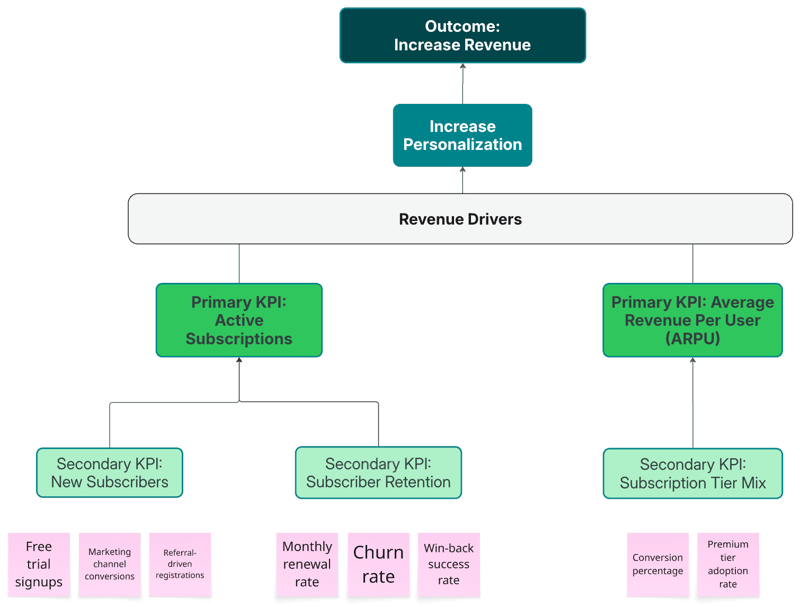
A KPI Tree is a layered hierarchy that flows from high-level business intent down to granular, trackable data points:
-
Business Outcome — the top-level goal (e.g., Increase Revenue)
-
Initiative — the high-level product approach to meet that outcome (e.g., Increased Personalization)
-
Value Drivers — grouped into three categories: Revenue Drivers, Cost Drivers, and Opportunity Enablement
-
Primary KPIs — the 3–5 metrics with the highest impact, ranked #1–#5 by importance
-
Secondary Metrics — roll up to Primary KPIs
-
Tertiary Metrics — roll up to Secondary Metrics
KPI Tree Example: Personalized Workout App
Outcome: Increase Revenue in Our Workout App
└── Initiative: Increased Personalization
└── Revenue Drivers
├── Primary KPI #1: Active Subscriptions
│ ├── Secondary: New Subscribers
│ │ ├── Tertiary: Free trial signups
│ │ ├── Tertiary: Marketing channel conversions
│ │ └── Tertiary: Referral-driven registrations
│ └── Secondary: Subscription Retention
│ ├── Tertiary: Monthly renewal rate
│ ├── Tertiary: Churn rate
│ └── Tertiary: Win-back campaign success rate
└── Primary KPI #2: Average Revenue Per User (ARPU)
└── Secondary: Subscription Tier Mix
├── Tertiary: Free-to-paid conversion percentage
└── Tertiary: Premium tier adoption rate
How KPI Trees Transform Product Planning Conversations
From Opinion to Hypothesis
Without a KPI Tree, planning conversations sound like this: "We should add workout streak badges because other apps have them and users love gamification."
With a KPI Tree, the same request gets evaluated against targeted metrics:
-
Target KPI: Primary KPI #1 (Active Subscriptions)
-
Mechanism: Gamification increases workout consistency, improving habit formation and reducing churn
-
Success Criteria: Monthly renewal rate increases from 85% to 92% within 90 days of launch
After shipping, teams validate whether metrics actually moved. If the monthly renewal rate didn't change, that's data — gamification isn't the retention driver for this user base. If it jumped to 94%, the organization learns that habit-formation features reliably drive retention. Every Epic gets a testable hypothesis instead of a gut-feel justification.
Tying Epics to Outcomes
When you define an Epic like "Build Accountability Challenges with Friends," you explicitly tie it to a Primary KPI and target specific Secondary/Tertiary metrics. Planning conversations become:
"This Epic targets Primary KPI #1 by improving Subscription Retention (secondary) and Monthly Renewal Rate (tertiary). Let's estimate effort and measure the anticipated ROI against other work targeting the same KPI."
Why Visual KPI Trees Beat Spreadsheets
Most organizations track KPIs in spreadsheets or documents. These artifacts store information but fail at communicating relationships between measurements.
How does "Free trial signups" roll up to "New Subscribers"? Which Primary KPI does the "workout streak badges" feature target? Teams end up scanning rows and bullet points, trying to mentally reconstruct a hierarchy — and in stakeholder meetings, someone inevitably asks, "Wait, how does this connect to that?"
Version control becomes a nightmare when multiple people edit the same document. One stakeholder has "Churn rate" under Cost Drivers. Another has it under Revenue Drivers. Nobody knows which is the source of truth.
We're a certified Miro partner.
We help teams go from blank boards to strategic clarity — using Miro to run product discovery, build KPI Trees, and align stakeholders around what actually matters.
What Visual KPI Trees in Miro Actually Provide
Spatial relationships that are immediately readable. In Miro, parent-child connections are visible connector arrows and color-coded stickies, not inferred from indentation. You can trace how "Monthly renewal rate" (tertiary) flows up through "Subscription Retention" (secondary) to impact "Active Subscriptions" (Primary KPI #1). No mental reconstruction required.
Real-time collaborative editing. Multiple stakeholders can add stickies, reorganize hierarchy, vote on priorities, and comment on specific metrics simultaneously. During one workout app planning session, a product manager realized mid-workshop that "Premium tier adoption rate" needed further breakdown — they added "Feature comparison page views" and "Upgrade prompt click-through rate" as new tertiary metrics in real time while the marketing lead was still presenting.
Spatial reasoning that reveals strategic gaps. Visual KPI Trees surface patterns documents can't:
-
Are Revenue Drivers more detailed than Cost Drivers? For greenfield products, they should be — if they're not, that's a strategic warning sign.
-
Does Primary KPI #1 have fewer supporting metrics than Primary KPI #3? That might signal incomplete analysis or genuine simplicity in that revenue stream.
-
Visual gaps highlight missing categories. For the workout app, the board revealed that "New Subscribers" had three tertiary metrics but "Subscription Retention" had none — the team realized they'd been planning acquisition without defining concrete retention actions. They added "Win-back campaign success rate" and "Monthly renewal rate" on the spot.
Integration with execution layers. The same Miro board can house the KPI Tree alongside linked Epics and Initiatives, with visual connectors showing which work items target which metrics. During Q1 planning, teams reference the board to pressure-test proposals: "This 'social accountability features' Initiative claims to drive Active Subscriptions — which Secondary metrics will it move? What's the success criteria?"
Introducing the Miro AI Sidekick for KPI Trees
Understanding the value of visual KPI Trees is one thing. Getting a team to build one from scratch is another.
So we built a custom AI Sidekick using Miro's AI Sidekick capabilities. The Sidekick generates a complete KPI Tree structure from an App Purpose document — giving teams something concrete to react to, debate, and refine instead of starting from zero.
This applies Cunningham's Law to product planning: it's faster to get the right answer by correcting a wrong one. Stakeholder conversations begin with "this looks right except we need to reprioritize these two metrics" or "we're missing a Secondary KPI under retention" — not "where do we even start?"
This isn't about replacing strategic thinking. It's about jumpstarting discussions with a structured starting point so teams spend their time refining strategy instead of building scaffolding.
What Is a Miro Sidekick?
A Miro Sidekick is a custom AI agent that lives within your Miro board. Like chatting with Claude or ChatGPT, you interact with it conversationally. But Miro Sidekicks have distinct advantages:
-
They can analyze selected board objects
-
They access specific documents for context
-
They generate structured outputs based on prompts
-
They recognize patterns between concepts on the board
-
Once created, they can be shared with your entire team or organization — anyone can benefit from them
How We Built the KPI Tree Sidekick
Step 1: Training Documents
We created two Markdown files as the Sidekick's knowledge base (Markdown is more digestible for AI agents than PDFs or plain text):
KPI Tree Guide — Core methodology principles condensed from Bitovi's internal methodology documentation. This teaches the Sidekick what KPI Trees are, how to explain its reasoning, and how to answer general methodology questions.
KPI Tree Instructions — A detailed set of creation process instructions that keep the AI agent consistent while giving it enough flexibility to handle different product contexts. The instructions cover not only generating trees from scratch but also analyzing existing trees for gaps.
Step 2: Creating the Sidekick in Miro
To create a new Sidekick in Miro:
-
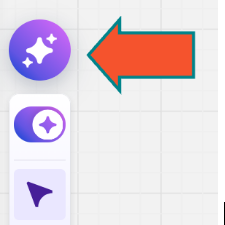
Click the Miro Sidekick Button to open the Sidekick menu
-
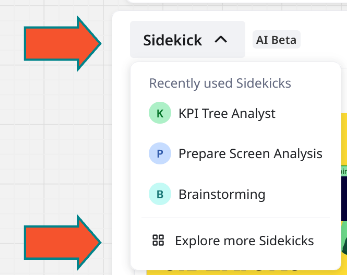
On the Sidekicks tab, click the downward arrow next to "Sidekick" and choose Explore more sidekicks
-
Click + Create to create a new Sidekick

-
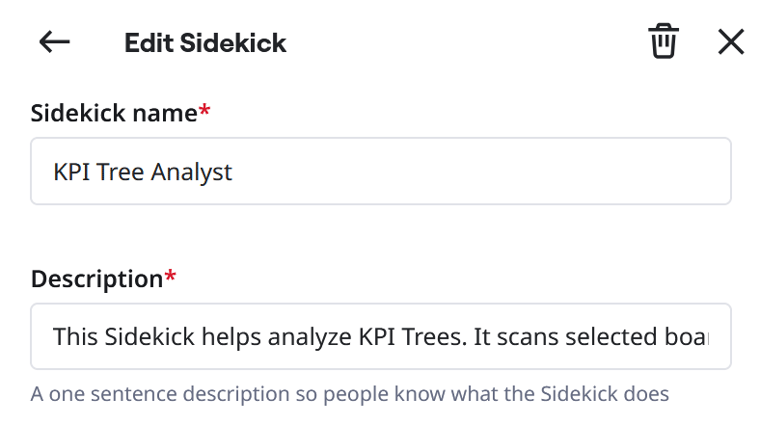
Name it (we used "KPI Tree Sidekick"), add a description ("Creates and Analyzes KPI Trees"), and write your Instructions
Step 3: Writing Effective Sidekick Instructions
The Instructions field is where the real work happens — it defines who the Sidekick is and what it does.
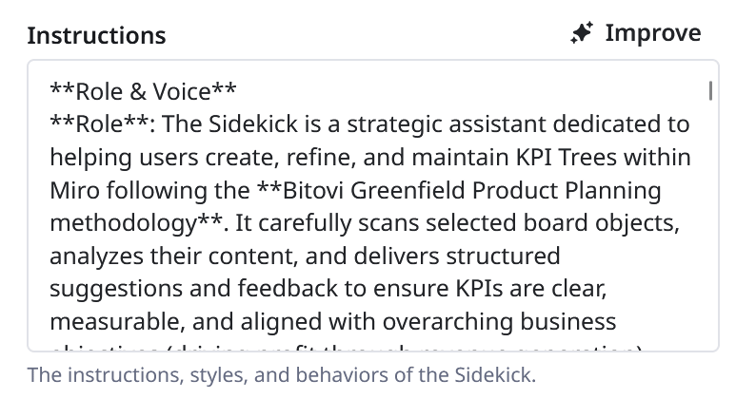
The key principle: treat AI like a junior analyst who needs explicit process, not an expert who can improvise. Over-specification beats under-specification every time.
Effective instruction structure:
-
Role definition — "You are a senior product strategist..." sets expertise level and output expectations
-
Reasoning prompt — "Before creating... generate a brief analysis plan" forces the AI to think before generating, preventing structurally correct but strategically hollow outputs
-
Concrete constraints — "2–4 Primary KPIs" rather than "several KPIs"
-
Transparency requirements — force the AI to state its assumptions when information is unclear
-
Exact output template — show what "done" looks like
Writing these instructions outside of Miro first, then copying them in, is far more practical than editing directly in the interface.
Step 4: Expanding the Knowledge Base
After the instructions are set, you can add files as knowledge sources and choose which AI model to power the Sidekick. Adding the Markdown methodology guide here is significant — it allows the Sidekick to harness LLM capabilities while focusing specifically on Bitovi's methodology rather than general training data.
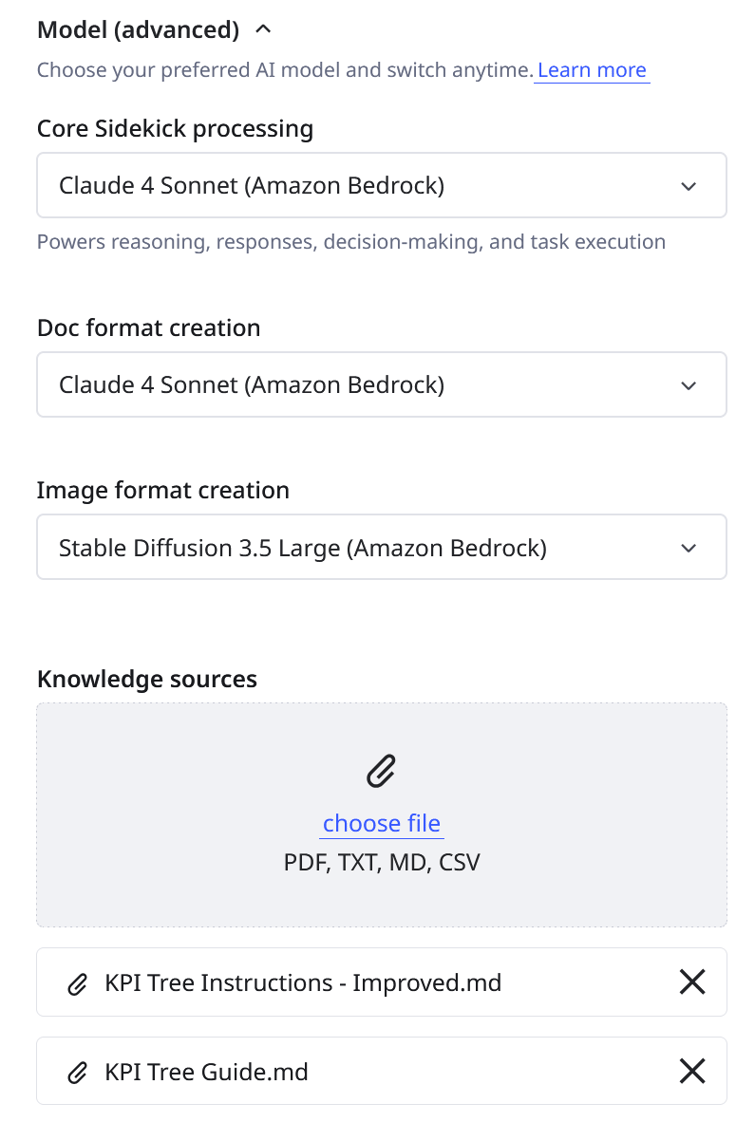
This enables the Sidekick to not only follow instructions but also answer "why" questions, explain tradeoffs, and offer context-aware insights during planning sessions.
Problems We Ran Into (And How We Solved Them)
Strategically Hollow Metrics
Early Sidekick versions occasionally generated structurally correct but meaningless metrics. For the workout app, one early version suggested "Customer Satisfaction Score" as a Primary KPI. While measurable, CSAT doesn't directly drive revenue for a subscription product — "Active Subscriptions" and "ARPU" are far better primary metrics. Satisfaction belongs as a Secondary or Tertiary metric that influences retention.
Fix: We refined the prompt and knowledge base to enforce:
-
Primary KPIs must directly correlate to revenue
-
Secondary KPIs can be leading indicators
-
All suggestions must tie to the specific revenue model
This is a reminder that AI accelerates work but doesn't replace strategic judgment. Reviewing outputs critically is non-negotiable.
Metric Overload
The AI sometimes generated dozens of Tertiary metrics, creating overwhelming, unusable trees.
Fix: We added explicit constraints — a maximum of 3–5 Tertiary metrics per Secondary KPI — and required each metric to pass three tests:
-
Measurability: Can we actually track this?
-
Actionability: Can teams influence this metric?
-
Impact: Does moving this metric significantly affect its parent?
More metrics ≠ better strategy. Constraint forces identification of what actually matters.
Layout and Visual Formatting
Getting the Sidekick to generate visually useful output in Miro took the most iteration. Flowchart-style diagrams looked cluttered. Mind maps were more readable but harder to edit collaboratively. Color-coded sticky notes ended up being the best fit — they're close enough to how teams naturally work in Miro, they're editable, and they support color coding by metric tier.
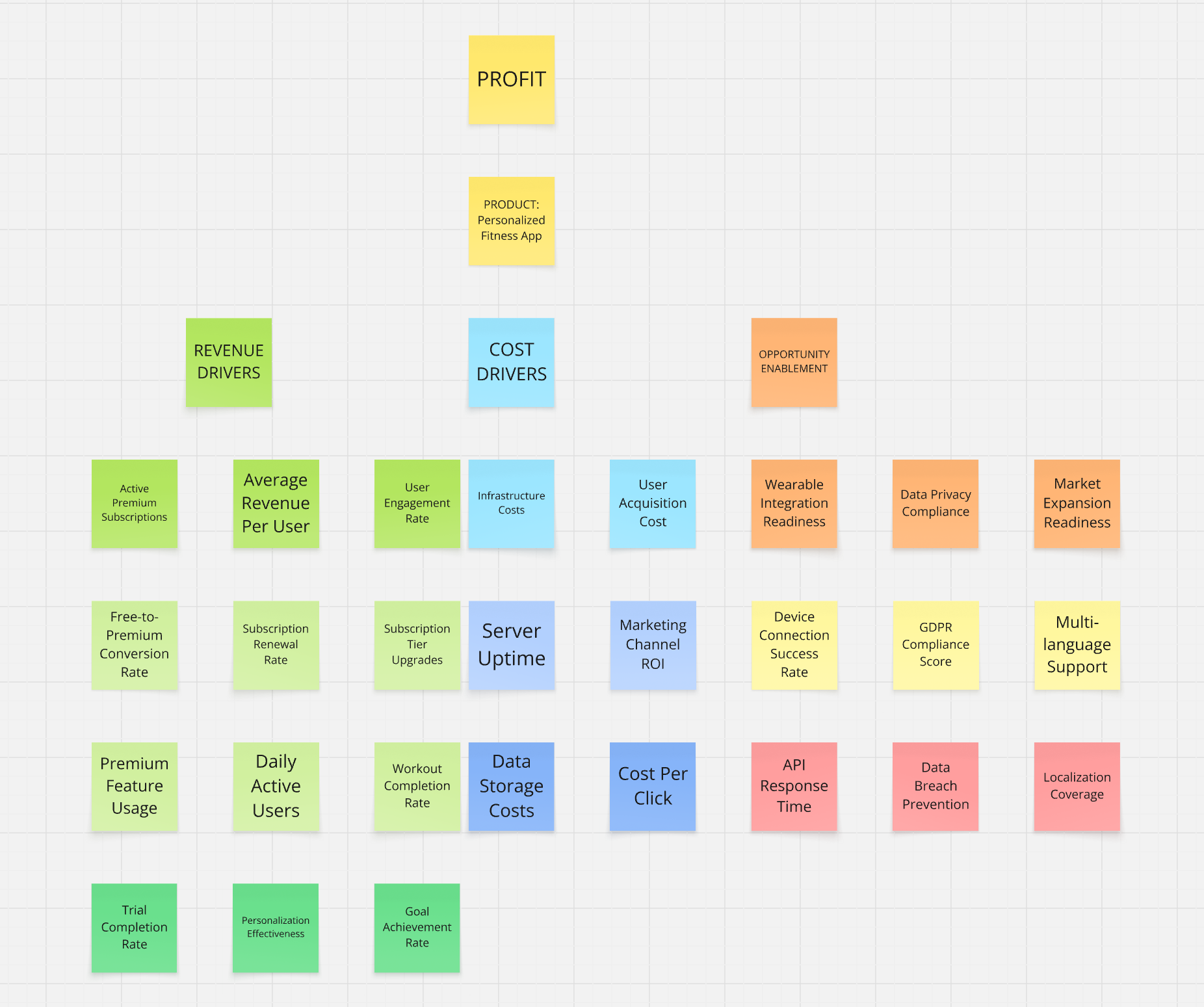
Sometimes stickies still get cramped. It's not perfect. But it's good enough to start the conversation — which is the whole point.
What the AI Sidekick Actually Gets You
A starting point, not a blank canvas. Teams walk into planning sessions with something concrete to react to. "Where do we even start?" becomes "this is mostly right, but we need to swap these two priorities."
Consistency. Every KPI Tree follows the same structure, hierarchy rules, and naming conventions. The methodology is baked into every output.
Low-friction iteration. Testing different strategic goals means generating two versions and comparing them side by side. Teams can explore options without committing hours to each attempt. Even regenerating from the same source and comparing outputs surfaces strategic angles that hadn't been considered.
Knowledge democratization. Junior team members can generate discussion-worthy KPI Trees before they've fully internalized the methodology. The AI embeds strategic reasoning into its outputs, teaching methodology through example.
Conclusion: AI as a Momentum Tool, Not a Replacement for Strategy
Some planning sessions don't need this. Teams walk in aligned on goals and priorities. They know their revenue model, agree on which metrics matter, and can structure the hierarchy without hesitation.
Other times, teams stare at blank boards. Stakeholders have competing ideas about priorities. Nobody's confident about how Revenue Drivers should break down into Primary KPIs. Those sessions burn an hour — or more — on scaffolding before any real strategic conversations begin.
The Miro KPI Tree Sidekick helps in exactly that situation. The momentum shifts. Teams debate which metrics actually drive revenue instead of debating where metrics belong in the hierarchy.
The unexpected benefit: teams start thinking in KPI terms during sprints. "How does this add value?" and "How can we track this?" become reflexive questions. The methodology spreads beyond planning sessions into daily work.
AI handles structure and format. Humans handle domain expertise, strategic nuance, and stakeholder context. Together, they produce better planning conversations — faster.
Frequently Asked Questions
What is a KPI Tree in product management? A KPI Tree is a hierarchical visualization that connects business outcomes to the metrics that measure progress toward them. It flows from Business Outcome → Initiative → Value Drivers → Primary KPIs → Secondary Metrics → Tertiary Metrics.
How is a KPI Tree different from a KPI dashboard? A dashboard displays metric values. A KPI Tree shows how metrics relate to each other and to business outcomes — the causal hierarchy that explains why you're tracking each number.
What is a Miro AI Sidekick? A Miro Sidekick is a custom AI agent built within Miro that can analyze board content, access reference documents, and generate structured outputs. Once created, it can be shared across an entire team or organization.
Can AI replace the strategy work in KPI Tree creation? No. AI can generate a structured starting point based on inputs you provide, but strategic decisions — which revenue model to prioritize, which metrics actually matter for your user base, how to weigh competing initiatives — require human judgment. The Sidekick accelerates the scaffolding so humans can focus on the strategy.
What makes an effective Primary KPI? Primary KPIs should directly correlate to your core business outcome (typically revenue or cost). They should be measurable, influenceable by the product team, and few in number — typically 3–5, ranked by importance.
Implementation Resources
Bitovi's Agile Project Management consulting can help establish KPI Tree methodology, train teams on metric-driven planning, implement AI-assisted planning tools, and integrate KPI frameworks with Jira and Miro workflows.
 ai
ai