




.svg)






Slots have transformed Figma’s ability to create complex components. Previously, to make a complex component, we had a few options, none of which were great:
-
Dozens of variants and booleans leading to bloated components
-
Providing atoms with recipes for larger structures, but not providing a component for them
-
Expecting users to detach components to rework them
-
Swappable instances where the user needed to make a new component of their content to swap in
-
Just giving up and not even trying to manage complex use cases.
It’s hard to overstate how transformative Slots are for making components that can handle high complexity while remaining versatile.
Let’s dive in with an example for a table, which was previously nearly impossible to effectively componentize.
We’ll start by making a Cell component. This example uses a single cell component with multiple variants, though you could make different components for different types of cells. There’s nothing new here, and if you’ve already got Cell components, you can reuse them.
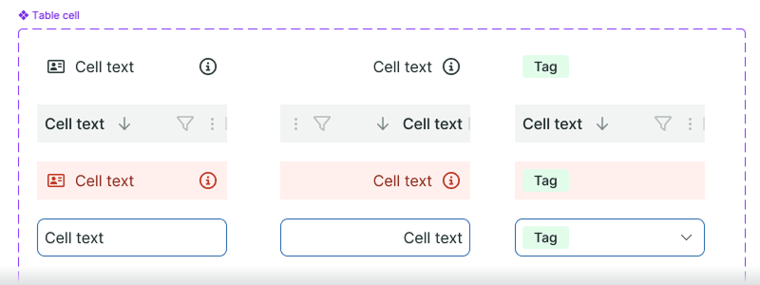
We’ll then create a Table Row component. Almost all it will contain is a Slot that’s a horizontal autolayout with no margins or padding. If you’ve got dividers between your rows, add it here. This is also where to add things like row hover effects, or alternating background colours if you’re using zebra-striping in your tables. Slots can be prefilled with example content, so you can add a few cells to the row to get people started.
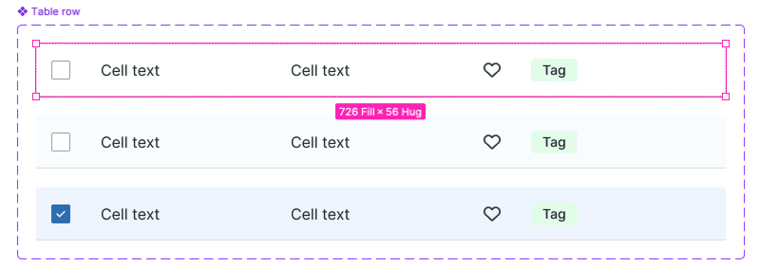
Lastly, we’ll make a Table component. The main part of this will be a Slot that’s a vertical autolayout to contain instances of the Table Row component. We can also add a Slot above the table with things like search, filters, actions, tabs, etc. that can be used with tables. Users of the design system now have complete control over the content of their table, while the design system can still maintain control over styling and general layout.
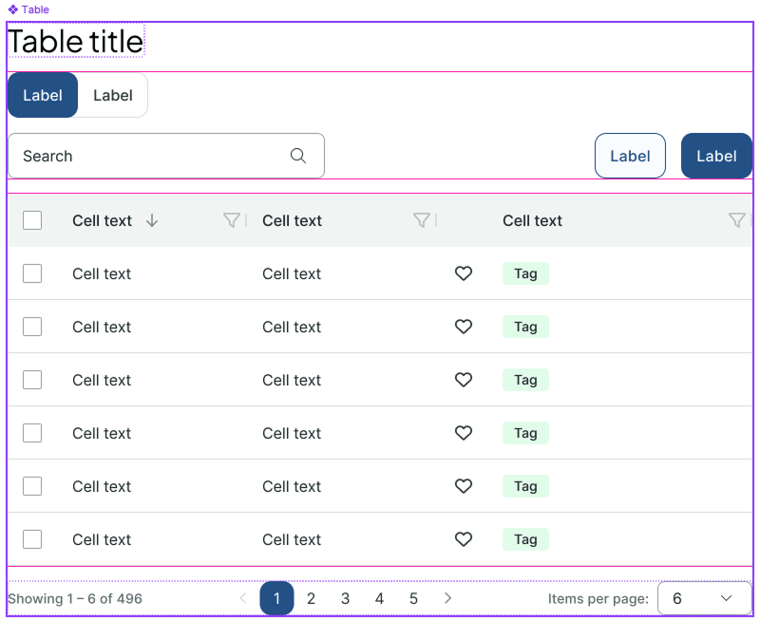
While you can directly insert instances of the Table Row component into the Slot in the Table component, I recommend componentizing an instance of the Table Row component once it has the cells/columns you want, with the spacing you want, so you can edit that directly if you need to make changes, rather than needing to tweak every row.
That’s all there is to it. You’ll find that once you start using Slots, your entire design system will get a lot more flexible for users while also being easier to maintain.
Slots are just one piece of a well-built design system. As an official Figma partner, Bitovi helps teams design and implement component libraries that scale — without the technical debt. See what we do with Figma →
 announcements