---
title: Using CanJS 2.2 with StealJS and NPM
description: Using CanJS 2.2 with StealJS and NPM
image: https://www.bitovi.com/hubfs/canjs-background-blue-2.gif
---
- 
[AI implementation](https://www.bitovi.com/services/ai-consulting)
- 
[Systems engineering](https://www.bitovi.com/services/systems-engineering-consulting)
- 
[Project Management](https://www.bitovi.com/services/agile-project-management-consulting)
- 
[Product Design](https://www.bitovi.com/services/product-design-consulting)
- 
[Frontend development](https://www.bitovi.com/services/frontend-development-consulting)
- [View more
→
](https://www.bitovi.com/digital-consulting-services)
We're Experts in...
- [JavaScript](https://www.bitovi.com/services/frontend/javascript-consulting)
- [AI training](https://www.bitovi.com/ai-training-for-software-engineers)
- [Angular](https://www.bitovi.com/services/frontend/angular-consulting)
- [Design systems](https://www.bitovi.com/services/axure-figma-migration)
- [React](https://www.bitovi.com/services/frontend/react-consulting)
- [Temporal](https://www.bitovi.com/services/backend/temporal-consulting)
- [React Native](https://www.bitovi.com/services/frontend/react-consulting/react-native)
- [Node.js](https://www.bitovi.com/services/backend/nodejs-consulting)
Showcase
[View case study](https://www.bitovi.com/en/bitovi-yum-case-study)
More Projects
- [](https://www.bitovi.com/web-application-consulting-work/levis-ecommerce-responsive-redesign)
- [](https://design.bitovi.com/christies)
- [](https://www.bitovi.com/ux-design-consulting/ux-case-studies/bafs-ppp)
- [View more
→
](https://www.bitovi.com/our-software-consulting-work)
Open Source Tools
We build powerful tools and open source them to support the community.
[See what we've built →](https://www.bitovi.com/open-source)
- [
BlogWe post about delivering products and solving problems.
](https://www.bitovi.com/blog)
- [
PartnershipsLearn about Bitovi's technology partners
](https://www.bitovi.com/partnerships)
- [.svg)
AcademyFree courses to build delivery skills
](https://www.bitovi.com/academy)
- [
Open source toolsUse or contribute to our community
](https://www.bitovi.com/open-source)
Let's Connect
- [
Discord
](https://discord.gg/J7ejFsZnJ4)
- [
LinkedIn
](https://www.linkedin.com/company/bitovi/)
- [
GitHub
](https://github.com/bitovi/)

Name *
Work Email *
Phone
What's your project?
Send
### Contact Us
(312) 620-0386contact@bitovi.com
April 23, 2015
# Using CanJS 2.2 with StealJS and NPM
Using CanJS 2.2 with StealJS and NPM
.png)
The Bitovi Team
Share:
[ ](https://twitter.com/intent/tweet?text=) [ ](http://reddit.com/submit?url=)
CanJS has always been fully modular and can be used with different module formats like AMD or CommonJS and installed via [Bower](http://bower.io/) or [NPM](https://www.npmjs.com/) or the direct download. When using a module loader - unlike many other frameworks that simply provide a [UMD wrapper](https://github.com/umdjs/umd) for the entire library - CanJS will only load the dependencies it really needs.
This is the beginning of a series of posts that go over different combinations of package managers and module loaders and how to set them up with CanJS.
In this post we will talk about using [CanJS](http://canjs.com/) with the new [StealJS](http://stealjs.com/) and NPM which provides a seamless, zero-configuration development experience.
## NPM and Steal setup
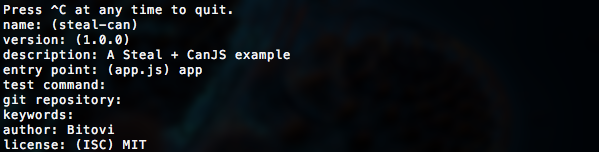
In a new folder initialize a `package.json` by answering the prompts from
```
npm init
```
The only important prompt here is to set the entry point to `app` which will be our main application file:
Then install and save the `steal` and `can` packages:
```
npm install can steal --save
```
jQuery will be installed and loaded automatically since it is a peer dependency of CanJS. Then create an `index.html` like this:
```
CanJS + Steal + NPM demo
```
Steal will now automatically load its configuration from the `package.json` we initialized. Because it supports different module formats we can choose to use ES6 modules (and any other ES6 features provided by the [Traceur](https://github.com/google/traceur-compiler) or [Babel](https://babeljs.io/) transpilers), CommonJS or AMD. In ES6 an `app.js` that loads jQuery and Stache and renders a simple template when the document is ready can look like this:
```
import $ from 'jquery';
import stache from 'can/view/stache/stache';
const template = stache('Hello !');
$(() => {
$('body').append(template({ message: 'David' }));
});
```
The same file in CommonJS would look like:
```
var $ = require('jquery');
var stache = require('can/view/stache/stache');
var template = stache('Hello !');
$(function() {
$('body').append(template({ message: 'David' }));
});
```
And using AMD like this:
```
define(['jquery', 'can/view/stache/stache'], function($, stache) {
var template = stache('Hello !');
$(function() {
$('body').append(template({ message: 'David' }));
});
});
```
If you now open `index.html` you will see that all dependencies are being loaded and the view is rendered.
## Configuring StealJS
This zero configuration approach already works with many client-side JavaScript libraries that are available on NPM like jQuery, Lodash, MomentJS or ChartJS. Additional configuration, like mappings and shims to libraries that do not support a module loader can be put into a `system` property in the `package.json`.
For example, if you downloaded the [Tooltipster](http://iamceege.github.io/tooltipster/) jQuery plugin and put it into a `lib/tooltipster` folder in your project, the configuration to make it available as the `tooltipster` module and load its CSS file automatically would look like this:
```
{
"name": "steal-can",
"version": "0.0.1",
"description": "A StealJS + CanJS example",
"main": "app",
"author": "Bitovi",
"license": "MIT",
"dependencies": {
"can": "^2.2.5",
"jquery": "^2.1.3",
"steal": "^0.9.3"
},
"system": {
"paths": {
"tooltipster": "lib/tooltipster/js/jquery.tooltipster.js"
},
"meta": {
"tooltipster": {
"deps": ["lib/tooltipster/css/tooltipster.css!"]
}
}
}
}
```
Then we can load and initialize the plugin in `app.js`:
```
import $ from 'jquery';
import 'tooltipster';
import stache from 'can/view/stache/stache';
const template = stache('Hover me for a tooltip
');
$(() => {
$('body').append(template({ message: 'David' }));
$('div').tooltipster();
});
```
When you now reload the page you will see the tooltip when hovering over the element.
## Production build
To build the project for production we will use the `steal-tools` NPM package that we can install as a development dependency:
```
npm install steal-tools --save-dev
```
Running `steal-tools` without any parameters will build using our `package.json` as the configuration. Lets add a `build` NPM script that simply runs the steal-tools binary we just installed:
```
{
"name": "steal-can",
"version": "0.0.1",
"description": "A StealJS + CanJS example",
"main": "app",
"scripts": {
"build": "steal-tools"
},
"author": "Bitovi",
"license": "MIT",
"dependencies": {
"can": "^2.2.5",
"jquery": "^2.1.3",
"steal": "^0.9.3"
},
"devDependencies": {
"steal-tools": "^0.9.4"
},
"system": {
"paths": {
"tooltipster": "lib/tooltipster/js/jquery.tooltipster.js"
},
"meta": {
"tooltipster": {
"deps": ["lib/tooltipster/css/tooltipster.css!"]
}
}
}
}
```
The production build can now be kicked off with:
```
npm run build
```
The build files will end up in `dist/bundles/app.css` and `dist/bundles/app.js`. To load those files instead of the individual modules we need to add a `main="app"` and `env="production"` to the Steal script tag in `index.html`:
```
CanJS + Steal + NPM demo
```
Now the application is ready to ship.
## Conclusion
In this post we went over a simple application that uses StealJS, NPM and CanJS and also configured Steal to load a third party jQuery plugin and use it in a CanJS Stache template. We were able to make a production build for both, JavaScript and CSS with no other configuration than a `package.json`. You can download the demo application in [this Gist](https://gist.github.com/daffl/dd6bf4e7f5971774d3ea).
[ open source ](https://www.bitovi.com/blog/topic/open-source)[ development ](https://www.bitovi.com/blog/topic/development)
Previous Post
 [ Introducing StealJS ](https://www.bitovi.com/blog/introducing-stealjs)
Next Post
 [ Free Weekly Online JavaScript Training! ](https://www.bitovi.com/blog/free-weekly-online-javascript-training)
```json
{
"@context" : "http://schema.org",
"@type" : "Organization",
"address" : {
"@type" : "PostalAddress",
"addressCountry" : "United States",
"addressLocality" : "Libertyville",
"addressRegion" : "IL",
"postalCode" : "60048",
"streetAddress" : "1134 Pine Tree Lane "
},
"alternateName" : "Bitovi",
"areaServed" : {
"@type" : "GeoCircle",
"geoMidpoint" : {
"@type" : "GeoCoordinates",
"latitude" : "41.8781",
"longitude" : "87.6298"
},
"geoRadius" : "5000 km"
},
"description" : "Bitovi is a UX, UI design and front-end JavaScript development consulting company",
"email" : "contact@bitovi.com",
"image" : "https://www.bitovi.com/hubfs/bitovi-logo-x2.png",
"logo" : "https://www.bitovi.com/hubfs/bitovi-logo-23-1.svg",
"mainEntityOfPage" : {
"@id" : "https://www.bitovi.com/blog/using-canjs-2-2-with-stealjs",
"@type" : "WebPage",
"description" : "Using CanJS 2.2 with StealJS and NPM"
},
"naics" : "541511",
"name" : "Bitovi Web App Consulting",
"sameAs" : [ "https://www.facebook.com/BitoviLLC/", "https://twitter.com/bitovi", "https://www.linkedin.com/company/bitovi" ],
"telephone" : "312-620-0386",
"url" : "http://bitovi.com"
}
```
```json
{
"@context" : "http://schema.org",
"@type" : "BlogPosting",
"author" : {
"@type" : "Person",
"name" : "The Bitovi Team"
},
"dateModified" : "September 19, 2016, 4:19:36 PM",
"datePublished" : "2015-04-23 19:14:27",
"description" : "Using CanJS 2.2 with StealJS and NPM",
"headline" : "Using CanJS 2.2 with StealJS and NPM",
"image" : {
"@type" : "ImageObject",
"url" : "http://cdn2.hubspot.net/hubfs/2171535/canjs-background-blue-2.gif"
},
"publisher" : {
"@type" : "Organization",
"logo" : {
"@type" : "ImageObject",
"url" : "https://www.bitovi.com/hubfs/bitovi-logo-23-1.svg"
},
"name" : "Bitovi"
}
}
```