Overview
In this section, we will:
- Learn what a directive is, and where one can be attached
- Include or skip fields with
@includeand@skip - See how a directive and a variable work together to make one query serve two screens
Directives let one query return different fields depending on a variable.
Objective 1: Understand directives
What is a directive?
A directive is an instruction attached to part of a query or schema, written as @ followed by a name. Some directives take arguments, just like fields do:
policies @include(if: $withPolicies)A directive changes how GraphQL treats the thing it’s attached to. The GraphQL specification defines a few built-in directives. Two of them are for queries, and the specification says every GraphQL server should support them:
@include(if: Boolean!)returns a field only whenifistrue.@skip(if: Boolean!)leaves a field out whenifistrue.
They do the same job from opposite directions. Use whichever reads more naturally.
Directives can also go in the schema, where the API’s author uses them to add rules or information to a type or field. You’ll use @deprecated and @oneOf that way in Mutations.
Why use them
These directives are most useful with a variable. A screen might show a policyholder’s contact details, with a toggle that adds their policies. Without directives, the client would need two separate queries. With @include, one query covers both, and the variable decides which fields come back.
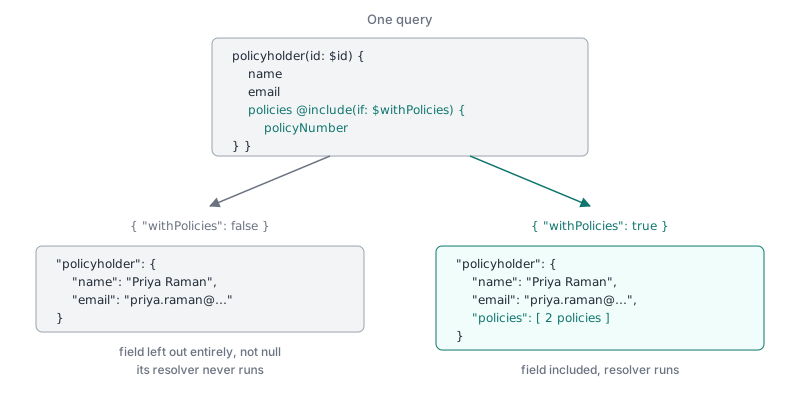
When a field is left out, it’s missing from the response entirely. It doesn’t come back as null. GraphQL also doesn’t run the resolver for a field that’s left out, so the server doesn’t do that work.
Exercise
✏️ In Apollo Sandbox, write one query named PolicyholderView that takes two variables: $id, a policyholder id, and $withPolicies, a Boolean!. It returns the policyholder’s name and email. Their policies, with each policy’s policyNumber and type, are included only when $withPolicies is true.
✏️ Run it with these variables:
{ "id": "ph3", "withPolicies": false }Your response should be:
{
  "data": {
    "policyholder": { "name": "Priya Raman", "email": "priya.raman@example.com" }
  }
}
✏️ Change the variables so withPolicies is true, and run it again:
{ "id": "ph3", "withPolicies": true }Your response should be:
{
  "data": {
    "policyholder": {
      "name": "Priya Raman",
      "email": "priya.raman@example.com",
      "policies": [
        { "policyNumber": "LIFE-100004", "type": "LIFE" },
        { "policyNumber": "RENTERS-100005", "type": "RENTERS" }
      ]
    }
  }
}
Hint: The directive attaches to the field you want to make conditional, not to the operation. Look at the @include example in What is a directive? above.
Solution
Click to see the solution
query PolicyholderView($id: ID!, $withPolicies: Boolean!) {
  policyholder(id: $id) {
    name
    email
    policies @include(if: $withPolicies) {
      policyNumber
      type
    }
  }
}
@include goes right after the field name, before its { }. When $withPolicies is false, GraphQL leaves out policies and everything inside it.
policies @skip(if: $withoutPolicies) would work too, with the variable’s meaning flipped.
Next steps
Next, we’ll change data with mutations, and see directives used in the schema itself.