Overview
Throughout this course, you’ll work on the API for a fictional insurance company. It holds two kinds of data:
- Policyholders: the company’s customers
- Policies: the insurance each policyholder owns (auto, home, life, or renters)
This page shows the data the API starts with, so you know what to expect before writing a query. Field names are shown exactly as you’d use them in a query.
Policyholders
id |
name |
email |
|---|---|---|
ph1 |
Maria Alvarez | maria.alvarez@example.com |
ph2 |
James Okafor | james.okafor@example.com |
ph3 |
Priya Raman | priya.raman@example.com |
Policies
policyNumber |
type |
monthlyPremium |
effectiveDate |
riskTier |
policyholder |
|---|---|---|---|---|---|
| AUTO-100001 | AUTO |
142.50 | 2025-01-15 | MEDIUM |
Maria Alvarez |
| HOME-100002 | HOME |
98.00 | 2024-06-01 | LOW |
Maria Alvarez |
| AUTO-100003 | AUTO |
210.75 | 2025-03-10 | HIGH |
James Okafor |
| LIFE-100004 | LIFE |
45.00 | 2023-11-20 | LOW |
Priya Raman |
| RENTERS-100005 | RENTERS |
18.25 | 2025-08-01 | MEDIUM |
Priya Raman |
Each policy also has an id (p1 through p5, in the order above).
How the data is connected
Each policy belongs to one policyholder, and a policyholder can have several policies. Maria Alvarez, for example, has both an auto and a home policy.
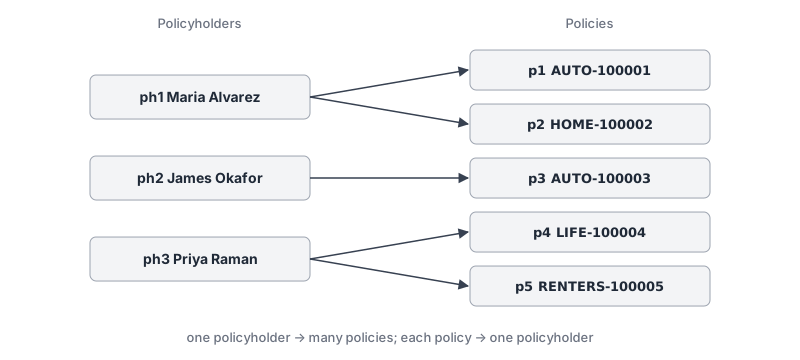
In a query, you follow that connection with nested fields: from a policy to its policyholder, or from a policyholder to their policies. You’ll do this in Writing Queries.
Good to know
- Your changes are saved. Policies you add or change are written to services/policies/data.json, and claims to services/policies/claims.json, so they’re still there after the server restarts. To go back to the starting data, stop the server, run
npm run reset-datain services/policies, and start it again. monthlyPremiumis in US dollars. The API returns it as a number, so trailing zeros are dropped:210.75comes back as210.75, but98.00comes back as98.