Overview
In this section, we will:
- See the N+1 problem happen in our own server
- Batch lookups with DataLoader
- Use
contextValueto give each request its own loaders - Batch the other direction of the relationship on our own
Objective 1: See the N+1 problem
One query, many lookups
Remember how resolvers chain together. In this query:
{
  policies {
    policyNumber
    policyholder {
      name
    }
  }
}
Query.policies runs once and returns five policies. Then Policy.policyholder runs once for each policy: five more times.
That’s the N+1 problem: 1 lookup for the list, plus N lookups for a field on each item in the list. Our data is in a small list, so it’s fast. With a real database, every one of those lookups would be a separate database query. A page showing 500 policies would send 501 queries.
Watch it happen
✏️ In services/policies/src/resolvers.ts, add a log line to the Policy.policyholder resolver so you can see every time it runs:
  Policy: {
    policyholder: (policy: Policy) => {
      console.log(`[RESOLVER] Looking up policyholder ${policy.policyholderId}`);
      return policyholders.find((ph) => ph.id === policy.policyholderId);
    },
  },
The resolver does the same thing as before. It now has a body ({ ... }), so it needs return to hand back the policyholder.
Starting the message with [RESOLVER] makes it easy to tell where each line in the terminal came from. Later, the loader’s messages will start with [LOADER]. The brackets are just part of the text.
✏️ Run the query above in Apollo Sandbox, then look at the terminal where the server is running:
[RESOLVER] Looking up policyholder ph1
[RESOLVER] Looking up policyholder ph1
[RESOLVER] Looking up policyholder ph2
[RESOLVER] Looking up policyholder ph3
[RESOLVER] Looking up policyholder ph3
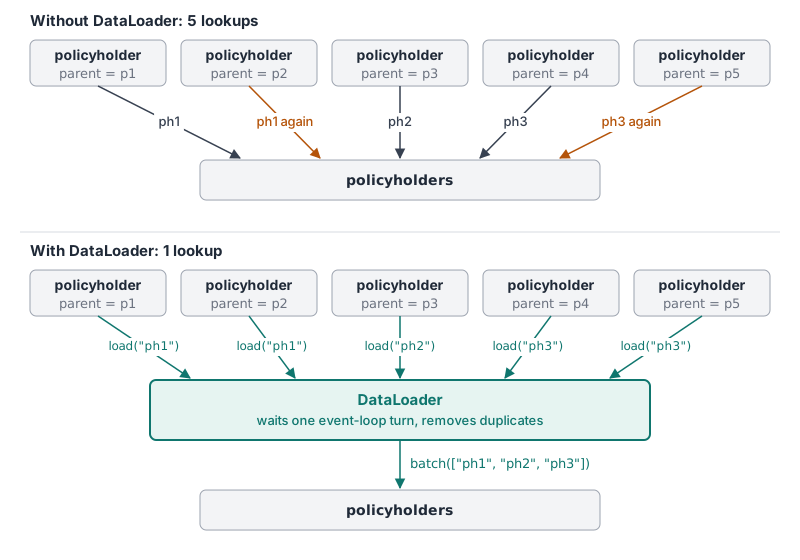
Five lookups for three policyholders. Maria Alvarez (ph1) and Priya Raman (ph3) each have two policies, so they’re each looked up twice.
Each resolver only knows about its own policy. Policy.policyholder has no idea that four other copies of it are about to run, so it can’t combine them.
Why only policyholder does a lookup
Every field on every policy has a resolver. Most of them are default resolvers, which just read a property from the policy object. That’s cheap.
Policy.policyholder is different. A saved policy doesn’t contain its policyholder, only a policyholderId:
{ id: "p1", policyNumber: "AUTO-100001", /* ... */ policyholderId: "ph1" }A default resolver would look for policy.policyholder, find nothing, and return null. So we override the default with our own resolver. It fetches the related data, the list of policyholders, and finds the one that matches the current policy’s policyholderId. That lookup is the work that gets repeated for every policy.
You can override any field this way, even one the default resolver handles fine.
✏️ In services/policies/src/resolvers.ts, add a policyNumber resolver next to policyholder:
  Policy: {
    policyholder: (policy: Policy) => {
      console.log(`[RESOLVER] Looking up policyholder ${policy.policyholderId}`);
      return policyholders.find((ph) => ph.id === policy.policyholderId);
    },
    policyNumber: (policy: Policy) => {
      console.log(`[RESOLVER] Overriding default resolver but still returning policyNumber value`);
      return policy.policyNumber;
    },
  },
It returns the same value the default resolver would, so the response doesn’t change. It just logs each time it runs.
✏️ Run the query again. The terminal shows both resolvers, running once for each policy:
[RESOLVER] Overriding default resolver but still returning policyNumber value
[RESOLVER] Looking up policyholder ph1
[RESOLVER] Overriding default resolver but still returning policyNumber value
[RESOLVER] Looking up policyholder ph1
[RESOLVER] Overriding default resolver but still returning policyNumber value
[RESOLVER] Looking up policyholder ph2
[RESOLVER] Overriding default resolver but still returning policyNumber value
[RESOLVER] Looking up policyholder ph3
[RESOLVER] Overriding default resolver but still returning policyNumber value
[RESOLVER] Looking up policyholder ph3
A few things to notice:
- Field resolvers always run once per item. That’s how GraphQL works, and it’s fine when a resolver only reads a property, like
policyNumber. - The N+1 problem comes from what the resolver does. It’s only a problem when each run does real work, like fetching related data.
- A resolver must return its own field’s value.
policyNumberis aString!, so its resolver returns a string. If it returned the wholepolicyobject, the request would fail.
✏️ Remove the policyNumber resolver before moving on. The default resolver already does the same job.
Objective 2: Batch lookups with DataLoader
What a DataLoader does
DataLoader is a small library that fixes this. Its README describes it as a JavaScript version of a data-loading API that Facebook built for its own servers, and it’s now kept in the GraphQL project’s GitHub organization. Instead of looking up a policyholder right away, each resolver asks the loader for one:
- Each
Policy.policyholderresolver callsload("ph1"),load("ph2"), and so on. - DataLoader waits until the code that’s running right now finishes, one turn of the JavaScript event loop, and collects the ids asked for in the meantime. Here, that’s every
Policy.policyholderresolver, because GraphQL calls them one after another for the same list. The README describes this timing. - It removes duplicates, then calls a batch function you write, once, with the whole list:
["ph1", "ph2", "ph3"]. - It hands each resolver back its own policyholder.
With a real database, the batch function would run a single query for all the ids, such as SELECT * FROM policyholders WHERE id IN ('ph1', 'ph2', 'ph3'). Five queries become one.
DataLoader is already installed in the Codespace.
Write the loader
Open services/policies/src/loaders.ts. It’s a starting point that already has the imports and an empty createLoaders() function.
✏️ Add a policyholder loader where it says // Add loaders here, so the file looks like this:
import DataLoader from "dataloader";
import { policyholders } from "./data.js";

export function createLoaders() {
  return {
    // Loads many policyholders at once, by id
    policyholder: new DataLoader(async (ids: readonly string[]) => {
      console.log(`[LOADER] Loading policyholders ${ids.join(", ")}`);

      // DataLoader needs one result per id, in the same order as ids
      return ids.map((id) => policyholders.find((ph) => ph.id === id));
    }),
  };
}

export type Loaders = ReturnType<typeof createLoaders>;
Here’s what each part does:
createLoaders()builds a fresh set of loaders. We’ll call it once for every request.new DataLoader(async (ids) => { ... })creates a loader. The function inside is the batch function.idsis the list of every id that resolvers asked for.- The batch function returns one result per id, in the same order as
ids. DataLoader gives the first result to whoever asked for the first id, and so on. Loadersis a TypeScript type. LikeIssuePolicyInput, it only helps your editor.
Give each request its own loaders
Resolvers need a way to reach the loaders. That’s what contextValue, the third resolver argument, is for: it’s created once per request and shared by every resolver in that request.
✏️ In services/policies/src/index.ts, import createLoaders:
import { createLoaders } from "./loaders.js";✏️ Then add a context function to startStandaloneServer:
const { url } = await startStandaloneServer(server, {
  listen: { port, host: "0.0.0.0" },
  // Runs once per request. Every resolver in that request receives this as contextValue.
  context: async () => ({ loaders: createLoaders() }),
});
Here’s what the new line does:
contextis an option you give Apollo, likelisten. Apollo calls this function at the start of every request.- Whatever the function returns becomes
contextValuefor every resolver in that request. Here that’s an object with aloadersproperty, so resolvers can reach the loaders ascontextValue.loaders. createLoaders()runs inside the function, so every request gets a new set of loaders.async () => ({ ... })is a function that returns an object. The extra( )around{ }tells JavaScript the braces are an object, not the function’s body. It’sasyncbecause Apollo lets a context function wait on things, like looking up the logged-in user. Ours doesn’t need to.
Why create the loaders here, once per request?
DataLoader remembers everything it loads. Within one request, that’s what we want: if two policies ask for ph1, it’s loaded once.
Across requests, that memory is a problem. If we created the loaders once, when the server starts, every request would share them, and they would never forget anything:
- Data would go stale. In the exercise, you’ll load each policyholder’s policies. With shared loaders, after you issue a new policy for James Okafor, his
policieswould keep coming back without it, because the loader already remembers his old list. - Requests could see each other’s data. In a real API, different users make different requests. Shared loaders could hand one user data that was loaded for someone else.
The server is the only part of the code that knows when a request starts. That’s why the loaders are created in index.ts, in the context function, and not in loaders.ts or in a resolver. Each request starts with empty loaders, and they’re thrown away when it ends.
Use the loader in the resolver
✏️ In services/policies/src/resolvers.ts, import the Loaders type at the top of the file:
import type { Loaders } from "./loaders.js";✏️ Then replace the Policy.policyholder resolver:
  Policy: {
    policyholder: (policy: Policy, _: unknown, contextValue: { loaders: Loaders }) => {
      console.log(`[RESOLVER] Looking up policyholder ${policy.policyholderId}`);
      return contextValue.loaders.policyholder.load(policy.policyholderId);
    },
  },
The resolver now uses three of its four arguments: policy (the parent), _ for args (it has none), and contextValue. Instead of finding the policyholder itself, it asks the loader for one. The [RESOLVER] log stays, so you can compare how often the resolver runs with how often the loader does.
See the result
✏️ Run the query from Objective 1 again. The response is the same, but the terminal now shows:
[RESOLVER] Looking up policyholder ph1
[RESOLVER] Looking up policyholder ph1
[RESOLVER] Looking up policyholder ph2
[RESOLVER] Looking up policyholder ph3
[RESOLVER] Looking up policyholder ph3
[LOADER] Loading policyholders ph1, ph2, ph3- The resolver still runs five times, once per policy. Field resolvers always do. But each run now only hands an id to the loader, which costs almost nothing.
- The loader runs once, after all five have asked, with each policyholder listed once.
Five lookups became one.
✏️ Run the query a second time. The same lines appear again, because each request gets new loaders.
Objective 3: Batch the other direction
Exercise
The relationship goes both ways. Policyholder.policies has the same problem. In this query, it runs once for each policyholder:
{
  policyholders {
    name
    policies {
      policyNumber
    }
  }
}
✏️ Add a [RESOLVER] log line to the Policyholder.policies resolver in services/policies/src/resolvers.ts and run the query. You should see one line per policyholder: three in total.
✏️ In services/policies/src/loaders.ts and services/policies/src/resolvers.ts, add a second loader, named policiesByPolicyholder, so that Policyholder.policies loads the policies for every policyholder in one batch.
Hint: A policyholder can have several policies. The batch function still returns one result per id, but each result is a list of policies.
✏️ Run the query again. The terminal shows the resolver running once per policyholder, and the batch function running once, with all three policyholder ids. For example:
[RESOLVER] Looking up policies for policyholder ph1
[RESOLVER] Looking up policies for policyholder ph2
[RESOLVER] Looking up policies for policyholder ph3
[LOADER] Loading policies for policyholders ph1, ph2, ph3
Verify
✏️ Check the response from the last step. It’s unchanged:
{
  "data": {
    "policyholders": [
      {
        "name": "Maria Alvarez",
        "policies": [{ "policyNumber": "AUTO-100001" }, { "policyNumber": "HOME-100002" }]
      },
      { "name": "James Okafor", "policies": [{ "policyNumber": "AUTO-100003" }] },
      {
        "name": "Priya Raman",
        "policies": [{ "policyNumber": "LIFE-100004" }, { "policyNumber": "RENTERS-100005" }]
      }
    ]
  }
}
If you’ve issued any policies since you reset the data at the end of the Mutations section, you’ll see them in the response too.
Solution
Click to see the solution
✏️ In services/policies/src/loaders.ts, import policies too, and add a second loader:
import DataLoader from "dataloader";
import { policies, policyholders } from "./data.js";

export function createLoaders() {
  return {
    // Loads many policyholders at once, by id
    policyholder: new DataLoader(async (ids: readonly string[]) => {
      console.log(`[LOADER] Loading policyholders ${ids.join(", ")}`);

      // DataLoader needs one result per id, in the same order as ids
      return ids.map((id) => policyholders.find((ph) => ph.id === id));
    }),

    // Loads the policies for many policyholders at once, by policyholder id
    policiesByPolicyholder: new DataLoader(async (policyholderIds: readonly string[]) => {
      console.log(`[LOADER] Loading policies for policyholders ${policyholderIds.join(", ")}`);

      // One result per policyholder id: that policyholder's list of policies
      return policyholderIds.map((id) => policies.filter((p) => p.policyholderId === id));
    }),
  };
}

export type Loaders = ReturnType<typeof createLoaders>;
✏️ In services/policies/src/resolvers.ts, replace the Policyholder.policies resolver:
  Policyholder: {
    policies: (policyholder: Policyholder, _: unknown, contextValue: { loaders: Loaders }) => {
      console.log(`[RESOLVER] Looking up policies for policyholder ${policyholder.id}`);
      return contextValue.loaders.policiesByPolicyholder.load(policyholder.id);
    },
  },
The only difference from the policyholder loader is what each id maps to. Before, each id matched one policyholder, so the batch function used find. Now, each id matches many policies, so it uses filter, and each result is a list.
Next steps
You’ve now seen GraphQL’s biggest performance trap, and the standard way to avoid it. Next is the final exam, where you’ll put everything in this course together.