Overview
The claims team wants insurance claims in the API. In this exam, you’ll add them yourself, using everything from this course:
- Schema types, enums, and arguments
- Field resolvers and relationships
- A calculated field
- A mutation with an input type and validation
- Batching with DataLoader
- A named query with variables
This time the exam’s parts have no file paths or hints, only the goal and the response you should get. The one file named is where the claims data lives, so you can check its shape in Part 2. Look back at earlier sections whenever you need to.
Parts 1–3 are the core of the exam. Parts 4–6 are stretch goals. Do them if you have time.
The claims data
The server already loads this claims data, alongside the policies. Nothing in the schema exposes it yet.
id |
claimNumber |
amount |
status |
filedDate |
policyId |
|---|---|---|---|---|---|
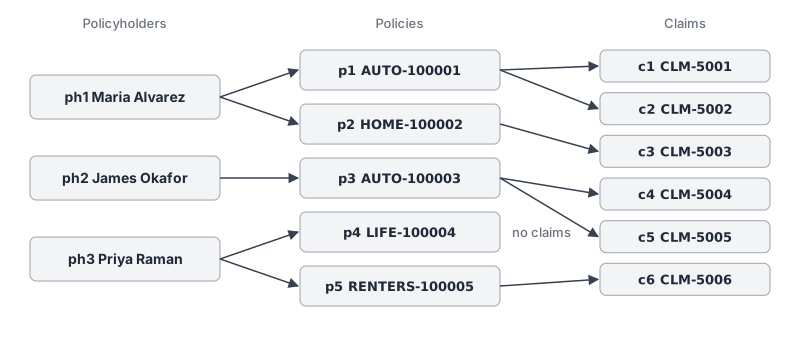
| c1 | CLM-5001 | 1250.00 | APPROVED | 2025-04-02 | p1 (AUTO-100001) |
| c2 | CLM-5002 | 430.50 | DENIED | 2025-06-18 | p1 (AUTO-100001) |
| c3 | CLM-5003 | 3800.00 | APPROVED | 2024-11-05 | p2 (HOME-100002) |
| c4 | CLM-5004 | 2200.00 | OPEN | 2025-08-21 | p3 (AUTO-100003) |
| c5 | CLM-5005 | 975.25 | APPROVED | 2025-05-09 | p3 (AUTO-100003) |
| c6 | CLM-5006 | 640.00 | OPEN | 2025-09-12 | p5 (RENTERS-100005) |
A claim belongs to one policy, and a policy can have several claims. LIFE-100004 has none.
Part 1: Query claims
✏️ Add a Claim type with id, claimNumber, amount, status, and filedDate. A claim’s status can only be OPEN, APPROVED, or DENIED. All of these fields are required.
✏️ Add a claims query that returns every claim, or only the claims with a given status.
Run this query:
{
  claims(status: OPEN) {
    claimNumber
    amount
    status
    filedDate
  }
}
Your response should be:
{
  "data": {
    "claims": [
      { "claimNumber": "CLM-5004", "amount": 2200, "status": "OPEN", "filedDate": "2025-08-21" },
      { "claimNumber": "CLM-5006", "amount": 640, "status": "OPEN", "filedDate": "2025-09-12" }
    ]
  }
}
claims with no arguments should return all six claims.
Solution
Click to see the solution
✏️ In services/policies/src/schema.graphql, add the Claim type and its status enum:
enum ClaimStatus {
  OPEN
  APPROVED
  DENIED
}

type Claim {
  id: ID!
  claimNumber: String!
  amount: Float!
  status: ClaimStatus!
  filedDate: String!
}
✏️ Add claims to Query:
type Query {
  # ...existing fields
  claims(status: ClaimStatus): [Claim!]!
}
✏️ In services/policies/src/resolvers.ts, import the claims data:
import { claims, type ClaimStatus } from "./data.js";✏️ Add a claims resolver under Query. It filters the same way as policies:
    claims: (_: unknown, args: { status?: ClaimStatus }) =>
      claims.filter((c) => {
        // A status was requested, and this claim isn't that status
        if (args.status && c.status !== args.status) return false;
        return true;
      }),
Part 2: Connect claims and policies
✏️ Make the relationship work in both directions: a claim has a policy, and a policy has a list of claims. Both are required.
Before you start, look at services/policies/src/data.ts and check the shape of the Claim data. What does a claim store about its policy, and what does a policy store about its claims?
Run this query:
{
  claims(status: OPEN) {
    claimNumber
    policy {
      policyNumber
      policyholder {
        name
      }
    }
  }
}
Your response should be:
{
  "data": {
    "claims": [
      {
        "claimNumber": "CLM-5004",
        "policy": { "policyNumber": "AUTO-100003", "policyholder": { "name": "James Okafor" } }
      },
      {
        "claimNumber": "CLM-5006",
        "policy": { "policyNumber": "RENTERS-100005", "policyholder": { "name": "Priya Raman" } }
      }
    ]
  }
}
A policy with no claims, like LIFE-100004, should return "claims": [].
Solution
Click to see the solution
✏️ In services/policies/src/schema.graphql, add policy to Claim and claims to Policy:
type Claim {
  # ...existing fields
  policy: Policy!
}

type Policy {
  # ...existing fields
  claims: [Claim!]!
}
✏️ In services/policies/src/resolvers.ts, add type Claim to the import from "./data.js":
import { claims, type Claim, type ClaimStatus } from "./data.js";✏️ Add a Claim.policy resolver, and a claims resolver under Policy:
  Claim: {
    policy: (claim: Claim) => policies.find((p) => p.id === claim.policyId),
}, claims: (policy: Policy) => claims.filter((c) => c.policyId === policy.id),A claim’s data has a policyId, not a policy, so the default resolver can’t answer Claim.policy. The same goes for Policy.claims. It’s the same situation as Policy.policyholder.
Part 3: Build the agent’s view
An agent wants to see all of a policyholder’s policies and their claims, in one request.
✏️ Write one query named PolicyholderClaims that takes a $policyholderId variable and returns the policyholder’s name, and for each of their policies, its policyNumber and the claimNumber, status, and amount of each claim.
✏️ Run it for ph1. Your response should be:
{
  "data": {
    "policyholder": {
      "name": "Maria Alvarez",
      "policies": [
        {
          "policyNumber": "AUTO-100001",
          "claims": [
            { "claimNumber": "CLM-5001", "status": "APPROVED", "amount": 1250 },
            { "claimNumber": "CLM-5002", "status": "DENIED", "amount": 430.5 }
          ]
        },
        {
          "policyNumber": "HOME-100002",
          "claims": [{ "claimNumber": "CLM-5003", "status": "APPROVED", "amount": 3800 }]
        }
      ]
    }
  }
}
Solution
Click to see the solution
This part needs no server changes:
query PolicyholderClaims($policyholderId: ID!) {
  policyholder(id: $policyholderId) {
    name
    policies {
      policyNumber
      claims {
        claimNumber
        status
        amount
      }
    }
  }
}
Variables:
{ "policyholderId": "ph1" }Part 4 (stretch): Total claimed
✏️ Add a required totalClaimed field to Policy: the total amount of that policy’s approved claims. Open and denied claims don’t count.
Run { policies { policyNumber totalClaimed } }. Your response should be:
{
  "data": {
    "policies": [
      { "policyNumber": "AUTO-100001", "totalClaimed": 1250 },
      { "policyNumber": "HOME-100002", "totalClaimed": 3800 },
      { "policyNumber": "AUTO-100003", "totalClaimed": 975.25 },
      { "policyNumber": "LIFE-100004", "totalClaimed": 0 },
      { "policyNumber": "RENTERS-100005", "totalClaimed": 0 }
    ]
  }
}
If you’ve issued any policies since you reset the data at the end of the Mutations section, you’ll see them too, with "totalClaimed": 0.
Solution
Click to see the solution
✏️ In services/policies/src/schema.graphql, add totalClaimed to Policy:
type Policy {
  # ...existing fields
  totalClaimed: Float!
}
✏️ In services/policies/src/resolvers.ts, add a totalClaimed resolver under Policy. The data has no totalClaimed property, so it has to be calculated:
    totalClaimed: (policy: Policy) => {
      // Add up the amounts of this policy's approved claims
      let total = 0;
      for (const claim of claims) {
        if (claim.policyId === policy.id && claim.status === "APPROVED") {
          total = total + claim.amount;
        }
      }
      return total;
    },
for (const claim of claims) runs the code inside once for each claim, calling it claim.
Part 5 (stretch): File a claim
✏️ Add a fileClaim mutation that takes an input with a policyId and an amount, and returns the new Claim. The server fills in everything else: the id, the claimNumber (next in the CLM-5001, CLM-5002, … series), a status of OPEN, and today’s date as the filedDate.
Run this mutation:
mutation {
  fileClaim(input: { policyId: "p4", amount: 1500 }) {
    claimNumber
    status
    amount
    filedDate
    policy {
      policyNumber
    }
  }
}
Your response should look like this, with today’s date:
{
  "data": {
    "fileClaim": {
      "claimNumber": "CLM-5007",
      "status": "OPEN",
      "amount": 1500,
      "filedDate": "2026-09-25",
      "policy": { "policyNumber": "LIFE-100004" }
    }
  }
}
Also check that:
- Filing a claim for a policy that doesn’t exist, such as
"p99", returnsPolicy p99 not foundwith the codeBAD_USER_INPUT, and nothing is created. - Leaving out
amountfails before your resolver runs. - The new claim is still there after the server restarts.
Solution
Click to see the solution
✏️ In services/policies/src/schema.graphql, add the input type, and add fileClaim to Mutation:
input FileClaimInput {
  policyId: ID!
  amount: Float!
}

type Mutation {
  # ...existing fields
  fileClaim(input: FileClaimInput!): Claim!
}
✏️ In services/policies/src/resolvers.ts, add saveClaims to the import from "./data.js", and describe the mutation’s input for TypeScript:
import { claims, saveClaims, type Claim, type ClaimStatus } from "./data.js";

type FileClaimInput = { policyId: string; amount: number };
✏️ Add a fileClaim resolver under Mutation. It follows the same steps as issuePolicy:
    fileClaim: (_: unknown, { input }: { input: FileClaimInput }) => {
      // 1. Check the input: the policy has to exist.
      if (!policies.some((p) => p.id === input.policyId)) {
        throw new GraphQLError(`Policy ${input.policyId} not found`, {
          extensions: { code: "BAD_USER_INPUT" },
        });
      }

      // 2. Fill in server-generated values. Every new claim starts OPEN.
      const n = claims.length + 1;
      const claim: Claim = {
        id: `c${n}`,
        claimNumber: `CLM-${5000 + n}`,
        amount: input.amount,
        status: "OPEN",
        filedDate: new Date().toISOString().slice(0, 10),
        policyId: input.policyId,
      };

      // 3. Save the claim: add it to the list, then write the list to claims.json.
      claims.push(claim);
      saveClaims();

      // 4. Return the new claim.
      return claim;
    },
Leaving out amount is rejected by the schema, because FileClaimInput.amount is Float!. The resolver never runs.
Part 6 (stretch): Batch the claims
{ policies { policyNumber claims { claimNumber } } } looks up claims once for each policy.
✏️ Make Policy.claims load the claims for every policy in one batch.
The response doesn’t change. Your batch function should run once per request, with all the policy ids. With [RESOLVER] and [LOADER] log lines like the ones in the N+1 section, the terminal shows:
[RESOLVER] Looking up claims for policy p1
[RESOLVER] Looking up claims for policy p2
[RESOLVER] Looking up claims for policy p3
[RESOLVER] Looking up claims for policy p4
[RESOLVER] Looking up claims for policy p5
[LOADER] Loading claims for policies p1, p2, p3, p4, p5
Solution
Click to see the solution
✏️ In services/policies/src/loaders.ts, import claims and add a loader alongside your others:
import { claims } from "./data.js"; // Loads the claims for many policies at once, by policy id
claimsByPolicy: new DataLoader(async (policyIds: readonly string[]) => {
console.log(`[LOADER] Loading claims for policies ${policyIds.join(", ")}`);
// One result per policy id: that policy's list of claims
return policyIds.map((id) => claims.filter((c) => c.policyId === id));
}),✏️ Then replace the Part 2 Policy.claims resolver in services/policies/src/resolvers.ts:
    claims: (policy: Policy, _: unknown, contextValue: { loaders: Loaders }) => {
      console.log(`[RESOLVER] Looking up claims for policy ${policy.id}`);
      return contextValue.loaders.claimsByPolicy.load(policy.id);
    },
It’s the same pattern as policiesByPolicyholder: each id maps to a list, so the batch function uses filter.
Wrapping up
You’ve taken a GraphQL API from reading its schema to extending it with a new type, relationships, a calculated field, a mutation, and batching. Those are the core skills you’ll use on any GraphQL API.
Reset the course data
To go back to the starting data, stop the server, run npm run reset-data in services/policies, and start it again. That restores the starting policies and claims.
Delete your Codespace
GraphQL 102 starts in a new Codespace, so you won’t need this one again. A stopped Codespace still counts toward your Codespaces storage, so once you’re done with it, delete it from github.com/codespaces. See Deleting a codespace for the steps.
Next steps
GraphQL 102 picks up where this course ends, and gets the API ready for real users: pagination, custom scalars, error handling, security, authorization, caching, subscriptions, and running the API in production.