Overview
In this section, we will:
- Read a GraphQL schema
- Learn what resolvers are and how they receive arguments
- Understand default resolvers, and add a calculated field that needs its own resolver
- Add a
riskTierargument to thepoliciesquery
Objective 1: Read the schema
The schema is the contract
The schema describes everything a client can ask for and what comes back. Ours lives in services/policies/src/schema.graphql. Here’s part of it, with the descriptions left out:
type Policy {
  id: ID!
  policyNumber: String!
  type: PolicyType!
  monthlyPremium: Float!
  effectiveDate: String!
  riskTier: RiskTier
  policyholder: Policyholder!
}

enum PolicyType {
  AUTO
  HOME
  LIFE
  RENTERS
}

enum RiskTier {
  LOW
  MEDIUM
  HIGH
}

type Query {
  policies(type: PolicyType): [Policy!]!
  policy(id: ID!): Policy
  policyholders: [Policyholder!]!
  policyholder(id: ID!): Policyholder
}
A few things to notice:
- Types and fields:
Policyis an object type with fields.ID,String,Float,Int, andBooleanare built-in scalar types. !means non-null:policyNumber: String!always has a value.riskTier: RiskTiermay benull.[Policy!]!is a list: a non-null list of non-null policies.- Enums:
PolicyTypeandRiskTierlimit a value to a fixed set. Queryis special: its fields are the entry points for reading data.policies(type: PolicyType)declares the argument you used in the Writing Queries section.- Descriptions: in the real file, many types and fields have a string just above them, like
"Monthly premium in US dollars"abovemonthlyPremium. That string is the field’s description. Apollo Sandbox shows it in the Documentation panel. A description that needs more than one line uses three quotes on each side,"""like this""".
Lists and nullability
A list type has two places to put !: after the item type, inside the brackets, and after the brackets. The first says whether an item can be null. The second says whether the list itself can be null. That gives four combinations:
| Schema | List can be null? |
Items can be null? |
Valid responses | Invalid responses |
|---|---|---|---|---|
[String] |
Yes | Yes | null[]["A", null, "B"] |
None |
[String!] |
Yes | No | null[]["A", "B"] |
["A", null, "B"] |
[String]! |
No | Yes | []["A", null, "B"] |
null |
[String!]! |
No | No | []["A", "B"] |
null["A", null, "B"] |
In plain English:
[String]: you might get no list, and any item in it might be missing.[String!]: you might get no list, but if you get one, every item is there.[String]!: you always get a list, but any item in it might be missing.[String!]!: you always get a list, and every item is there. “Nothing found” is an empty list,[].
Use [Item!]! unless you have a reason not to. It’s the easiest shape for clients. They can loop over the result without checking for null first, and an empty list means there’s nothing to show. That’s why policies and policyholders in our schema return [Policy!]! and [Policyholder!]!.
Objective 2: Understand resolvers
A resolver supplies one field’s data
A resolver is a function that returns the data for one field. Ours live in services/policies/src/resolvers.ts:
export const resolvers = {
  Query: {
    policies: (_: unknown, args: { type?: PolicyType }) =>
      policies.filter((p) => {
        if (args.type && p.type !== args.type) return false;
        return true;
      }),
    // ...
  },
  Policy: {
    policyholder: (policy: Policy) =>
      policyholders.find((ph) => ph.id === policy.policyholderId),
  },
};
Apollo matches resolvers to the schema by name: resolvers.Query.policies answers the policies field on type Query.
Every resolver receives four arguments: (parent, args, contextValue, info).
parentis the object that owns the field.Queryfields have no parent, sopoliciesignores it (_).argsholds the query’s arguments.policies(type: AUTO)calls the resolver with{ type: "AUTO" }.contextValueis shared by every resolver in a request. It’s typically where the logged-in user or a database connection lives.infodescribes the query itself.
Reading the policies resolver
The resolver’s args match the field’s arguments in the schema:
policies(type: PolicyType)in the schema declares one argument,type. It has no!, so a query can leave it out.args: { type?: PolicyType }in the resolver is that same argument. When a query leavestypeout,args.typeis empty.- The
ifline leaves out any policy that doesn’t matchargs.type, but only when atypewas passed.
So policies(type: AUTO) returns only the auto policies, and policies with no arguments returns all of them.
The if line is a filter. Each argument you want to filter by gets its own args entry and its own if line, in the same shape.
Resolvers chain together
In policies { policyholder { name } }:
Query.policiesruns once and returns a list of policies.Policy.policyholderruns once for each policy, receiving that policy asparent. That’s how it can readpolicy.policyholderId.
If a query doesn’t ask for policyholder, Policy.policyholder never runs.
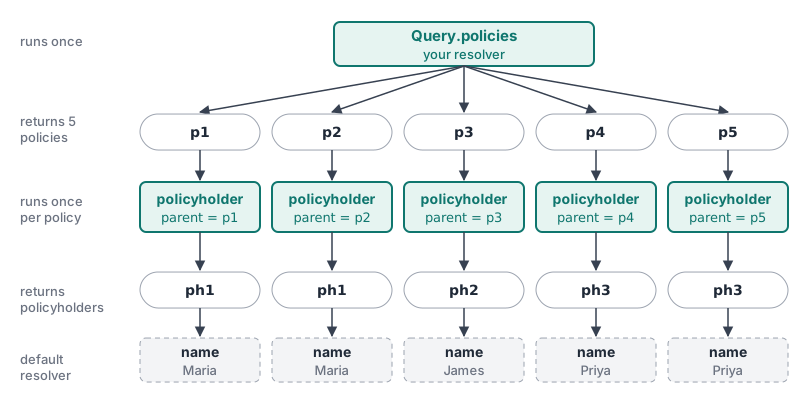
policies { policyholder { name } }.Default resolvers
Look back at the resolvers above. There’s a resolver for Policy.policyholder, but none for Policy.policyNumber, Policy.type, or any other Policy field. Yet all of them work.
When a field has no resolver, GraphQL uses a default resolver. It returns the property with the same name from the parent object. In policies { policyNumber }, Query.policies returns objects from services/policies/src/data.ts like this one:
{ id: "p1", policyNumber: "AUTO-100001", type: "AUTO", monthlyPremium: 142.5, /* ... */ policyholderId: "ph1" }For each policy, GraphQL resolves policyNumber by reading policy.policyNumber. You get this for free whenever the schema’s field names match your data’s property names.
The default resolver only reads properties. It can’t compute anything. Two things follow from that:
- Data can have properties the schema doesn’t expose.
policyholderIdis on every policy object, but it isn’t a field ontype Policy, so clients can’t ask for it. ThePolicy.policyholderresolver uses it behind the scenes. - A field with no matching property comes back as
null. If the schema declares a field that isn’t in the data and has no resolver, the default resolver finds nothing. For a non-null field (!), that’s an error.
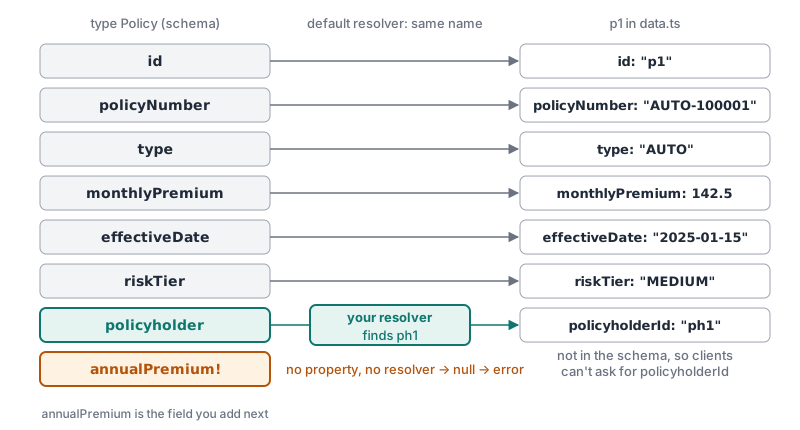
Policy field gets its value for p1.When a field’s value has to be looked up or calculated, write a resolver for it, the way Policy.policyholder looks up a policyholder from policyholderId.
Exercise
Billing wants to show each policy’s yearly cost, which is its monthlyPremium times 12. We’ll add this as an annualPremium field. The data doesn’t have an annualPremium property, so the server will calculate it.
This exercise has two parts. The first one breaks things on purpose.
Part 1: Add the field to the schema only.
✏️ In services/policies/src/schema.graphql, add a required annualPremium field to the Policy type. It’s a dollar amount, like monthlyPremium, so give it the same kind of type. Don’t add a resolver yet.
The server restarts automatically every time you save a file.
✏️ Run this query:
{
  policies {
    policyNumber
    monthlyPremium
    annualPremium
  }
}
The query fails. The response (trimmed for readability) is:
{
  "errors": [{ "message": "Cannot return null for non-nullable field Policy.annualPremium." }],
  "data": null
}
The schema accepted the new field, so the request passed validation. But no resolver was written for annualPremium, so the default resolver ran. It looked for policy.annualPremium, found nothing, and returned null, which breaks the !.
Part 2: Add the resolver.
✏️ In services/policies/src/resolvers.ts, add a resolver so annualPremium returns the policy’s yearly cost.
Hint: Look at how Policy.policyholder gets the policy it’s resolving a field for.
✏️ Run the query from Part 1 again. Your response should be:
{
  "data": {
    "policies": [
      { "policyNumber": "AUTO-100001", "monthlyPremium": 142.5, "annualPremium": 1710 },
      { "policyNumber": "HOME-100002", "monthlyPremium": 98, "annualPremium": 1176 },
      { "policyNumber": "AUTO-100003", "monthlyPremium": 210.75, "annualPremium": 2529 },
      { "policyNumber": "LIFE-100004", "monthlyPremium": 45, "annualPremium": 540 },
      { "policyNumber": "RENTERS-100005", "monthlyPremium": 18.25, "annualPremium": 219 }
    ]
  }
}
Solution
Click to see the solution
✏️ In services/policies/src/schema.graphql, add the field to Policy:
type Policy {
  id: ID!
  policyNumber: String!
  type: PolicyType!
  monthlyPremium: Float!
  annualPremium: Float!
  effectiveDate: String!
  riskTier: RiskTier
  policyholder: Policyholder!
}
✏️ In services/policies/src/resolvers.ts, add an annualPremium resolver next to policyholder:
  Policy: {
    policyholder: (policy: Policy) => policyholders.find((ph) => ph.id === policy.policyholderId),
    annualPremium: (policy: Policy) => policy.monthlyPremium * 12,
  },
Like policyholder, annualPremium receives the policy as parent. Every other Policy field still uses the default resolver.
The resolver runs only when a query asks for annualPremium, so the calculation costs nothing for queries that don’t use it.
Objective 3: Add a query argument
Exercise
Let’s make the query that failed in the Writing Queries section work:
{
  policies(riskTier: HIGH) {
    policyNumber
    riskTier
  }
}
✏️ Update services/policies/src/schema.graphql and services/policies/src/resolvers.ts so that policies can be filtered by riskTier, type, both, or neither.
Hint: Declaring an argument in the schema only gets it into args. The resolver still has to use it.
✏️ Run the query above. Your response should be:
{ "data": { "policies": [{ "policyNumber": "AUTO-100003", "riskTier": "HIGH" }] } }✏️ Combine both filters:
{
  policies(type: AUTO, riskTier: MEDIUM) {
    policyNumber
    riskTier
  }
}
Your response should be:
{ "data": { "policies": [{ "policyNumber": "AUTO-100001", "riskTier": "MEDIUM" }] } }Verify
✏️ Run policies with no arguments:
{
  policies {
    policyNumber
  }
}
It still returns all five policies.
Solution
Click to see the solution
✏️ Update the policies field in services/policies/src/schema.graphql:
type Query {
  policies(type: PolicyType, riskTier: RiskTier): [Policy!]!
  policy(id: ID!): Policy
  policyholders: [Policyholder!]!
  policyholder(id: ID!): Policyholder
}
✏️ In services/policies/src/resolvers.ts, update the policies resolver:
    policies: (_: unknown, args: { type?: PolicyType; riskTier?: RiskTier }) =>
      policies.filter((p) => {
        // A type was requested, and this policy isn't that type
        if (args.type && p.type !== args.type) return false;
        // A risk tier was requested, and this policy isn't that tier
        if (args.riskTier && p.riskTier !== args.riskTier) return false;
        // Passed every filter that was requested
        return true;
      }),
Two things changed:
riskTier?: RiskTierwas added toargs, so the resolver knows about the new argument.RiskTieris already imported at the top of the file.- A second
ifline was added. It follows the same shape as thetypeline: “if a risk tier was requested, and this policy isn’t that tier, leave it out.”
Each filter only applies when its argument was provided, so type and riskTier can be combined or left out.
Next steps
Next, we’ll change data with mutations.