Overview
In this section, we will:
- Write a mutation that issues a new policy
- Use input types to pass data to a mutation
- See how the mutation’s resolver creates data and reports errors
- Make a field required, and see what breaks when data doesn’t keep that promise
- Understand why data saved before a schema change has to be fixed
- Add a new way to look up a policy with
@oneOf, and retire the old one with@deprecated
Objective 1: Write a mutation
What is a mutation?
Queries read data. Mutations change it. They’re declared on the Mutation type in the schema, the same way queries are declared on Query:
type Mutation {
  issuePolicy(input: IssuePolicyInput!): Policy!
}
Writing one looks almost like a query, with two differences:
- It starts with the
mutationkeyword. (A query can leave outquery, but a mutation can’t leave outmutation.) - It does something first, then returns the fields you select from the result.
For example, this mutation issues a new HOME policy to James Okafor. Don’t run it yet. You’ll run it in the exercise, and every time you run it, it saves another policy.
mutation {
  issuePolicy(input: { type: HOME, monthlyPremium: 112.0, policyholderId: "ph2" }) {
    policyNumber
  }
}
Input types
issuePolicy takes a single argument, input, whose type is IssuePolicyInput:
input IssuePolicyInput {
  type: PolicyType!
  monthlyPremium: Float!
  policyholderId: ID!
  effectiveDate: String
}
An input type groups the values a mutation needs into one object. It’s declared with input instead of type, and it can only contain values, not fields with resolvers.
type,monthlyPremium, andpolicyholderIdare required (!).effectiveDateis optional. If it’s left out, the server uses today’s date.
Default values
Today’s date for effectiveDate is a default value: what an optional argument or input field is set to when the client leaves it out. There are two places to set one.
In the schema, with = after the type. Our schema doesn’t have one, but a policies query that returned 10 policies unless told otherwise would look like this:
type Query {
  policies(type: PolicyType, first: Int = 10): [Policy!]!
}
GraphQL fills in first: 10 before the resolver runs, so the resolver always receives a value. Clients can see the default too, because it’s part of the schema and shows up in Apollo Sandbox’s Documentation panel.
In the resolver, when the default can’t be written as a fixed value. “Today” changes every day, so effectiveDate has no default in the schema. The resolver fills it in when it’s missing. You’ll see that line in Objective 2.
Either way, the field stays optional for the client. A default value only decides what happens when it’s left out.
Required input fields are validated too
Like any other request, a mutation is checked against the schema before the resolver runs. Leaving out required input fields fails immediately, and no policy is created:
mutation {
  issuePolicy(input: { type: HOME }) {
    policyNumber
  }
}
The response (trimmed for readability) is:
{
  "errors": [
    { "message": "Field \"IssuePolicyInput.monthlyPremium\" of required type \"Float!\" was not provided." },
    { "message": "Field \"IssuePolicyInput.policyholderId\" of required type \"ID!\" was not provided." }
  ]
}
Exercise
James Okafor (ph2) wants home insurance at $112.00 a month.
✏️ Write and run a mutation that issues the policy and returns its id, policyNumber, effectiveDate, and the policyholder’s name. Your response should look like:
{
  "data": {
    "issuePolicy": {
      "id": "p6",
      "policyNumber": "HOME-100006",
      "effectiveDate": "2026-09-24",
      "policyholder": { "name": "James Okafor" }
    }
  }
}
effectiveDate will be today’s date. If you’ve already issued other policies, your id and policyNumber numbers will be higher.
Solution
Click to see the solution
mutation {
  issuePolicy(input: { type: HOME, monthlyPremium: 112.0, policyholderId: "ph2" }) {
    id
    policyNumber
    effectiveDate
    policyholder {
      name
    }
  }
}
The response can include related data, like policyholder, because issuePolicy returns a Policy. Every Policy field and its resolvers are available.
Objective 2: Understand the mutation resolver
Mutation resolvers work like query resolvers
The resolver for issuePolicy lives in services/policies/src/resolvers.ts, under Mutation:
  Mutation: {
    issuePolicy: (_: unknown, { input }: { input: IssuePolicyInput }) => {
      // 1. Check the input. The schema confirms policyholderId is an ID,
      //    but only the resolver can check that the policyholder exists.
      if (!policyholders.some((ph) => ph.id === input.policyholderId)) {
        throw new GraphQLError(`Policyholder ${input.policyholderId} not found`, {
          extensions: { code: "BAD_USER_INPUT" },
        });
      }

      // 2. Fill in server-generated values. The client never chooses the
      //    id or policyNumber, and effectiveDate defaults to today.
      const n = policies.length + 1;
      const policy: Policy = {
        ...input,
        id: `p${n}`,
        policyNumber: `${input.type}-${100000 + n}`,
        effectiveDate: input.effectiveDate ?? new Date().toISOString().slice(0, 10),
      };

      // 3. Save the policy: add it to the list, then write the list to data.json.
      policies.push(policy);
      savePolicies();

      // 4. Return the new policy. GraphQL then resolves whatever fields
      //    the mutation selected (policyNumber, policyholder, ...).
      return policy;
    },
  },
It follows the same (parent, args, contextValue, info) signature as any resolver. The difference is what it does:
- Checks the input. The schema can confirm
policyholderIdis anID, but not that the policyholder exists. That check belongs in the resolver. - Fills in server-generated values. The client never chooses the
idorpolicyNumber.effectiveDatedefaults to today. - Saves the policy by adding it to the list, then calling
savePolicies()to write the list to services/policies/data.json. - Returns the new policy. GraphQL then resolves whatever fields the mutation selected.
Because the list is written to a file, every policy you issue is still there after the server restarts.
Errors from resolvers
When a resolver throws a GraphQLError, the response contains an error instead of data. Try issuing a policy for a policyholder that doesn’t exist:
mutation {
  issuePolicy(input: { type: HOME, monthlyPremium: 112.0, policyholderId: "ph99" }) {
    policyNumber
  }
}
The response (trimmed for readability) is:
{
  "errors": [
    {
      "message": "Policyholder ph99 not found",
      "path": ["issuePolicy"],
      "extensions": { "code": "BAD_USER_INPUT" }
    }
  ],
  "data": null
}pathshows which field failed.extensions.codegives clients a machine-readable reason, so they don’t have to parse the message.
Exercise
✏️ Using the id from the exercise in Objective 1, query the new policy and ask for every field Policy has, including riskTier. Your response should look like:
{
  "data": {
    "policy": {
      "id": "p6",
      "policyNumber": "HOME-100006",
      "type": "HOME",
      "monthlyPremium": 112,
      "annualPremium": 1344,
      "effectiveDate": "2026-09-24",
      "riskTier": null,
      "policyholder": { "name": "James Okafor" }
    }
  }
}
Solution
Click to see the solution
{
  policy(id: "p6") {
    id
    policyNumber
    type
    monthlyPremium
    annualPremium
    effectiveDate
    riskTier
    policyholder {
      name
    }
  }
}
riskTier is null because IssuePolicyInput has no riskTier field, so there was no way to provide one. The schema allows this: riskTier: RiskTier has no !.
Objective 3: Make a field required
Non-null is a promise
Underwriting says every policy must have a risk tier. In the schema, that means changing riskTier: RiskTier to riskTier: RiskTier!.
A ! isn’t just documentation. It’s a promise to every client that the field will never be null. If the server can’t keep it, GraphQL returns an error instead of the bad value.
Changing the schema doesn’t change the data you already have. The policy you issued in Objective 1 was saved without a risk tier, and it’s still there. In a real system, there could be thousands of records like it.
Exercise
This exercise has two parts. The first one breaks things on purpose.
Part 1: Change the field only.
✏️ In services/policies/src/schema.graphql, make riskTier required for the Policy type.
Saving restarts the server, but the policy you issued in Objective 1 is still saved, and it still has no risk tier.
✏️ Run { policies { policyNumber riskTier } }. It fails. The response (trimmed for readability) is:
{
  "errors": [
    {
      "message": "Cannot return null for non-nullable field Policy.riskTier.",
      "path": ["policies", 5, "riskTier"]
    }
  ],
  "data": null
}
The path points at policies entry 5 (counting from 0): the policy you issued in Objective 1. The schema now promises every policy has a risk tier, but data saved before the change breaks that promise. Because one policy breaks it, the whole policies query fails, not just that one policy.
If you’ve issued other policies, your path may point at a different entry.
✏️ Run the mutation from Objective 1 again, this time also selecting riskTier in the response:
mutation {
  issuePolicy(input: { type: HOME, monthlyPremium: 112.0, policyholderId: "ph2" }) {
    id
    policyNumber
    effectiveDate
    riskTier
    policyholder {
      name
    }
  }
}
It fails too. The response (trimmed for readability) is:
{
  "errors": [
    {
      "message": "Cannot return null for non-nullable field Policy.riskTier.",
      "path": ["issuePolicy", "riskTier"]
    }
  ],
  "data": null
}
Even though the mutation returned an error, the policy was still created. The error happened while GraphQL was building the response, after the resolver had already saved the policy. Run { policies { id policyNumber } } without riskTier and you’ll see it listed. Now there are two policies without a risk tier, or more if you’ve issued others.
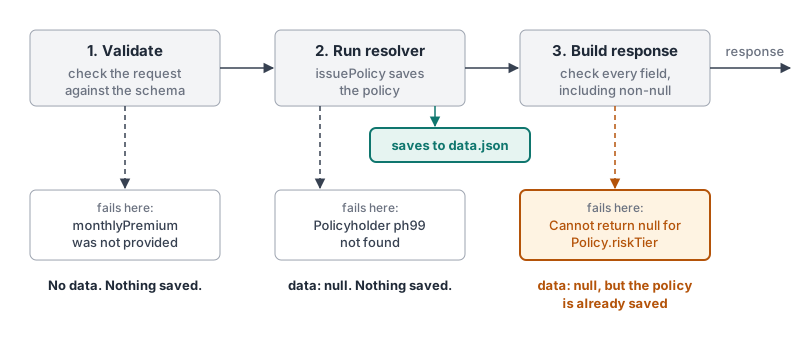
Part 2: Keep the promise for new policies.
✏️ In services/policies/src/schema.graphql, make sure a policy can’t be issued without a risk tier.
✏️ Run the same mutation again. Its input still has no riskTier:
mutation {
  issuePolicy(input: { type: HOME, monthlyPremium: 112.0, policyholderId: "ph2" }) {
    id
    policyNumber
    effectiveDate
    riskTier
    policyholder {
      name
    }
  }
}
It fails before the resolver runs, and nothing is created. The response (trimmed for readability) is:
{
  "errors": [{ "message": "Field \"IssuePolicyInput.riskTier\" of required type \"RiskTier!\" was not provided." }]
}
✏️ Run it with riskTier: LOW in the input:
mutation {
  issuePolicy(input: { type: HOME, monthlyPremium: 112.0, policyholderId: "ph2", riskTier: LOW }) {
    id
    policyNumber
    effectiveDate
    riskTier
    policyholder {
      name
    }
  }
}
It succeeds, and the response includes "riskTier": "LOW".
✏️ Run { policies { policyNumber riskTier } } again. It still fails, with the same error as in Part 1. New policies keep the promise, but the two policies saved without a risk tier are still there. We’ll talk about that after the solution.
Solution
Click to see the solution
✏️ In services/policies/src/schema.graphql, make riskTier required on both Policy and IssuePolicyInput:
type Policy {
  id: ID!
  policyNumber: String!
  type: PolicyType!
  monthlyPremium: Float!
  annualPremium: Float!
  effectiveDate: String!
  riskTier: RiskTier!
  policyholder: Policyholder!
}

input IssuePolicyInput {
  type: PolicyType!
  monthlyPremium: Float!
  policyholderId: ID!
  riskTier: RiskTier!
  effectiveDate: String
}
That’s the only change needed. GraphQL checks every request against the schema before any resolver runs, so a mutation without riskTier is rejected right there. The resolver doesn’t change either: ...input already copies every input field, including riskTier, onto the new policy.
Once a field is required on the output, every way of creating that data has to guarantee it. Here, that means requiring it on the input too, so bad data is rejected before it’s saved.
What about IssuePolicyInput in resolvers.ts?
services/policies/src/resolvers.ts also has an IssuePolicyInput type near the top. That’s a TypeScript type, not part of GraphQL. It only helps your editor, and it doesn’t change what the server accepts, which is why your mutation worked without touching it. To keep it in sync with the schema anyway, add "riskTier" to it:
type IssuePolicyInput = Pick<Policy, "type" | "monthlyPremium" | "policyholderId" | "riskTier"> & { effectiveDate?: string };Fixing the existing data
Part 2 protects new policies, but it can’t do anything about the ones already saved. The schema is a contract: riskTier: RiskTier! promises every policy has a risk tier. Until the saved data matches that contract, the server can’t keep the promise, and any query that asks for riskTier fails.
The fix happens in the data, not in GraphQL. How the data gets fixed doesn’t matter to GraphQL. In a real system it could be a database migration, a one-off script, an admin tool, or someone in underwriting filling in the missing values. GraphQL only cares that, by the time a resolver returns a policy, the value is there.
Reset the course data
✏️ For this course, restore the starting data, where every policy has a risk tier. To go back to the starting data, stop the server, run npm run reset-data in services/policies, and start it again.
This deletes the policies you’ve issued. { policies { policyNumber riskTier } } works again.
We did it in the wrong order on purpose
This exercise tightened the schema first, then dealt with the data. That’s why things broke along the way.
It also broke something you couldn’t see. Any app that already called issuePolicy without riskTier now gets the “was not provided” error from Part 2. Making an input field or argument required is a breaking change: requests that used to be valid are now rejected.
When you make a field required in a real API, a safer order is:
- Add the field to the input as optional (
riskTier: RiskTier). Apps that don’t send it keep working. Decide what the server does when it’s missing, for example use a default value, so the mutation behaves the way it did before. - Fix the existing data (a backfill), so every saved record has a value.
- Make the output field non-null (
riskTier: RiskTier!onPolicy). Every record now has a value, so apps that read it never get an error. - Make the input field required (
riskTier: RiskTier!onIssuePolicyInput) only once every app sends it. Until then, leave it optional.
Steps 1 to 3 never break an app. Step 4 is the only breaking change, and you choose when to make it.
Summary: ! on outputs and inputs
The same ! means something different depending on which way the data flows:
- On an output (a field on a
type),!is a promise from the server: “this will never benull.” Clients can skip theirnullchecks. - On an input (an argument, or a field on an
input),!is a requirement on the client: “you must send this.” Requests that leave it out are rejected before any resolver runs.
That’s why changing a ! is safe in one direction and breaking in the other, and the directions are opposite for outputs and inputs:
| Where | Change | Result | Why |
|---|---|---|---|
| Output | String → String! |
Safe | Clients already handle null. Getting a value every time doesn't hurt them. The server has to keep the promise, though: as you saw with riskTier, missing data turns into errors. |
| Output | String! → String |
Breaking | Clients trusted the promise and don't check for null. When one arrives, the app can crash. |
| Input | String → String! |
Breaking | Requests that leave the value out used to work. Now they fail validation. |
| Input | String! → String |
Safe | Clients already send the value. Making it optional doesn't change their requests. |
The same rules apply to each ! in a list type from Lists and nullability. For example, changing an output from [Policy] to [Policy!]! is safe, and changing it back is breaking.
A quick way to remember it: outputs can get stricter, inputs can get looser. Anything else breaks someone.
Objective 4: Evolve the schema
Schema directives
In the Writing Queries section, you used directives in queries: @include and @skip. Directives can also go in the schema, where the API’s author uses them to add rules or information to a type or field. The GraphQL specification defines several. This section covers two:
@oneOf, for an input that can be given in more than one way@deprecated, for retiring part of a schema without breaking the clients that use it
Together, they let you add a new way to look up a policy, then retire the old one. That’s the exercise at the end of this section.
@oneOf
@oneOf goes on an input type. It means the client must set exactly one of the input’s fields: not zero, and not two. It was added in the September 2025 edition of the GraphQL specification, so some servers and tools don’t support it yet. Apollo Server does, through the graphql package it’s built on, which added it in version 16.9.
It’s useful when there are several ways to identify the same thing. For example, if policyholders could be looked up by id or by email, the input would look like this:
"Look up a policyholder by exactly one of these fields"
input PolicyholderLookupInput @oneOf {
  id: ID
  email: String
}
Because the client can only set one field, every field in a @oneOf input must be optional (ID, not ID!), and none can have a default value. If a field breaks either rule, the server won’t start, and the error names the field, like OneOf input field PolicyholderLookupInput.id must be nullable.
When a request comes in, GraphQL checks that exactly one field is set and that it isn’t null, before any resolver runs. The course API has no PolicyholderLookupInput. This example only shows the shape.
@deprecated
@deprecated(reason: String) marks a field, argument, input field, or enum value as retired. In What is GraphQL?, you saw that GraphQL APIs change without version numbers: new fields are added, and old ones are deprecated instead of removed.
A schema directive goes after the thing it describes. For example, if the API had an old premium field that was replaced by monthlyPremium:
type Policy {
  # ...other fields
  premium: Float @deprecated(reason: "Use monthlyPremium.")
}
A deprecated field still works. Clients that use it keep getting data. What changes is how the field is shown to people writing new queries:
- Introspection leaves it out of
fieldsby default. A tool has to ask forfields(includeDeprecated: true)to see it. - When a tool does ask, introspection reports the field as deprecated, along with the
reason, so the tool can warn whoever is writing the query.
Once no clients use the field anymore, it can be removed from the schema. GraphQL doesn’t track that for you: the server has to report which fields each request uses. Apollo GraphOS, for example, shows when each field was first and last requested, and which clients requested it.
Exercise
Agents often know a policy’s number, like LIFE-100004, but not its id. Right now, policy(id:) only accepts an id.
✏️ In services/policies/src/schema.graphql and services/policies/src/resolvers.ts, add a findPolicy query that takes a required by argument. by is an input type named PolicyLookupInput, where the client sets exactly one of id or policyNumber. findPolicy returns the matching policy, or null if none matches.
✏️ Run this query:
{
  findPolicy(by: { policyNumber: "LIFE-100004" }) {
    id
    policyNumber
  }
}
Your response should be:
{ "data": { "findPolicy": { "id": "p4", "policyNumber": "LIFE-100004" } } }✏️ Run it with both fields set:
{
  findPolicy(by: { id: "p4", policyNumber: "LIFE-100004" }) {
    id
    policyNumber
  }
}
It fails before your resolver runs. The response (trimmed for readability) is:
{
  "errors": [
    {
      "message": "OneOf Input Object \"PolicyLookupInput\" must specify exactly one key.",
      "extensions": { "code": "GRAPHQL_VALIDATION_FAILED" }
    }
  ]
}
✏️ Run it with neither field set:
{
  findPolicy(by: {}) {
    id
    policyNumber
  }
}
It fails with the same error.
findPolicy does everything policy(id:) does, so policy(id:) can be retired.
✏️ In services/policies/src/schema.graphql, deprecate the policy query, with the reason Use findPolicy, which can look a policy up by id or policy number.
✏️ Run this query:
{
  policy(id: "p4") {
    policyNumber
  }
}
It still works, and returns LIFE-100004.
✏️ Run this introspection query. policy is missing from the list:
{
  __type(name: "Query") {
    fields {
      name
    }
  }
}
✏️ Run it again, this time asking for deprecated fields too:
{
  __type(name: "Query") {
    fields(includeDeprecated: true) {
      name
      isDeprecated
      deprecationReason
    }
  }
}
policy is back, with its reason:
{ "name": "policy", "isDeprecated": true, "deprecationReason": "Use findPolicy, which can look a policy up by id or policy number." }Every other field has "isDeprecated": false and "deprecationReason": null.
Solution
Click to see the solution
✏️ In services/policies/src/schema.graphql, add the input type:
"Look up a policy by exactly one of these fields"
input PolicyLookupInput @oneOf {
  id: ID
  policyNumber: String
}
✏️ Add findPolicy to Query, and deprecate policy:
type Query {
  # ...other fields
  policy(id: ID!): Policy @deprecated(reason: "Use findPolicy, which can look a policy up by id or policy number.")
  findPolicy(by: PolicyLookupInput!): Policy
}
✏️ In services/policies/src/resolvers.ts, add a findPolicy resolver under Query:
    findPolicy: (_: unknown, { by }: { by: { id?: string; policyNumber?: string } }) =>
      policies.find((p) => p.id === by.id || p.policyNumber === by.policyNumber),
The resolver doesn’t check that exactly one field was set. By the time it runs, GraphQL has already rejected any request that set zero or two. Only one of by.id and by.policyNumber has a value, so only that one can match.
findPolicy returns Policy, not Policy!, so a policy number that doesn’t match anything returns null instead of an error.
Nothing in resolvers.ts changes for the deprecation, because policy still works exactly as before.
Next steps
Next, we’ll look at how nested fields can quietly multiply the work your server does, and how to fix it.