This page explores ideas around work hierarchy and how to translate that into decisions for your Jira Work Item Hierarchy.
These ideas centered around using Jira and Jira Plans to manage delivery across multiple portfolios and programs. Atlassian Focus / Align and other products may provide other options.
Background
Bitovi’s product practices prioritize getting alignment on “atomic increments of value” (IncrementsOfValue). That is, what need to be done, that when shipped to users, will hopefully provide value. These IncrementsOfValue can be very small (example: a bigger checkout button), or massive (example: rewrite core legacy functionality).
Furthermore, it’s also important to get alignment on what is a “team’s” responsibility. In an enterprise, communication is often from one team representative to another.
The Problem
Jira has a fixed hierarchy. This means if you want a universal IncrementsOfValue, Jira has challenges scaling for both Massive efforts and Small efforts. Ultimately, this often means some form of compromise to make both Massive and Small efforts work is needed.
Typically, this means you either need to:
Allow flexibility of definitions of what the work items mean, which makes reporting and communication more challenging. For example, sometimes an
Epicwill be shipped, or aStory, or sometimes it’s something 2 levels up from anEpic.Have a big hierarchy to fit Massive efforts, leaving small efforts to create a lot of extra Jira structures.
Have a small hierarchy, leaving Massive efforts to organize their breakdown with some kind of label (instead of parent/child).
Similarly, the fixed hierarchy creates a challenge on where to place the team boundary. There are only two realistic choices:
Level 1 - Epics define the “team” boundary. This is Bitovi’s default.
Level 0 - Stories define the “team boundary”. Subtasks must be used for large work items.
Creating hierarchy constructs between IncrementsOfValue and the Team boundary
Within a Massive effort, you might want some hierarchy between IncrementsOfValue and TeamWork. These might be (from the bottom up):
A “feature” or “use case” that houses
TeamWorkA “milestone” or “wave” that houses multiple “features”.
For example:
IncrementOfValue- Rebuild legacy system and get first users onboardedMilestone - Prototype
Feature - Basic CRUD of one type
Epic -
TeamAwork to be doneEpic -
TeamBwork to be done
Feature - Basic CRUD of another type
Milestone - Next set of features
However, the problem is that if you have a small IncrementOfValue like “Bigger checkout button”, you could end up with:
IncrementOfValue- Bigger checkout buttonMilestone - See parent
Feature - See grandparent parent
Epic -
FrontendTeam- see great grandparentStory - See great great grandparent
No one wants to create 5 Jira constructs for something that might take 15 min for a developer to do!
What about constructs above IncrementsOfValue?
Organizations and product/portfolio leadership have all sorts of conceptual entities above an IncrementOfValue. Some common buckets:
Measures: KPIs. These are often expressed as
{direction} {measurement} {amount} {when}like “Improve checkout conversions 5% by Q3”. KPI’s are often nested, see https://wiki.at.bitovi.com/wiki/spaces/agiletraining/pages/1292992537/KPI+Tree+Greenfield?search_id=c40c7073-e9be-46f5-aacb-ecf4cf72a2d1&xpis=eyJicmlkZ2UiOiJxdWlja0ZpbmQiLCJpZCI6IjE3OTE5MjM1NjQzNzUiLCJzb3VyY2UiOiJjb25mbHVlbmNlIn0%3DBets: Mission / Strategies / Problems / Tactics / Directions. These help identify where to focus, what to put effort into, eventually leading to specific
IncremntsOfValue.Temporal Delivery Groupings: Waves / Quarters (PIs) / Phases / Milestones - Groupoings of
IncrementsOfValueto make it easier for folks to reason about. (These can often merge into Bets).
These constructs do not often form a simple tree-like structure. Some of the following “problems” have multiple parent strategies:
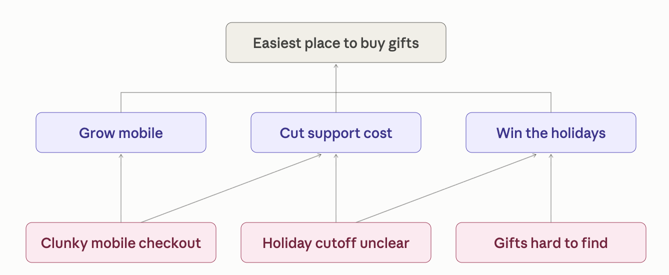
Multiple parents are very common in KPIs:
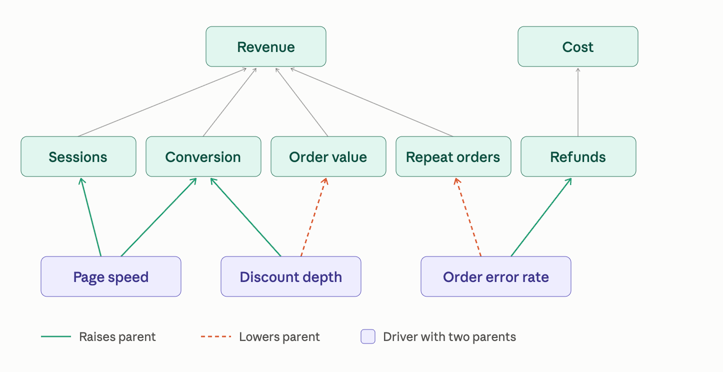
And sometimes even cycles can be formed. A happy customer is more likely to come back and create new sessions:
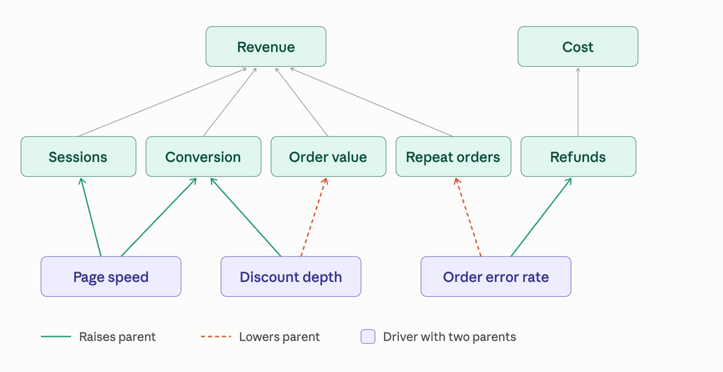
Jira doesn’t support multiple parents. It does support links which can be used to model graphs. However, it doesn’t support visualizing these graphs out-of-the-box.
Putting it together
Given everything above, there are some choices to make, and it’s likely not a one-size-fits-everything-best. The following walks through some possible options and the pros and cons.
Maximal solution
To make everything come after a bit easier to understand, let's see what a solution that puts everything in Jira under a 1:many parent tree might look like. We’ve never done this and do not recommend it. But this is a good starting place for learning.
The KPI and Bets levels:
Mission - The purpose of your organization
KPI - a target value
Strategy - What you are going to focus on
Problem - One problem preventing the strategy from succeeding
Initiative - A high-level solution approach that might solve the problem
Increment - An
Atomic Increment of Value
Increment
Milestone
Feature
Epic (TeamWork level)
Story
Pros:
All in Jira
Trees can be nice because they are easy to understand and navigate
Handles Massive
Atomic Increments of Value
Cons:
Does not handle 1:many relationships or loops
Jira doesn’t handle KPI tracking well as a special type.
Way too much topology for large items.
Common Solution
For most organizations, Bitovi uses something like:
Outcome
Direction
Increment
Epic
Story
And we allow for some flexibility for definitions. This works well for Increments that need multiple teams and take about 2-4 weeks to deliver:
Outcome - Improve conversions 2%
Direction - One click checkout
Increment - One click checkout on simple pages
Epic -
Store- One click checkout flagEpic -
ProductPages- One click checkout
Increment - One click checkout on bundles
However, for HUGE efforts, the outcome is really the increment. The Directions become more like milestones and the increments are more like features:
Outcome - Rebuild legacy system and get first users onboarded
Direction - Prototype
Increment - Basic CRUD of one type
Epic -
TeamAwork to be doneEpic -
TeamBwork to be done
Increment - Basic CRUD of another type
Direction - Next set of features
But if increment wants to mean an increment and you don’t want a big hierarchy
Create a hierarchy with two types at the increment level:
Outcome
Direction
Increment | BuildingBlock
Epic
Story
Then you can do something like:
Outcome - Save costs
Direction - Rebuild legacy system
BuildingBlock - Basic CRUD of one type
Building Block - Basic CRUD of another type
Increment - Rollout to the first set of users
This “flattens” the Jira hierarchy. BuildingBlocks represent work that isn’t being shipped to users, but is being “code complete”.
If some additional grouping (like waves) is needed, relaase tagging typically suffices.