Overview
In this section, we will:
- Learn why APIs return long lists one page at a time
- Compare offset pagination with cursor pagination
- Learn the connection pattern that most GraphQL APIs use for pages
- Add a paginated
claimsConnectionquery to the API, and use it to page through every claim
Objective 1: Understand pagination
Why paginate?
Right now, claims returns every claim in one response. With six claims, that’s fine. A real insurance company has millions, and a single request for all of them would be slow for the server to build, slow to send, and more than any screen can show.
Pagination means returning a list one page at a time. The client asks for a page, and then asks for the next one only if it needs more.
Offset pagination
The simplest approach is to count. The client asks for “2 claims, skipping the first 2”, usually with arguments like limit and offset:
{
  claims(limit: 2, offset: 2) {
    claimNumber
  }
}
The course API doesn’t have limit and offset arguments. This example only shows the shape.
Offsets are easy to build, but they break when the list changes between requests. Imagine a screen that shows the newest claims first, 2 at a time:
- The client asks for page 1 (
limit: 2, offset: 0). The newest claims areCLM-5006,CLM-5004,CLM-5002, and so on, so it getsCLM-5006andCLM-5004. - Someone files a new claim,
CLM-5007. It’s the newest, so it goes to the front of the list, and every other claim moves back one place. - The client asks for page 2 (
limit: 2, offset: 2). The list now startsCLM-5007,CLM-5006,CLM-5004,CLM-5002. Skipping the first 2 givesCLM-5004andCLM-5002.
The client sees CLM-5004 twice, because everything shifted down one place. If a claim had been deleted instead, the client would have skipped one without knowing.
Cursor pagination
Instead of counting, cursor pagination asks for “the next 2 claims after this one”. A cursor is a string that points to one item in the list. The server gives the client a cursor for the last item on each page, and the client sends it back to get the next page.
In the example above, the client would ask for the 2 claims after CLM-5004, and get CLM-5002 and CLM-5005, no matter how many claims were filed at the front of the list.
Cursors are usually opaque: they look like random text, such as YzQ=, and clients shouldn’t try to read or build them. That leaves the server free to change what a cursor contains later without breaking any clients. The GraphQL documentation suggests base64-encoding cursors as a reminder that they’re opaque, which is what we’ll do.
What cursors cost
Cursors fix the shifting-list problem, but they give up things offsets make easy. Slack’s engineering team lists these trade-offs from moving its API to cursors:
- No jumping to a page. A client can’t ask for page 7 directly. It has to load pages 1 to 6 first, to get the cursor that leads to page 7. Screens with numbered pages are easier to build with offsets.
- No page count. A cursor doesn’t say how far through the list you are, or how many pages there are.
- The order has to be stable. A cursor means “after this item, in this order”. The list needs an order that doesn’t change between requests, with no ties, like newest
filedDatefirst, thenid.
The GraphQL documentation still calls cursors the most powerful option, partly because an opaque cursor can hold an offset, an id, or anything else, and the server can change which later.
Objective 2: Learn the connection pattern
The shape of a page
Many GraphQL APIs return pages in the same shape, called a connection. The pattern comes from Relay, a GraphQL client, which publishes it as the GraphQL Cursor Connections Specification. The official GraphQL documentation points to that specification as one you can follow for any API, whether or not its clients use Relay. A query for the first 2 claims looks like this:
{
  claimsConnection(first: 2) {
    edges {
      cursor
      node {
        claimNumber
      }
    }
    pageInfo {
      startCursor
      endCursor
      hasPreviousPage
      hasNextPage
    }
  }
}first: how many items to returnafter(not used here): the cursor to start after. Leave it out to start at the beginning.edges: the items on this page. Each edge has the item itself, called thenode, and the item’scursor.pageInfo: information about the page as a whole.endCursoris the cursor of the last item, andhasNextPagesays whether there’s more after it.startCursorandhasPreviousPageare the same for the other end of the page: the first item’s cursor, and whether there’s anything before it.
To get the next page, the client sends the same query with after set to the endCursor it just received. It keeps going until hasNextPage is false.
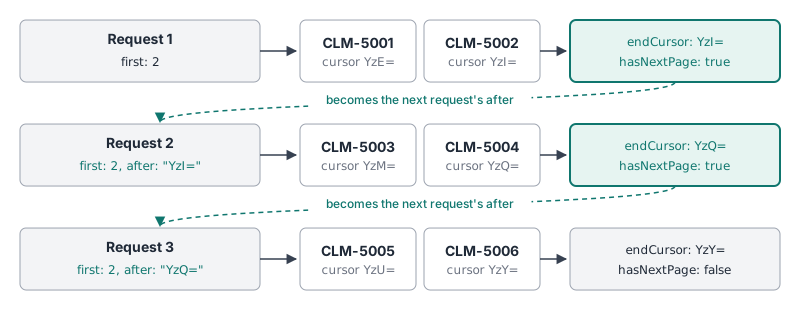
endCursor becomes the next request's after.The specification requires all four pageInfo fields. The course API only pages forward, with first and after, so startCursor and hasPreviousPage matter less here. They’re still part of the shape clients expect, so the API includes them.
edges and node look like extra nesting at first. They’re there so the API can add information about an item’s place in the list, like its cursor, without adding fields to Claim itself.
Why a new field?
The API already has a claims query that returns a list. Changing it to return a connection would break every client that uses it today, because the response would have a different shape. Instead, we’ll add a new claimsConnection query next to it. Clients can move over when they’re ready.
In a real API, you’d mark claims @deprecated as soon as claimsConnection exists, as you did with policy(id:) in 101. A deprecated field still works, so nothing breaks, and the deprecation tells clients early that they should move. Once no client uses claims anymore, you can remove it.
Exercise
✏️ In services/policies/src/schema.graphql, add three new object types and a query:
| Add | What it holds |
|---|---|
ClaimConnection type |
One page of claims: a list of edges, and the pageInfo for the page |
ClaimEdge type |
One claim on the page: its cursor, and the claim itself as node |
PageInfo type |
The page's startCursor and endCursor, and whether it hasPreviousPage and hasNextPage |
claimsConnection query |
Takes a required first argument, and returns a ClaimConnection |
startCursor and endCursor can be null, because an empty page has no first or last item. Every other field, and every list item, is required.
✏️ In services/policies/src/resolvers.ts, add a resolver for it that returns the first first claims, in the order they’re stored. Each claim’s cursor is its id, base64-encoded. The first page never has anything before it, so hasPreviousPage is false.
Hint: Node.js can base64-encode a string with Buffer.
✏️ Run this query:
{
  claimsConnection(first: 2) {
    edges {
      cursor
      node {
        claimNumber
        status
      }
    }
    pageInfo {
      startCursor
      endCursor
      hasPreviousPage
      hasNextPage
    }
  }
}
Your response should be:
{
  "data": {
    "claimsConnection": {
      "edges": [
        { "cursor": "YzE=", "node": { "claimNumber": "CLM-5001", "status": "APPROVED" } },
        { "cursor": "YzI=", "node": { "claimNumber": "CLM-5002", "status": "DENIED" } }
      ],
      "pageInfo": { "startCursor": "YzE=", "endCursor": "YzI=", "hasPreviousPage": false, "hasNextPage": true }
    }
  }
}
✏️ Run the same query with first: 10:
{
  claimsConnection(first: 10) {
    edges {
      cursor
      node {
        claimNumber
        status
      }
    }
    pageInfo {
      startCursor
      endCursor
      hasPreviousPage
      hasNextPage
    }
  }
}
You should get all six claims, ending with CLM-5006, and "hasPreviousPage": false and "hasNextPage": false.
Solution
Click to see the solution
✏️ In services/policies/src/schema.graphql, add the new types:
"One page of claims"
type ClaimConnection {
  edges: [ClaimEdge!]!
  pageInfo: PageInfo!
}

"A claim, and the cursor that points to it"
type ClaimEdge {
  cursor: String!
  node: Claim!
}

type PageInfo {
  "The cursor of the first item on this page"
  startCursor: String
  "The cursor of the last item on this page. Pass it as after to get the next page."
  endCursor: String
  hasPreviousPage: Boolean!
  hasNextPage: Boolean!
}
✏️ Add claimsConnection to Query:
type Query {
  # ...existing fields
  claimsConnection(first: Int!): ClaimConnection!
}
first is required here (Int!), so every request says how big a page it wants. The connection specification also allows it to be optional, and many APIs give it a default instead, like first: Int = 10.
✏️ In services/policies/src/resolvers.ts, add a claimsConnection resolver under Query:
    claimsConnection: (_: unknown, args: { first: number }) => {
      const page = claims.slice(0, args.first);
      const edges = page.map((claim) => ({
        cursor: Buffer.from(claim.id).toString("base64"),
        node: claim,
      }));

      return {
        edges,
        pageInfo: {
          startCursor: edges.length > 0 ? edges[0].cursor : null,
          endCursor: edges.length > 0 ? edges[edges.length - 1].cursor : null,
          hasPreviousPage: false,
          hasNextPage: args.first < claims.length,
        },
      };
    },
claims.slice(0, args.first)takes the firstfirstclaims.Buffer.from(claim.id).toString("base64")turnsc1intoYzE=. Base64 isn’t a secret code: anyone can decode it. It only signals to clients that the cursor isn’t meant to be read.edges[0]is the first edge on the page, andedges[edges.length - 1]is the last.hasPreviousPage: false: this resolver always starts at the beginning of the list, so there’s never anything before the page.
The resolver returns plain objects in the shape of the schema, so the default resolvers answer edges, cursor, node, and pageInfo. node is a Claim, so Claim.policy still works inside it.
PageInfo doesn’t mention claims. You can reuse it for any other connection you add later.
In a real API, this is also when you’d deprecate the old list, so clients find out about claimsConnection right away:
type Query {
  # ...existing fields
  claims(status: ClaimStatus): [Claim!]! @deprecated(reason: "Use claimsConnection, which returns claims a page at a time.")
  claimsConnection(first: Int!): ClaimConnection!
}
The course leaves claims as it is, because later sections still use it.
Objective 3: Get the next page
Exercise
The client can get the first page, but not the next one.
✏️ Update services/policies/src/schema.graphql and services/policies/src/resolvers.ts so claimsConnection also takes an optional after cursor, and starts with the claim after the one it points to. hasPreviousPage is now true whenever the page doesn’t start at the first claim.
✏️ Get the second page by passing the endCursor from the first page, YzI=, as after:
{
  claimsConnection(first: 2, after: "YzI=") {
    edges {
      cursor
      node {
        claimNumber
        status
      }
    }
    pageInfo {
      startCursor
      endCursor
      hasPreviousPage
      hasNextPage
    }
  }
}
Your response should be:
{
  "data": {
    "claimsConnection": {
      "edges": [
        { "cursor": "YzM=", "node": { "claimNumber": "CLM-5003", "status": "APPROVED" } },
        { "cursor": "YzQ=", "node": { "claimNumber": "CLM-5004", "status": "OPEN" } }
      ],
      "pageInfo": { "startCursor": "YzM=", "endCursor": "YzQ=", "hasPreviousPage": true, "hasNextPage": true }
    }
  }
}
✏️ Get the third page by passing the endCursor from the second page, YzQ=, as after:
{
  claimsConnection(first: 2, after: "YzQ=") {
    edges {
      cursor
      node {
        claimNumber
        status
      }
    }
    pageInfo {
      startCursor
      endCursor
      hasPreviousPage
      hasNextPage
    }
  }
}
Your response should be:
{
  "data": {
    "claimsConnection": {
      "edges": [
        { "cursor": "YzU=", "node": { "claimNumber": "CLM-5005", "status": "APPROVED" } },
        { "cursor": "YzY=", "node": { "claimNumber": "CLM-5006", "status": "OPEN" } }
      ],
      "pageInfo": { "startCursor": "YzU=", "endCursor": "YzY=", "hasPreviousPage": true, "hasNextPage": false }
    }
  }
}
hasNextPage is false, so this is the last page.
✏️ Ask for the page after the last claim, YzY=:
{
  claimsConnection(first: 2, after: "YzY=") {
    edges {
      cursor
      node {
        claimNumber
        status
      }
    }
    pageInfo {
      startCursor
      endCursor
      hasPreviousPage
      hasNextPage
    }
  }
}
There’s nothing after the last claim, so you should get "edges": [] and "pageInfo": { "startCursor": null, "endCursor": null, "hasPreviousPage": true, "hasNextPage": false }. hasPreviousPage is still true, because there are claims before the cursor.
Solution
Click to see the solution
✏️ In services/policies/src/schema.graphql, add after to claimsConnection:
type Query {
  # ...existing fields
  claimsConnection(first: Int!, after: String): ClaimConnection!
}
✏️ In services/policies/src/resolvers.ts, update the claimsConnection resolver:
    claimsConnection: (_: unknown, args: { first: number; after?: string }) => {
      // Start after the claim the cursor points to, or at the beginning
      let start = 0;
      if (args.after) {
        const afterId = Buffer.from(args.after, "base64").toString("utf8");
        start = claims.findIndex((c) => c.id === afterId) + 1;
      }

      const page = claims.slice(start, start + args.first);
      const edges = page.map((claim) => ({
        cursor: Buffer.from(claim.id).toString("base64"),
        node: claim,
      }));

      return {
        edges,
        pageInfo: {
          startCursor: edges.length > 0 ? edges[0].cursor : null,
          endCursor: edges.length > 0 ? edges[edges.length - 1].cursor : null,
          hasPreviousPage: start > 0,
          hasNextPage: start + args.first < claims.length,
        },
      };
    },
Buffer.from(args.after, "base64").toString("utf8")decodes the cursor back into a claim id:YzI=becomesc2.findIndex(...) + 1finds that claim’s position, and moves one past it. The page starts with the claim after the cursor.hasNextPagenow counts fromstart, since the page no longer begins at the start of the list.hasPreviousPage: start > 0istruewhen there are claims before the page. The specification lets an API that only pages forward always returnfalsehere, but it may returntruewhen that’s cheap to work out, as it is here.
Try passing a cursor that doesn’t point to any claim, like after: "bogus". findIndex returns -1, so start becomes 0, and the client quietly gets the first page again. A client with a broken cursor would never find out. We’ll fix that kind of problem in the Error Handling section.
The same thing happens if the claim a cursor points to is deleted: its id is no longer in the list. This course’s cursors hold only an id, to keep the code short. Production APIs often put the values the list is sorted by in the cursor instead, like the claim’s filedDate and id. The server can then find “everything after this point” even when that claim is gone.
Next steps
Next, we’ll look at custom scalars: types like dates, with rules about what values they accept.