Overview
In this section, we will:
- Tell authentication and authorization apart
- See how the logged-in user reaches every resolver through
contextValue - See how a resolver refuses a request, and which error codes to use
- Learn why the rules belong in one place, not spread across resolvers
- Protect the
issuePolicymutation so only agents can issue policies
Objective 1: Understand authorization in GraphQL
Authentication and authorization
Right now, anyone who can reach the course API can issue a policy. A real insurance company needs to answer two questions about every request:
- Authentication: who is making this request? Usually the client sends a token, often in the
AuthorizationHTTP header, and the server checks it. - Authorization: is this person allowed to do what they’re asking? An adjuster can approve claims. An agent can view them, but not approve them.
Authentication usually happens before GraphQL is involved at all: in a login service, an identity provider, or middleware in front of the API. The GraphQL documentation recommends that GraphQL starts only after the user’s identity is confirmed, and that the API receives a user, not just a token.
The user goes in contextValue
In 101, you used contextValue to give each request its own DataLoaders. It’s also where the logged-in user goes. Apollo’s documentation shows this pattern: the context function reads the token from the request’s headers, looks up the user, and returns it.
Apollo’s example looks like this:
context: async ({ req }) => {
  const token = req.headers.authorization || "";
  const user = await getUser(token);
  return { user };
},
req is the incoming HTTP request, so req.headers.authorization is the value of its Authorization header. getUser stands for whatever turns a token into a user. It might check the token’s signature, or look it up in a database. It returns null when there’s no valid token, so resolvers can tell a logged-out request from a logged-in one.
The context function runs once per request, so every resolver in that request sees the same user.
Checking permissions in a resolver
A resolver can read the user from contextValue and refuse the request. Here’s what the start of approveClaim could look like:
    approveClaim: (_: unknown, args: { id: string }, contextValue: Context) => {
      if (!contextValue.user) {
        throw new GraphQLError("You must be logged in to approve claims", {
          extensions: { code: "UNAUTHENTICATED", http: { status: 401 } },
        });
      }

      if (contextValue.user.role !== "ADJUSTER") {
        throw new GraphQLError("Only adjusters can approve claims", {
          extensions: { code: "FORBIDDEN" },
        });
      }

      // ...the rest of the resolver is unchanged
Context is the type that describes contextValue. The course API already defines it at the top of services/policies/src/resolvers.ts, with the loaders. The user gets added to it next to them.
Apollo’s documentation uses these two codes, FORBIDDEN in its custom errors example, and UNAUTHENTICATED in its authentication guide:
UNAUTHENTICATED: there’s no logged-in user. The client should ask the user to log in.FORBIDDEN: the user is logged in, but not allowed to do this. Logging in again won’t help.
http: { status: 401 } also sets the response’s HTTP status to 401 Unauthorized, which tools outside GraphQL, like proxies and monitoring, understand.
These are mistakes in the Error Handling sense, so they go in errors, not in a union. A working client doesn’t show an approve button to an agent in the first place.
Keep the rules in one place
Checking in each resolver works, but it has a weakness. The same data can be reached in many ways. A claim can be reached through claims, claimsConnection, Policy.claims, and a policyholder’s policies. If the rule “agents can’t see denied claims” is written in one resolver, it has to be copied into every other one, and one missed copy is a leak.
The OWASP GraphQL Cheat Sheet warns about exactly this: check permissions on every way into the data, including both the edges and the nodes of a connection.
The GraphQL documentation recommends putting the rules in the business logic layer: the code underneath your resolvers that loads and changes data. Every resolver calls that code, passing along the user, and the rule is written once:
// The rules live here, once. Nothing here depends on GraphQL.
export class NotLoggedInError extends Error {}
export class NotAllowedError extends Error {}

export const claimRepository = {
  approve(user: User | null, claimId: string) {
    if (!user) {
      throw new NotLoggedInError("You must be logged in to approve claims");
    }
    if (user.role !== "ADJUSTER") {
      throw new NotAllowedError("Only adjusters can approve claims");
    }
    // ...approve the claim
  },
};

// The resolver passes the request along, and turns the
// business logic's errors into GraphQL errors
approveClaim: (_: unknown, args: { id: string }, contextValue: Context) => {
  try {
    return claimRepository.approve(contextValue.user, args.id);
  } catch (error) {
    if (error instanceof NotLoggedInError) {
      throw new GraphQLError(error.message, {
        extensions: { code: "UNAUTHENTICATED", http: { status: 401 } },
      });
    }
    if (error instanceof NotAllowedError) {
      throw new GraphQLError(error.message, {
        extensions: { code: "FORBIDDEN" },
      });
    }
    throw error;
  }
},
The business logic throws its own errors, not GraphQLError, so it doesn’t depend on GraphQL. Any other API that uses it, like a REST API or a background job, gets the same rules too, and turns the same errors into its own format. A REST API, for example, might send 401 and 403 responses.
The resolver is the only place that knows about GraphQL error codes. In a larger API, that translation would be written once, in a helper every resolver uses, instead of in each resolver.
Other approaches
Apollo’s documentation describes a few other places to check permissions:
- The whole API: reject any request without a valid user in the
contextfunction, before GraphQL runs. This suits internal APIs where every user must be logged in. - Schema directives: a custom directive like
@auth(requires: ADJUSTER)marks which fields need which role, and server code enforces it. This makes the rules visible in the schema, but it needs extra tooling to build.
Objective 2: Protect a mutation
The course API’s users
Real authentication needs a login flow, signed tokens, and libraries to check them, none of which is about GraphQL. So the course API fakes it. services/policies/src/auth.ts has two users, each with a made-up token:
| Token | User | role |
|---|---|---|
agent-token |
Alex Chen | AGENT |
adjuster-token |
Sam Rivera | ADJUSTER |
It exports a User type, a Role type (AGENT or ADJUSTER), and a getUser function. getUser takes the value of the Authorization header, like Bearer agent-token, and returns the matching user, or null if the header is missing or the token isn’t one of these.
In a real API, getUser would check a signed token instead. Everything after it, in context and in the resolvers, would be the same.
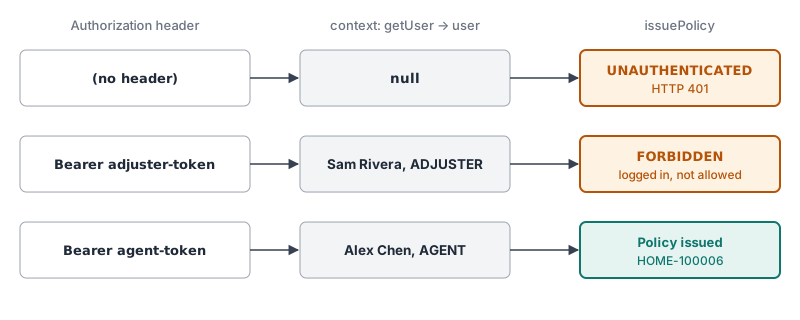
issuePolicy does for each user, once it's protected.Sending a header from Apollo Sandbox
To send a token, open the Headers tab below the operation editor in Sandbox, next to Variables. Add a header with the name Authorization and a value like Bearer agent-token. Sandbox sends it with every request until you remove it.
Exercise
Agents sell insurance, so only agents should be able to issue policies. Right now, anyone can.
✏️ In services/policies/src/index.ts, add the logged-in user to contextValue as user, using getUser from auth.ts. Keep the loaders that are already there.
✏️ In services/policies/src/resolvers.ts, make issuePolicy check the user before it does anything else:
- If there’s no user, throw
You must be logged in to issue policies, with the codeUNAUTHENTICATEDand the HTTP status401. - If the user isn’t an
AGENT, throwOnly agents can issue policies, with the codeFORBIDDEN.
Leave approveClaim as it is. This exercise only protects issuePolicy.
✏️ With no Authorization header, run this mutation:
mutation {
  issuePolicy(input: { type: HOME, monthlyPremium: 112.0, policyholderId: "ph2", riskTier: LOW }) {
    policyNumber
  }
}
Your response (trimmed for readability) should be:
{
  "errors": [
    {
      "message": "You must be logged in to issue policies",
      "path": ["issuePolicy"],
      "extensions": { "code": "UNAUTHENTICATED" }
    }
  ],
  "data": null
}
✏️ Add the header Authorization: Bearer adjuster-token, and run the same mutation. Your response (trimmed for readability) should be:
{
  "errors": [
    {
      "message": "Only agents can issue policies",
      "path": ["issuePolicy"],
      "extensions": { "code": "FORBIDDEN" }
    }
  ],
  "data": null
}
✏️ Change the header to Authorization: Bearer agent-token, and run it again. It works:
{ "data": { "issuePolicy": { "policyNumber": "HOME-100006" } } }If you’ve issued other policies, your policyNumber ends in a higher number.
Verify
✏️ Remove the header, and run a query:
{
  policies(type: LIFE) {
    policyNumber
  }
}
It still works without logging in, and returns LIFE-100004. Only issuePolicy checks the user.
Solution
Click to see the solution
✏️ In services/policies/src/index.ts, import getUser:
import { getUser } from "./auth.js";✏️ Update the context function so it returns the user too:
const { url } = await startStandaloneServer(server, {
  listen: { port, host: "0.0.0.0" },
  // Runs once per request. Every resolver in that request receives this as contextValue.
  context: async ({ req }) => ({
    user: getUser(req.headers.authorization),
    loaders: createLoaders(),
  }),
});
✏️ In services/policies/src/resolvers.ts, import the User type:
import type { User } from "./auth.js";✏️ Add user to the Context type near the top of the file:
type Context = { loaders: Loaders; user: User | null };✏️ Add the checks to the start of issuePolicy:
    issuePolicy: (_: unknown, { input }: { input: IssuePolicyInput }, contextValue: Context) => {
      if (!contextValue.user) {
        throw new GraphQLError("You must be logged in to issue policies", {
          extensions: { code: "UNAUTHENTICATED", http: { status: 401 } },
        });
      }

      if (contextValue.user.role !== "AGENT") {
        throw new GraphQLError("Only agents can issue policies", {
          extensions: { code: "FORBIDDEN" },
        });
      }

      // ...the rest of the resolver is unchanged
contextValue is the third argument, after the parent and the args. issuePolicy didn’t use it before, so it wasn’t listed. Typing it as Context means services/policies/src/resolvers.ts describes the context in one place, for every resolver.
Reusing the checks
The two checks in issuePolicy are the same ones approveClaim would need, with a different role and message. Instead of copying them into every resolver that needs a role, you could move them into a function in services/policies/src/auth.ts, next to getUser:
import { GraphQLError } from "graphql";

// Throws unless there's a logged-in user with the given role
export function requireRole(user: User | null, role: Role, action: string): User {
  if (!user) {
    throw new GraphQLError(`You must be logged in to ${action}`, {
      extensions: { code: "UNAUTHENTICATED", http: { status: 401 } },
    });
  }
  if (user.role !== role) {
    throw new GraphQLError(`Only ${role.toLowerCase()}s can ${action}`, {
      extensions: { code: "FORBIDDEN" },
    });
  }
  return user;
}
Each resolver then needs one line, and gets the same errors you saw in the exercise:
requireRole(contextValue.user, "AGENT", "issue policies");
requireRole(contextValue.user, "ADJUSTER", "approve claims");
This is a small step toward Keep the rules in one place: how a role is checked, and which errors come back, is now written once. Which resolvers call requireRole is still spread across resolvers.ts, so a larger API would move those decisions into its business logic layer too.
Reset the course data
Issuing a policy changed the course data. To go back to the starting data, stop the server, run npm run reset-data in services/policies, and start it again.
Next steps
Next, we’ll look at caching: avoiding repeated work for data that doesn’t change often.