Overview
In this section, we will:
- Review how GraphQL reports errors, and what the error codes mean
- See how one error can wipe out other data in the same response
- Reject a bad pagination cursor with an error the client can recognize
- Return an expected problem as part of the data, using a union type
Objective 1: Report errors clients can recognize
What an error contains
In 101, you saw that when a resolver throws a GraphQLError, the response has an errors array. The GraphQL specification says what an error can contain:
message: a description for developers. Every error has one.locations: the line and column in the query where the problem ispath: which field failed. Only errors that happen while the query runs have apath. Validation errors, like asking for a field that doesn’t exist, don’t.extensions: anything else the server wants to add. The specification leaves it open.
Apollo Server puts a code in extensions: a short, fixed string that code can check, so clients don’t have to read the message. That’s Apollo’s convention, not part of the specification.
While you’re developing, Apollo Server also adds a stacktrace to extensions, showing where in the server’s code the error happened. It leaves the stack trace out when NODE_ENV is production or test, so it isn’t shown to real users. Apollo Sandbox shows it in the Codespace, but the examples on this page leave it out.
Error codes
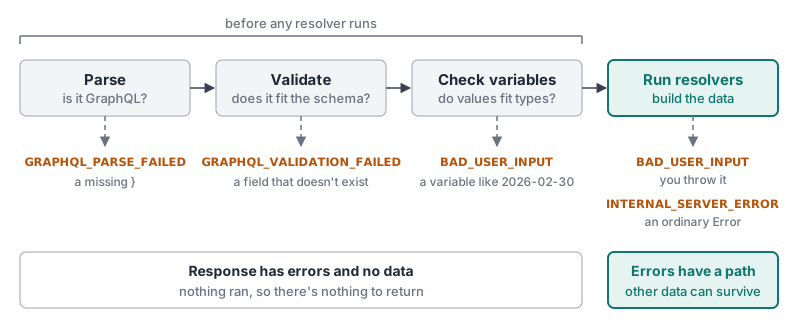
Apollo Server uses a set of built-in error codes. These are the ones you’re most likely to see:
| Code | Meaning | Example |
|---|---|---|
GRAPHQL_PARSE_FAILED |
The query isn't valid GraphQL syntax | A missing } |
GRAPHQL_VALIDATION_FAILED |
The query doesn't match the schema | Asking for a field that doesn't exist |
BAD_USER_INPUT |
An argument has a value the server can't use | Filing a claim for a policy that doesn't exist |
INTERNAL_SERVER_ERROR |
Something went wrong on the server | A bug in a resolver |
The first two happen before any resolver runs. BAD_USER_INPUT can come from either side. Apollo sends it when a variable’s value doesn’t fit its type, like the February 30th date in the Custom Scalars section. You also throw it yourself, from a resolver, when a value has the right type but can’t be used. When a resolver throws an ordinary Error instead of a GraphQLError, Apollo reports it as INTERNAL_SERVER_ERROR.
You can also make up your own codes, like CLAIM_LOCKED, when a client needs to tell one problem apart from another.
One error can wipe out other data
A response can contain both data and errors. If one field fails, the rest of the query can still succeed.
That only works if the failed field is allowed to be null. GraphQL replaces a failed field with null. If the field is required, like claimsConnection: ClaimConnection!, GraphQL can’t do that, so it makes the field’s parent null instead. That keeps going up until it reaches a field that can be null, or the top of the response. You saw this in 101, when one policy without a risk tier made the whole policies query fail.
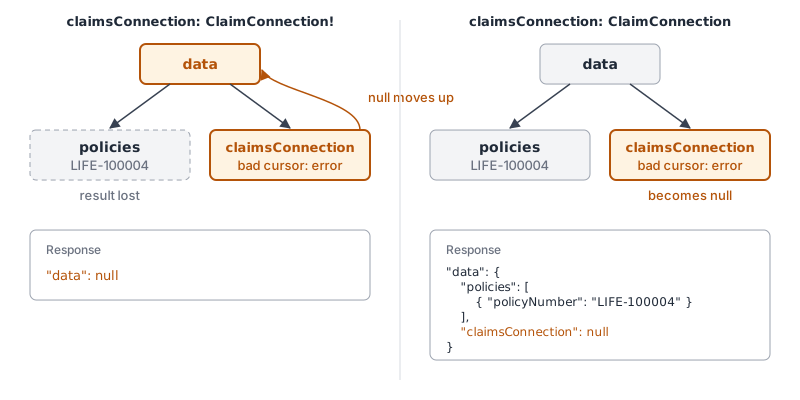
claimsConnection takes down with it, required versus nullable.So when you design a schema, making a field required is also a choice about what a failure takes down with it. The GraphQL specification describes the exact rules.
Exercise
Before you start: this exercise builds on claimsConnection, which you add in the Pagination section. Complete Pagination first.
In the Pagination section, a cursor that doesn’t point to any claim quietly returns the first page. A client with a broken cursor never finds out.
✏️ Before changing anything, see it for yourself. Run this query, with a cursor that doesn’t point to any claim:
{
  claimsConnection(first: 2, after: "bogus") {
    edges {
      node {
        claimNumber
      }
    }
  }
}
There’s no error. You get the first page, as if you hadn’t passed a cursor at all:
{
  "data": {
    "claimsConnection": {
      "edges": [{ "node": { "claimNumber": "CLM-5001" } }, { "node": { "claimNumber": "CLM-5002" } }]
    }
  }
}
A client paging through claims with a broken cursor would show the first two claims again, and never know anything was wrong.
✏️ In services/policies/src/resolvers.ts, make claimsConnection throw an error when its after cursor doesn’t point to a claim. The message is Invalid cursor: followed by the cursor, and the code is BAD_USER_INPUT.
✏️ Run this query:
{
  claimsConnection(first: 2, after: "bogus") {
    edges {
      node {
        claimNumber
      }
    }
  }
}
Your response (trimmed for readability) should be:
{
  "errors": [
    {
      "message": "Invalid cursor: bogus",
      "path": ["claimsConnection"],
      "extensions": { "code": "BAD_USER_INPUT" }
    }
  ],
  "data": null
}
✏️ Run it with a valid cursor:
{
  claimsConnection(first: 2, after: "YzI=") {
    edges {
      node {
        claimNumber
      }
    }
  }
}
Valid cursors still work: you get CLM-5003 and CLM-5004.
✏️ Now add a second field to the bad query, so it asks for LIFE policies too:
{
  policies(type: LIFE) {
    policyNumber
  }
  claimsConnection(first: 2, after: "bogus") {
    edges {
      node {
        claimNumber
      }
    }
  }
}
The response is the same as before: "data": null. policies worked, but its result is gone too. claimsConnection is required, so GraphQL made its parent null, and its parent is the whole data object.
Solution
Click to see the solution
✏️ In services/policies/src/resolvers.ts, update the if (args.after) block in the claimsConnection resolver:
      if (args.after) {
        const afterId = Buffer.from(args.after, "base64").toString("utf8");
        const index = claims.findIndex((c) => c.id === afterId);
        if (index === -1) {
          throw new GraphQLError(`Invalid cursor: ${args.after}`, {
            extensions: { code: "BAD_USER_INPUT" },
          });
        }
        start = index + 1;
      }
findIndex returns -1 when no claim matches. Before, -1 + 1 became 0, the start of the list. Now the resolver checks for -1 first, and stops with an error.
GraphQLError is already imported at the top of the file, because issuePolicy and fileClaim use it.
If claimsConnection returned ClaimConnection instead of ClaimConnection!, the response would have "claimsConnection": null next to the LIFE policies. Whether that’s better depends on the screen: can it show policies without claims, or is the page useless without both?
Objective 2: Return expected problems as data
Two kinds of problems
Not every problem is a mistake.
- Mistakes are things that shouldn’t happen when the client is working correctly: a broken cursor, an id that doesn’t exist, a bug on the server. These belong in
errors. The client usually can’t do much except log them or show “Something went wrong.” - Expected outcomes are things that happen in normal use, and that the user needs to see. An adjuster tries to approve a claim, but someone else has already denied it. That isn’t a bug. The screen should say so, in words the adjuster understands.
Expected outcomes can go in errors with a custom code. But then they aren’t in the schema: a client developer can’t see from introspection which problems a mutation can return, and has to check code strings by hand.
The alternative is to put them in the schema, as part of the data.
Union types
A union is a type that can be one of several object types:
union SearchResult = Policy | PolicyholderA field that returns SearchResult returns either a Policy or a Policyholder. The two types don’t need to share any fields.
To query a union, the client uses inline fragments, written ... on TypeName, to say which fields it wants for each type. __typename, which you used in 101’s Exploring the Schema section, tells the client which type it got:
{
  search(text: "Maria") {
    __typename
    ... on Policy {
      policyNumber
    }
    ... on Policyholder {
      name
    }
  }
}
Returning a union from a resolver
A resolver for a union field has one extra job: it has to tell GraphQL which type each result is. A policy and a policyholder are both plain objects, so GraphQL can’t tell them apart on its own.
One way to tell it is to add a __typename property to each object the resolver returns. Here’s what a resolver for search could look like:
    search: (_: unknown, args: { text: string }) => {
      const results = [];

      for (const policy of policies) {
        if (policy.policyNumber.includes(args.text)) {
          results.push({ __typename: "Policy", ...policy });
        }
      }

      for (const policyholder of policyholders) {
        if (policyholder.name.includes(args.text)) {
          results.push({ __typename: "Policyholder", ...policyholder });
        }
      }

      return results;
},- The two loops go through every policy and every policyholder, and add the ones that match the search text to
results. { __typename: "Policy", ...policy }makes a copy of the policy with one extra property,__typename: "Policy". The...copies every property ofpolicyinto the new object. The saved policy itself doesn’t change.- The value of
__typenamemust be the exact name of one of the union’s types. GraphQL uses it to decide which inline fragment applies.
If the resolver returned the policyholders without __typename, the query would fail with an error like this:
Abstract type "SearchResult" must resolve to an Object type at runtime for field "Query.search".The course API has no search field. This example only shows the shape of the query and the resolver.
Unions for expected problems
A union can hold a successful result and the expected problems. For example, a mutation can return Claim | ClaimNotOpen. The problems are now in the schema, visible through introspection, and the client handles each one with its own fragment. Apollo’s documentation calls this pattern errors as data.
Exercise
Adjusters need a way to approve claims. Only an open claim can be approved.
✏️ In services/policies/src/schema.graphql, add:
| Add | What it holds |
|---|---|
ClaimNotOpen type |
A message for the user, and the claim's current status. Both are required. |
ApproveClaimResult union |
Either a Claim or a ClaimNotOpen |
approveClaim mutation |
Takes a required claim id, and returns a required ApproveClaimResult |
✏️ In services/policies/src/resolvers.ts, add a resolver for approveClaim:
- If no claim has that
id, it’s a mistake: throwClaim <id> not foundwith the codeBAD_USER_INPUT. - If the claim isn’t
OPEN, it’s an expected outcome: return aClaimNotOpenwith the message<claimNumber> is already <status>. - Otherwise, set the claim’s status to
APPROVED, save the claims, and return the claim.
Each object the resolver returns needs a __typename, like the search example in Returning a union from a resolver.
✏️ Run this mutation:
mutation {
  approveClaim(id: "c4") {
    __typename
    ... on Claim {
      claimNumber
      status
    }
    ... on ClaimNotOpen {
      message
      status
    }
  }
}
Your response should be:
{
  "data": {
    "approveClaim": { "__typename": "Claim", "claimNumber": "CLM-5004", "status": "APPROVED" }
  }
}
✏️ Run the same mutation again. CLM-5004 is approved now, so your response should be:
{
  "data": {
    "approveClaim": { "__typename": "ClaimNotOpen", "message": "CLM-5004 is already APPROVED", "status": "APPROVED" }
  }
}
There’s no errors array. The problem is part of the data, and the client can show message to the adjuster.
✏️ Run it with a claim id that doesn’t exist:
mutation {
  approveClaim(id: "c99") {
    __typename
    ... on Claim {
      claimNumber
      status
    }
    ... on ClaimNotOpen {
      message
      status
    }
  }
}
Your response (trimmed for readability) should be:
{
  "errors": [
    {
      "message": "Claim c99 not found",
      "path": ["approveClaim"],
      "extensions": { "code": "BAD_USER_INPUT" }
    }
  ],
  "data": null
}
✏️ Run it without the fragments, asking for claimNumber directly:
mutation {
  approveClaim(id: "c6") {
    claimNumber
  }
}
The query fails before it runs, so c6 isn’t approved. The response (trimmed for readability) is:
{
  "errors": [
    {
      "message": "Cannot query field \"claimNumber\" on type \"ApproveClaimResult\". Did you mean to use an inline fragment on \"Claim\"?",
      "extensions": { "code": "GRAPHQL_VALIDATION_FAILED" }
    }
  ]
}
A union has no fields of its own, so the client has to say which type it’s asking about.
Solution
Click to see the solution
✏️ In services/policies/src/schema.graphql, add the new types:
"Returned when a claim can't be approved because it's no longer open"
type ClaimNotOpen {
  message: String!
  status: ClaimStatus!
}

union ApproveClaimResult = Claim | ClaimNotOpen
✏️ Add approveClaim to Mutation:
type Mutation {
  # ...existing fields
  approveClaim(id: ID!): ApproveClaimResult!
}
✏️ In services/policies/src/resolvers.ts, add an approveClaim resolver under Mutation:
    approveClaim: (_: unknown, args: { id: string }) => {
      // A claim id that doesn't exist is a mistake, so it's an error.
      const claim = claims.find((c) => c.id === args.id);
      if (!claim) {
        throw new GraphQLError(`Claim ${args.id} not found`, {
          extensions: { code: "BAD_USER_INPUT" },
        });
      }

      // A claim that's already decided is an expected outcome, so it's data.
      if (claim.status !== "OPEN") {
        return {
          __typename: "ClaimNotOpen",
          message: `${claim.claimNumber} is already ${claim.status}`,
          status: claim.status,
        };
      }

      claim.status = "APPROVED";
      saveClaims();
      return { __typename: "Claim", ...claim };
    },
__typename: "ClaimNotOpen"tells GraphQL which type in the union this object is. When a result has a__typenameproperty, GraphQL uses it to pick the type.{ __typename: "Claim", ...claim }copies every property of the claim into a new object, and adds__typename. The saved claim itself doesn’t get a__typename.saveClaims()writes the change to services/policies/claims.json, the same wayfileClaimdoes.
Another way to pick the type is a __resolveType resolver on the union, which looks at each result and returns its type’s name. That’s useful when the results come from somewhere you can’t add a property to.
When a union gets a new type
Right now, approveClaim can return one expected problem: ClaimNotOpen. Say the API later needs a second problem result that approveClaim can return, ClaimLocked, for when another adjuster is already reviewing the claim. You’d add it to the ApproveClaimResult union: Claim | ClaimNotOpen | ClaimLocked.
Every existing query still works. Apollo’s schema checks even list adding a type to a union as a safe change. But an app written before ClaimLocked existed has no fragment for it. When it gets a ClaimLocked, the response has none of the fields it asked for:
{ "data": { "approveClaim": { "__typename": "ClaimLocked" } } }If the app checks __typename only for Claim and ClaimNotOpen, it might show nothing, or treat the request as a success. So a client should always handle a __typename it doesn’t recognize, for example by showing a general “Couldn’t approve this claim” message.
The server can help with an interface: a set of fields that several types promise to have. Apollo’s example gives all its problem types a shared interface. For claims, that could be interface ClaimProblem { message: String! }, with type ClaimNotOpen implements ClaimProblem. A client that asks for ... on ClaimProblem { message } then gets a message from every problem type, including ones added later.
Reset the course data
Approving CLM-5004 changed the course data. To go back to the starting data, stop the server, run npm run reset-data in services/policies, and start it again.
Next steps
Next, we’ll look at security: protecting the API from expensive or malicious queries.