Overview
In this section, we will:
- Learn the places a GraphQL response can be cached, and why GraphQL makes some of them harder
- Mark how long policies and policyholders can be cached, using
@cacheControl - Serve repeated queries from a server-side cache, without running any resolvers
- See a cached query miss a policy that was just issued, because a mutation doesn’t clear the cache
Objective 1: Understand where caching happens
Why caching GraphQL is different
In 101, you saw one of GraphQL’s trade-offs: caching is harder. A REST API has a URL for each resource, like /policies/p1, so browsers and CDNs can cache each URL. A GraphQL API usually has one URL, and clients send every query to it as a POST request. Browsers and CDNs don’t cache POST requests.
So GraphQL caching happens in several other places instead.
Where a response can be cached
| Where | What it saves | Addressed by |
|---|---|---|
| Within one request | Loading the same record twice while building one response | DataLoader, which remembers each record it has loaded until the request ends |
| On the server | Running the resolvers again for a query the server has already answered | @cacheControl hints, and a server-side cache like Apollo's response cache plugin |
| In a CDN or browser | Sending the request to the server at all | GET requests, often with automatic persisted queries, and the response's Cache-Control header |
| In the client | Asking the server again for data a screen has already loaded | A client-side cache, like Apollo Client's InMemoryCache |
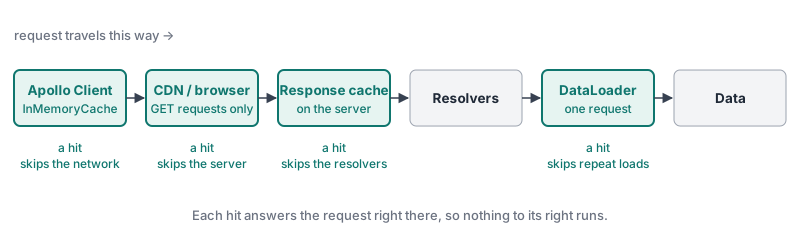
CDNs and browsers can cache GraphQL responses, but only if the client sends queries as GET requests. Apollo’s documentation describes how, using automatic persisted queries: the client sends a short hash of the query instead of the whole query, which keeps GET URLs short. The Performance and Hosting section describes them in more detail.
Client-side caches are the most common kind in GraphQL apps. As you saw in 101’s Exploring the Schema section, Apollo Client stores each object it receives under an ID made from its __typename and id, like Policy:p1. When two screens ask for the same policy, the second one reads it from the cache. When a mutation returns an updated policy, every screen showing it updates. That’s one reason it’s worth asking for id in your queries.
The rest of this section covers the server side, which the course API controls.
Objective 2: Mark what can be cached
Cache hints
Only the API’s author knows how long each piece of data stays correct. Policies rarely change. Claims change as adjusters work on them.
Apollo Server lets you say so in the schema, with the @cacheControl directive. It’s not one of GraphQL’s built-in directives, so the schema has to declare it first. This is the declaration from Apollo’s documentation:
enum CacheControlScope {
  PUBLIC
  PRIVATE
}

directive @cacheControl(
  maxAge: Int
  scope: CacheControlScope
  inheritMaxAge: Boolean
) on FIELD_DEFINITION | OBJECT | INTERFACE | UNIONmaxAge: how many seconds the data can be cachedscope:PUBLIC(the default) if the data is the same for everyone, orPRIVATEif it’s specific to one user
You can put a hint on a type, or on a single field. For example, in an API with a Coverage type:
type Coverage @cacheControl(maxAge: 3600) {
  name: String!
  "Changes every time the limit is used"
  remainingLimit: Float! @cacheControl(maxAge: 0)
}
Every Coverage can be cached for an hour, but remainingLimit can’t be cached at all. The course API has no Coverage type. This example only shows the shape.
How Apollo combines the hints
Apollo works out one cache policy for the whole response, using the rules in its documentation:
- The response’s
maxAgeis the lowest of all its fields. A response is only as fresh as its most short-lived part. - Fields that return an object type, and fields on
Query, default to0, unless the type they return has a hint. AmaxAgeof0means the response can’t be cached. - Other fields, like strings and numbers, use their parent’s
maxAge, unless they have their own hint.
Apollo reports the result in the response’s Cache-Control HTTP header, for example max-age=60, public. If anything in the response can’t be cached, the header is no-store.
Checking the header
You’ll check the header from a terminal with curl, a command-line tool that sends HTTP requests. With -i, it prints the response’s headers above its body.
✏️ Open a second terminal in the Codespace, so the server keeps running in the first one. In the Terminal panel, click +.
Exercise
✏️ In the second terminal, send a query for every policy’s policyNumber, and show the response headers:
curl -s -i http://localhost:4001/ -H 'content-type: application/json' --data '{"query":"{ policies { policyNumber } }"}'Look for the cache-control line near the top of the output. Nothing has a hint yet, so the response can’t be cached:
cache-control: no-store✏️ In services/policies/src/schema.graphql, add the @cacheControl declaration from Cache hints, and let every Policy and every Policyholder be cached for 60 seconds.
✏️ Run the same curl command again. The response can now be cached for 60 seconds:
cache-control: max-age=60, public✏️ Ask for each policy’s claims too:
curl -s -i http://localhost:4001/ -H 'content-type: application/json' --data '{"query":"{ policies { policyNumber claims { claimNumber } } }"}'The response can’t be cached anymore:
cache-control: no-storePolicy.claims returns Claim objects, and Claim has no hint, so it defaults to 0. The lowest maxAge in the response wins.
✏️ Ask for each policy’s totalClaimed:
curl -s -i http://localhost:4001/ -H 'content-type: application/json' --data '{"query":"{ policies { policyNumber totalClaimed } }"}'It can be cached for 60 seconds:
cache-control: max-age=60, publicThat’s a problem. totalClaimed is a number, so it uses its parent’s hint, the policy’s 60 seconds. But it’s calculated from the policy’s claims, and approving a claim changes it. A cached response could show the old total for up to a minute.
✏️ In services/policies/src/schema.graphql, make totalClaimed impossible to cache, while the rest of Policy stays cacheable.
✏️ Run the totalClaimed command again. It can’t be cached:
cache-control: no-storeVerify
✏️ Run the first curl command, for policyNumber only, again. It still shows cache-control: max-age=60, public. Only responses that include totalClaimed lost their caching.
Solution
Click to see the solution
✏️ In services/policies/src/schema.graphql, add the declaration at the end of the file:
enum CacheControlScope {
  PUBLIC
  PRIVATE
}

directive @cacheControl(
  maxAge: Int
  scope: CacheControlScope
  inheritMaxAge: Boolean
) on FIELD_DEFINITION | OBJECT | INTERFACE | UNION
✏️ Add hints to Policy and Policyholder, and to the totalClaimed field:
type Policy @cacheControl(maxAge: 60) {
  # ...other fields
  totalClaimed: Float! @cacheControl(maxAge: 0)
}

type Policyholder @cacheControl(maxAge: 60) {
  # ...other fields
}
A hint on a type goes after the type’s name. A hint on a field goes after the field’s type, the same place @deprecated goes, as you saw in 101’s Mutations section.
policies is a field on Query, so it would default to 0. It returns Policy objects, and Policy now has a hint, so policies uses that instead.
Objective 3: Cache responses on the server
The response cache plugin
Cache hints only describe what could be cached. Something still has to do the caching.
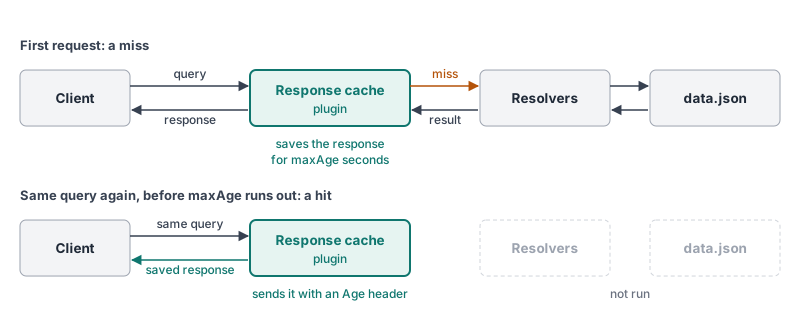
Apollo’s response cache plugin, @apollo/server-plugin-response-cache, is one option, and the course API already has it installed. When a query’s response can be cached, the plugin saves the whole response. When the same query arrives again before its maxAge runs out, the plugin sends the saved response without running any resolvers. It adds an Age header saying how many seconds old the saved response is.
A few details from Apollo’s documentation:
- The plugin saves each different query and variables separately.
{ policies { policyNumber } }and{ policies { policyNumber type } }are two different entries. - It only caches queries, never mutations.
- By default, it keeps the saved responses in the server’s memory, so they’re lost when the server restarts.
- It doesn’t cache
PRIVATEresponses unless you tell it how to tell users apart, with asessionIdfunction. Otherwise one user could be sent another user’s data.
The plugin is imported as the default export of @apollo/server-plugin-response-cache, and calling responseCachePlugin() creates it.
Exercise
✏️ In services/policies/src/resolvers.ts, add a log line to the policies resolver, so you can see each time it runs:
    policies: (_: unknown, args: { type?: PolicyType; riskTier?: RiskTier }) => {
      console.log("[RESOLVER] Looking up policies");
      return policies.filter((p) => {
        if (args.type && p.type !== args.type) return false;
        if (args.riskTier && p.riskTier !== args.riskTier) return false;
        return true;
      });
    },
✏️ In services/policies/src/index.ts, add the response cache plugin to the server.
Hint: The ApolloServer constructor already has a plugins list, with the plugin that shows Apollo Sandbox.
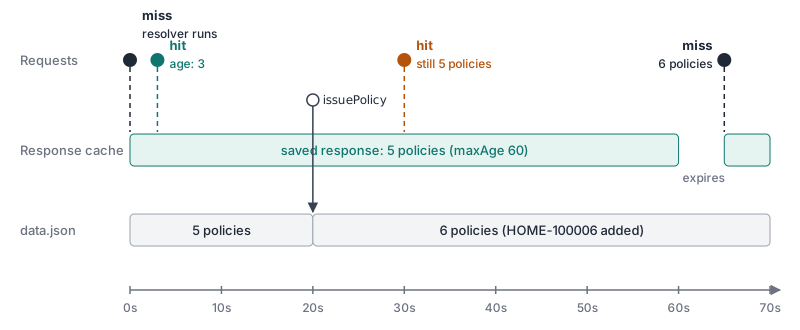
✏️ In the second terminal, run the policyNumber query twice, a few seconds apart:
curl -s -i http://localhost:4001/ -H 'content-type: application/json' --data '{"query":"{ policies { policyNumber } }"}'The second response has an age header, showing how many seconds ago the saved copy was made:
age: 3
cache-control: max-age=60, public
✏️ Look at the server’s terminal. [RESOLVER] Looking up policies appears once. The second response came from the cache, and no resolver ran.
✏️ Within a minute, issue a new policy as an agent:
curl -s http://localhost:4001/ -H 'content-type: application/json' -H 'Authorization: Bearer agent-token' --data '{"query":"mutation { issuePolicy(input: { type: HOME, monthlyPremium: 112.0, policyholderId: \"ph2\", riskTier: LOW }) { policyNumber } }"}'It returns the new policy, HOME-100006, or a higher number if you’ve issued other policies.
✏️ Run the policyNumber query again. The new policy is missing: you get the same five policies, with an age header. The server is sending the saved response, from before the policy existed.
✏️ Wait until a minute has passed since the first query, and run it once more. The saved response has expired, so the resolver runs again, and the new policy appears.
Solution
Click to see the solution
✏️ In services/policies/src/index.ts, import the plugin:
import responseCachePlugin from "@apollo/server-plugin-response-cache";✏️ Add it to the plugins list:
plugins: [ApolloServerPluginLandingPageLocalDefault(), responseCachePlugin()],Choosing a maxAge
The missing policy isn’t a bug in the plugin. issuePolicy changed the data, but nothing told the cache, so the saved response stayed until its maxAge ran out. Apollo’s response cache plugin doesn’t support clearing out-of-date responses. Other tools do, like The Guild’s response cache plugin for servers built on Envelop, such as GraphQL Yoga, which removes saved responses that contain the objects a mutation returned. Even then, changes made outside the API, like a nightly import writing straight to the database, never reach the cache.
So the maxAge you choose is how long you’re willing to show data that might be out of date. It should come from how the data is used:
- A list of policy types for a dropdown could be cached for hours.
- A policy’s details could be cached for a minute.
- A claim’s status, which an adjuster is waiting to see change, shouldn’t be cached on the server at all.
When in doubt, leave data uncached. Apollo’s defaults do the same: a field has to be given a hint before anything is cached.
Data that depends on who’s asking
The plugin saves responses by query and variables. It doesn’t look at the Authorization header or at contextValue.user, and every hint is PUBLIC unless you say otherwise.
So if a field’s value depends on who’s asking and its hint is PUBLIC, the plugin saves the first user’s response and sends it to other users who send the same query. That includes people who aren’t logged in. For example, suppose agents weren’t allowed to see denied claims, and Claim had a PUBLIC hint. If an adjuster ran { claims { id status } } first, the next agent to run it would get the adjuster’s saved response, denied claims included.
The course API doesn’t have this problem. Every query returns the same data to everyone, and only mutations check who’s asking. In a real API, for each field whose value depends on the user, do one of these:
- Don’t cache it: give it
maxAge: 0. - Cache one copy per user: give it
scope: PRIVATE, and give the plugin asessionIdfunction that says which user sent the request. - Decide while the query runs: if only some answers depend on the user, set the hint in the resolver with
info.cacheControl.setCacheHint.
Where the cache lives
By default, the response cache plugin saves responses in the server’s memory. Apollo Server’s default cache is limited to about 30 MiB. It’s a least recently used (LRU) cache: when it’s full, it throws out the entries that haven’t been read in the longest time. So it can’t grow until the server runs out of memory. On a busy API, entries are just thrown out sooner, and fewer queries are answered from the cache.
That 30 MiB is shared. The plugin uses the same cache as other Apollo features, like automatic persisted queries.
Memory also has limits that don’t depend on size:
- Restarts empty it. Every restart or new deploy starts with an empty cache.
- Each server has its own. Production APIs usually run several copies of the server behind a load balancer. With in-memory caches, each copy caches the same queries separately, and a query only hits the cache if it reaches a copy that has already answered it.
For those reasons, production APIs often keep the cache in a separate, shared store instead, like Redis or Memcached. Every copy of the server reads and writes the same cache, and it survives restarts. Apollo’s documentation shows how to connect one.
The course API runs one copy of the server with a handful of policies, so the default in-memory cache is all it needs.
Reset the course data
Issuing a policy changed the course data. To go back to the starting data, stop the server, run npm run reset-data in services/policies, and start it again. You can also remove the [RESOLVER] log line from the policies resolver.
Next steps
Next, we’ll look at subscriptions: how a server can push live updates to clients.