Overview
In this section, we will:
- Review how a standard REST API works, as a baseline
- Learn what GraphQL is (and what it isn’t)
- Compare GraphQL to a REST API
- Weigh the benefits and trade-offs of using GraphQL
- Run our first query
Objective 1: Understand GraphQL
Starting point: how a REST API works
In a REST API, the server exposes resources, and each resource has its own URL. For our insurance company, that’s something like:
GET    /policies            # list policies
GET    /policies/p1         # one policy
POST   /policies            # create a policy
PATCH  /policies/p1         # update a policy
GET    /policyholders/ph1   # one policyholder
Three properties of that design matter for the comparison:
- The server decides the response shape.
GET /policies/p1returns whatever fields the endpoint’s author chose to include. The client takes the whole object and ignores what it doesn’t need. - One request returns one kind of thing.
/policies/p1returns a policy. If that policy’s owner is represented as"policyholderId": "ph1", getting the owner’s name is a second request to/policyholders/ph1. - The URL and the HTTP method carry the meaning.
GETreads,POSTcreates, the path says which resource, and the HTTP status code says what happened:200for success,404for a missing resource,500for a server error.
Here’s a concrete version. Say a screen lists every policy with its policyholder’s name. GET /policies returns:
[
  { "id": "p1", "policyNumber": "AUTO-100001", "type": "AUTO", "monthlyPremium": 142.5,
    "effectiveDate": "2025-01-15", "riskTier": "MEDIUM", "policyholderId": "ph1" },
  { "id": "p2", "policyNumber": "HOME-100002", "type": "HOME", "monthlyPremium": 98,
    "effectiveDate": "2024-06-01", "riskTier": "LOW", "policyholderId": "ph1" }
]
The screen needs two fields per policy: policyNumber and the policyholder’s name. This response has extra fields and no name. So the client sends more requests, one per policyholder, and then stitches the results together itself.
REST is a well-understood design, and most APIs you’ll use are built this way. Its two costs, extra data and extra round trips, come from the properties above. GraphQL addresses both.
What is GraphQL?
GraphQL is a query language for APIs, plus a server runtime that answers those queries using functions you write.
GraphQL is not a database. It sits in front of your data sources: databases, REST APIs, or other services. The API in this course starts with data written into its code, and saves your changes to a JSON file. The same API could read from Postgres instead, without the client ever noticing.
GraphQL was created at Facebook in 2012 and open-sourced in 2015. Since 2019, it has been governed by the GraphQL Foundation, a non-profit hosted by the Linux Foundation.
GraphQL vs REST
Imagine we’re building a screen for an insurance company that lists each policy with the name of its policyholder.
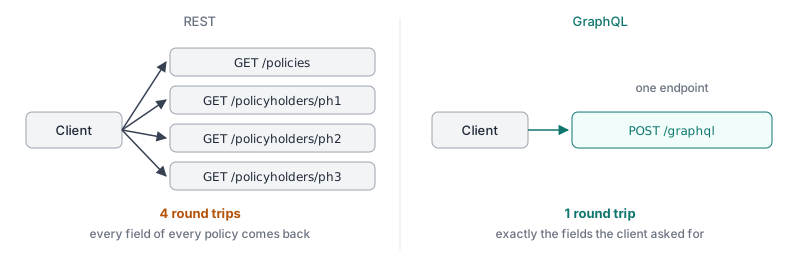
With a REST API, the server decides the shape of each response, and each resource lives at its own URL:
GET /policies           # returns every field of every policy
GET /policyholders/ph1  # then one request per policyholder...
GET /policyholders/ph2
GET /policyholders/ph3
This shows the two classic REST pain points:
- Over-fetching:
/policiesreturns every field, even the ones the screen doesn’t use. - Under-fetching: one call isn’t enough, so the client makes several round trips (or asks the backend team for a new endpoint).
With GraphQL, there is one endpoint, and the client describes exactly what it wants:
{
  policies {
    policyNumber
    policyholder {
      name
    }
  }
}
The response has the same shape as the query.
Here are the first two of the five policies:
{
  "data": {
    "policies": [
      { "policyNumber": "AUTO-100001", "policyholder": { "name": "Maria Alvarez" } },
      { "policyNumber": "HOME-100002", "policyholder": { "name": "Maria Alvarez" } }
    ]
  }
}
Why teams choose GraphQL
- Clients get exactly what they need. A mobile screen and a desktop screen can ask for different fields from the same API.
- Fewer round trips for related data.
- A strongly typed schema is the contract. It powers tooling for free: autocomplete, documentation, validation, and code generation.
- APIs evolve without versioning. New fields can be added at any time, and old ones retired with
@deprecatedinstead of shipping a/v2. - One graph over many services. Several teams’ APIs can be combined into a single graph, using federation. Federation has its own training.
Trade-offs
- Caching is harder. Most clients send every query as a
POSTto the same URL, and browsers and CDNs don’t cachePOSTrequests. A server can also accept queries asGETrequests, which can be cached, but that takes extra setup, like persisted queries. Many teams rely on client-side caches instead. - Nested queries can get expensive. A client can ask for
policies → policyholder → policies → policyholder…as deep as it likes. Production APIs add depth or complexity limits. - More upfront work. You write a schema and resolvers. For a simple CRUD API, that may be overkill.
- Errors look different. A request the server can’t parse or validate, like one asking for a field that doesn’t exist, gets HTTP
400. But a query that fails while it runs usually still gets HTTP200, with the problem in anerrorsarray next todata. Code that only checks the HTTP status misses those failures. - REST can close part of the gap. A well-designed REST API can let clients request a subset of fields and include related resources in one response. Specs like JSON:API define exactly that, with
fields[]andincludeparameters. If sparse fields and fewer round trips are the only things you want, you may be able to get them without adopting GraphQL.
So when is GraphQL clearly the right call?
A single service with a handful of screens usually doesn’t need GraphQL. The schema and resolvers are real upfront work, and a sparse-fieldset REST API gets you much of the benefit.
GraphQL earns its cost when many services have to look like one API. With several teams each owning part of the data, the alternatives are a hand-written aggregation layer that someone has to maintain, or clients that know every backend’s URL. Federation lets each team own its slice of a single graph, and the client sends one query without knowing how many services answered it.
This course teaches schemas, queries and resolvers on one small service. Federation is built on the same pieces.
Objective 2: Run your first query
You’ll run queries in Apollo Sandbox, which you opened in Course Setup.
Sandbox opens to its Explorer, the page for writing and running operations. If you’ve moved to another page, click Explorer in the left sidebar to get back. You write a query in the Operation panel, click Run, and the result shows in the Response panel.
Exercise
✏️ In Apollo Sandbox, write a query that returns the response below, then click Run. It should have the same fields, in the same shape, and nothing extra. Your response should be:
{
  "data": {
    "policies": [
      { "policyNumber": "AUTO-100001", "type": "AUTO" },
      { "policyNumber": "HOME-100002", "type": "HOME" },
      { "policyNumber": "AUTO-100003", "type": "AUTO" },
      { "policyNumber": "LIFE-100004", "type": "LIFE" },
      { "policyNumber": "RENTERS-100005", "type": "RENTERS" }
    ]
  }
}
Hint: The Documentation panel on the left lists every field you can ask for. For a starting point, look at the query in GraphQL vs REST above; you’ll only need to change which fields it asks for.
Solution
Click to see the solution
{
  policies {
    policyNumber
    type
  }
}
Each field in the query appears in the response, in the same order and nesting.
Next steps
Next, we’ll meet the policyholders and policies in the course API.