---
title: "Faster Page Loads: How to Use NDJSON to Stream API Responses"
description: Learn how to create streaming apps with this NDJSON stream express API tutorial. Improve performance and user experience using this technique.
image: https://www.bitovi.com/hubfs/Bitovi_July_2016_Theme/Images/canjs-background-blue.gif
---
- 
[AI implementation](https://www.bitovi.com/services/ai-consulting)
- 
[Systems engineering](https://www.bitovi.com/services/systems-engineering-consulting)
- 
[Project Management](https://www.bitovi.com/services/agile-project-management-consulting)
- 
[Product Design](https://www.bitovi.com/services/product-design-consulting)
- 
[Frontend development](https://www.bitovi.com/services/frontend-development-consulting)
- [View more
→
](https://www.bitovi.com/digital-consulting-services)
We're Experts in...
- [JavaScript](https://www.bitovi.com/services/frontend/javascript-consulting)
- [AI training](https://www.bitovi.com/ai-training-for-software-engineers)
- [Angular](https://www.bitovi.com/services/frontend/angular-consulting)
- [Design systems](https://www.bitovi.com/services/axure-figma-migration)
- [React](https://www.bitovi.com/services/frontend/react-consulting)
- [Temporal](https://www.bitovi.com/services/backend/temporal-consulting)
- [React Native](https://www.bitovi.com/services/frontend/react-consulting/react-native)
- [Node.js](https://www.bitovi.com/services/backend/nodejs-consulting)
Showcase
[View case study](https://www.bitovi.com/en/bitovi-yum-case-study)
More Projects
- [](https://www.bitovi.com/web-application-consulting-work/levis-ecommerce-responsive-redesign)
- [](https://design.bitovi.com/christies)
- [](https://www.bitovi.com/ux-design-consulting/ux-case-studies/bafs-ppp)
- [View more
→
](https://www.bitovi.com/our-software-consulting-work)
Open Source Tools
We build powerful tools and open source them to support the community.
[See what we've built →](https://www.bitovi.com/open-source)
- [
BlogWe post about delivering products and solving problems.
](https://www.bitovi.com/blog)
- [
PartnershipsLearn about Bitovi's technology partners
](https://www.bitovi.com/partnerships)
- [
AcademyFree courses to build delivery skills
](https://www.bitovi.com/academy)
- [
Open source toolsUse or contribute to our community
](https://www.bitovi.com/open-source)
Let's Connect
- [
Discord
](https://discord.gg/J7ejFsZnJ4)
- [
LinkedIn
](https://www.linkedin.com/company/bitovi/)
- [
GitHub
](https://github.com/bitovi/)

Name *
Work Email *
Phone
What's your project?
Send
### Contact Us
(312) 620-0386contact@bitovi.com
July 12, 2017
# Faster Page Loads: How to Use NDJSON to Stream API Responses
Learn how to create streaming apps with this NDJSON stream express API tutorial. Improve performance and user experience using this technique.

The Bitovi Team
Share:
[ ](https://twitter.com/intent/tweet?text=) [ ](http://reddit.com/submit?url=)
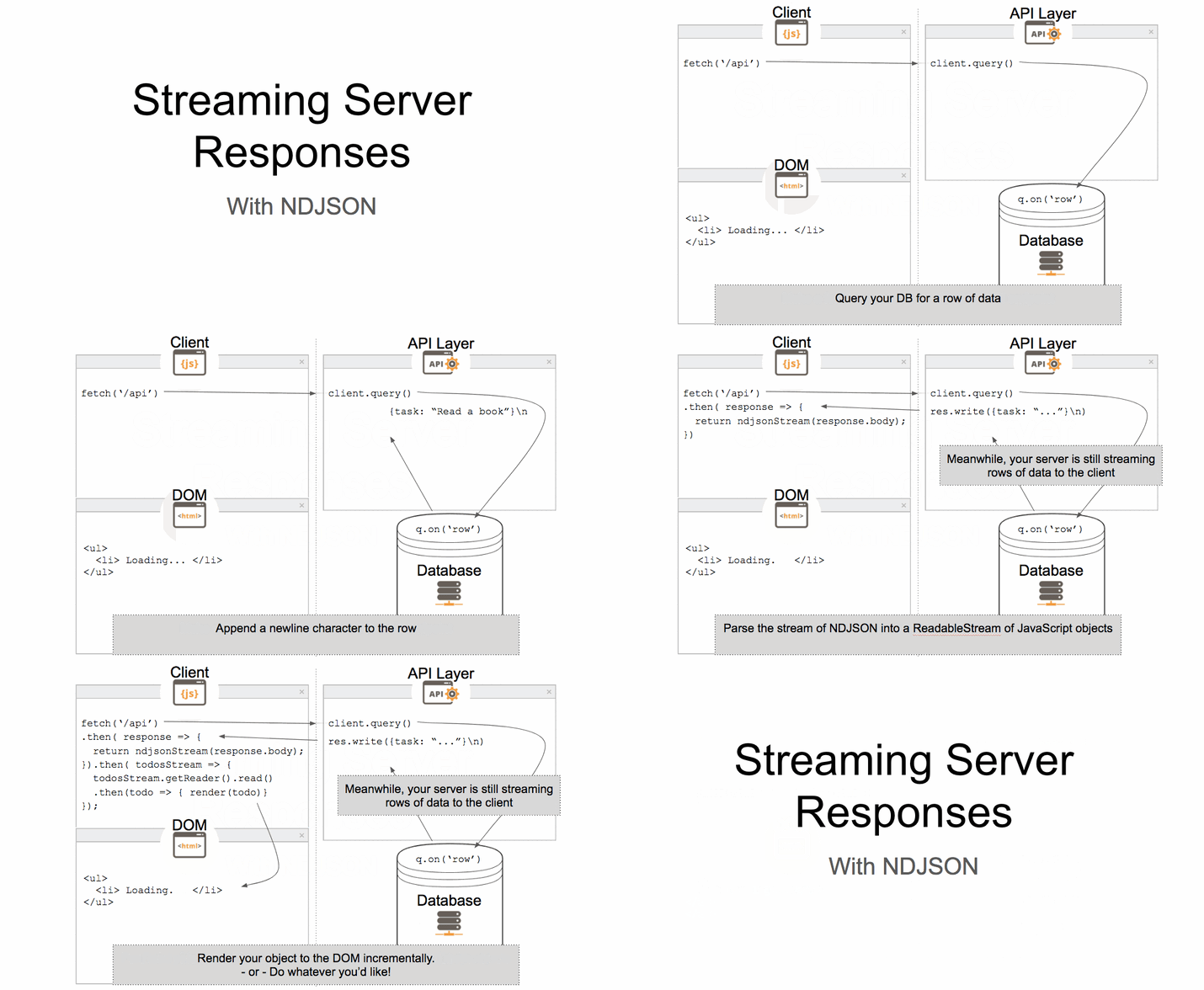
Ever wish you could send your data as a stream so that the client can start manipulating it and rendering it as it arrives? Tired of waiting for your entire JSON object to resolve before your users see anything interesting? As you may have seen in my [previous article on David Walsh Blog](https://davidwalsh.name/streaming-data-fetch-ndjson), this is now possible with the Fetch API! Stream responses are supported in [Chrome 52](https://www.chromestatus.com/feature/4531143755956224) and in development in [Firefox](https://bugzilla.mozilla.org/show_bug.cgi?id=1128959) and [Edge](https://developer.microsoft.com/en-us/microsoft-edge/platform/status/streamsapi). This quick tutorial will show you how to set up a simple [Express](https://expressjs.com/) API to emit a [ReadableStream](https://developer.mozilla.org/en-US/docs/Web/API/ReadableStream) of NDJSON.
Just want to see the code? Check out and remix it [here](https://glitch.com/edit/#!/ndjson-stream-api-demo?path=public/ndjson-stream-demo.html:1:0).
### What is NDJSON?
[NDJSON](http://ndjson.org/) is a data format that separates individual JSON objects with a newline character (`\n`). The 'nd' stands for newline-delimited JSON. You may have a file that contains JSON objects, each on their own line:
```
{"item":"first"}\n
{"item":"second"}\n
{"item":"third"}\n
{"item":"fourth"}\n
```
Each line can be sent individually over a stream, which allows our client to receive the data as a stream. Instead of reading lines from a file, you can also setup your service later to append newlines to each row received from a database before sending it to the client. In this example we will walk through how to read NDJSON from a file and stream it to the client.
### Getting Started
First, make sure you have a recent version of [Node.js](https://nodejs.org/en/) installed.
Next, create a new project folder (and switch to it), initialize a package.json file, and install [Express](https://expressjs.com/en/starter/installing.html):
```
$ mkdir ndjson-stream-demo && cd ndjson-stream-demo
$ npm init -y
$ npm i express --save
```
### Setup Basic Express Server
Now create a server file named `server.js` in your project directory:
```
$ touch server.js
```
Paste the following code for a basic setup.
/server.js
```
const express = require('express');
const app = express();
app.get('/', (req, res) => {
res.send('Hello World!');
});
app.listen(3000, () => {
console.log('Example app listening on port 3000!');
});
```
Test your basic server setup by running this command in the same directory that your `server.js` file is in:
```
$ node server.js
```
Then navigate to [http://localhost:3000/](http://localhost:3000/) to make sure you see "Hello World" displayed.
### Add the demo page
Create a file using this HTML skeleton, name it `ndjson-stream-demo.html` and place it in the `public/` directory, which should be in your project directory at the same level as your `server.js` file.
```
$ mkdir public && cd public
$ touch ndjson-stream-demo.html
```
Open that file and copy in this HTML. We will throw a `script` tag in this file later to interact with our data.
/public/ndjson-stream-demo.html
```
NDJSON Stream Demo
NDJSON demo
```
### Serve your demo page
Install the path dependency:
```
$ npm i path --save
```
Add these lines to serve your static public directory:
/server.js
```
const express = require('express');
const app = express();
const path = require('path');
app.use(express.static(path.join(__dirname, 'public')));
app.get('/', (req, res) => {
res.send('Hello World!');
});
app.listen(3000, () => {
console.log('Example app listening on port 3000!');
});
```
Run your server and navigate to localhost:3000/ndjson-stream-demo.html
```
$ node server.js
```
### Add sample data locally in the NDJSON format
[](https://cta-redirect.hubspot.com/cta/redirect/2171535/414b6773-9049-4955-9572-fdb3a0b2eb16)
Now that we are serving static files and responding to requests, we are ready to serve our NDJSON. In the real world, you would likely be receiving this data from your database, but to keep things simple we will just be reading our NDJSON from the filesystem. Copy or download [this gist](https://gist.github.com/bgando/971a84dd09118dbb8f21c041a3fb96e4) into a file named `todos.ndjson` into your root directory.
### Add filesystem to your project
Add the `fs` module to your server file, and have it read from your local NDJSON file. Make sure the path is correct to your NDJSON file, which should be named `todos.ndjson`:
/server.js
```
const express = require('express');
const app = express();
const path = require('path');
const fs = require('fs');
app.use(express.static(path.join(__dirname, 'public')));
app.get('/api', (req, res) => {
let readStream = fs.createReadStream(__dirname + '/todos.ndjson');
//setup headers
res.writeHead(200, {'Content-Type': 'application/ndjson'});
readStream.on('open', () => {
readStream.pipe(res); //pipe stream to response object
});
});
app.listen(3000, () => {
console.log('Example app listening on port 3000!');
});
```
When you make a `fetch` request to localhost:3000/api, it will download a file with an output that looks like this:
```
{"date":"2017-02-24 03:07:45","user":"21109850","fuel":"37","ammo":"2","steel":"13","baux":"5","seaweed":"0","type":"LOOT","product":"134"}
{"date":"2017-02-22 04:40:13","user":"21109850","fuel":"37","ammo":"2","steel":"13","baux":"5","seaweed":"0","type":"LOOT","product":"75"}
{"date":"2017-02-21 20:47:51","user":"26464462","fuel":"37","ammo":"3","steel":"19","baux":"5","seaweed":"1","type":"LOOT","product":"81"}
...
```
#### Source Code
Take a look at [the example code](https://step2-ndjson-stream-api-dem0.glitch.me) for this step.
### Convert regular JSON stream to an NDJSON stream
Now we are piping the data as regular JSON. Let's get started on that by using the `ndjson` package to parse our NDJSON in the service layer before streaming it to the client. For this example, we will be using a `setInterval` to throttle the stream so that we can see it in action.
Install the ndjson module
```
$ npm i ndjson --save
```
/server.js
```
const express = require('express');
const app = express();
const path = require('path');
const fs = require('fs');
const ndjson = require('ndjson');
app.use(express.static(path.join(__dirname, 'public')));
app.get('/', (req, res) => {
let readStream = fs.createReadStream(__dirname + '/todos.ndjson').pipe(ndjson.parse());
const chunks = [];
readStream.on('data', (data) => {
chunks.push(JSON.stringify(data));
});
readStream.on('end', () => {
var id = setInterval(() => {
if (chunks.length) {
res.write(chunks.shift() + '\n');
} else {
clearInterval(id);
res.end();
}
}, 500);
});
});
app.listen(3000, () => {
console.log('Example app listening on port 3000!');
});
```
#### Source Code
Check out [the code for this step here](https://step3-ndjson-stream-api-demo.glitch.me).
Now your server is serving one line of NDJSON every 500 milliseconds! Move on to the next section to see your demo page consume the stream!*
*Note: `fetch` with `ReadableStream` is only supported in Chrome 52 or higher.
### Receive and render your NDJSON:
Copy these scripts into your `ndjson-stream-demo.html` file to see your server in action. For more information about this code and the `can-ndjson-stream` npm module which parses your NDJSON stream into a ReadableStream of JS objects, see this [blog](https://davidwalsh.name/streaming-data-fetch-ndjson) and the [documentation on canjs.com](https://canjs.com/doc/can-ndjson-stream.html).
public/ndjson-stream-demo.html
```
//load the global can-ndjson-stream module to parse your NDJSON into JavaScript objects.
```
#### Final Source Code
See the [final product](https://ndjson-stream-api-demo.glitch.me/ndjson-stream-demo.html) or check out the [example code](https://glitch.com/edit/#!/ndjson-stream-api-demo?path=public/ndjson-stream-demo.html:1:0) to see it all together.
## What's next?
Now that you know how to serve NDJSON, learn how to use [can-ndjson-stream](https://canjs.com/doc/can-ndjson-stream.html) to [stream data with fetch() and ndjson](https://gist.github.com/bgando/93ba9c9a4be69a876a3c1bf4d27f8a2c) on the client-side.
Tell us about the creative ways you are using NDJSON in your application by tweeting to us at [@canjs](https://twitter.com/intent/tweet?text=@canjs)! If you need any help, please reach out to us in the [CanJS Gitter](https://gitter.im/canjs/canjs) or on the [forums](http://forums.donejs.com/c/canjs)!
[ open source ](https://www.bitovi.com/blog/topic/open-source)[ development ](https://www.bitovi.com/blog/topic/development)[ canjs ](https://www.bitovi.com/blog/topic/canjs)
Previous Post
 [ June 2017 DoneJS Community Update ](https://www.bitovi.com/blog/june-2017-donejs-community-update)
Next Post
 [ How To Use NDJSON Streams with can-connect ](https://www.bitovi.com/blog/how-to-use-ndjson-streams-with-can-connect)
```json
{
"@context" : "http://schema.org",
"@type" : "Organization",
"address" : {
"@type" : "PostalAddress",
"addressCountry" : "United States",
"addressLocality" : "Libertyville",
"addressRegion" : "IL",
"postalCode" : "60048",
"streetAddress" : "1134 Pine Tree Lane "
},
"alternateName" : "Bitovi",
"areaServed" : {
"@type" : "GeoCircle",
"geoMidpoint" : {
"@type" : "GeoCoordinates",
"latitude" : "41.8781",
"longitude" : "87.6298"
},
"geoRadius" : "5000 km"
},
"description" : "Bitovi is a UX, UI design and front-end JavaScript development consulting company",
"email" : "contact@bitovi.com",
"image" : "https://www.bitovi.com/hubfs/bitovi-logo-x2.png",
"logo" : "https://www.bitovi.com/hubfs/bitovi-logo-23-1.svg",
"mainEntityOfPage" : {
"@id" : "https://www.bitovi.com/blog/faster-page-loads-how-to-use-ndjson-to-stream-api-responses",
"@type" : "WebPage",
"description" : "Learn how to create streaming apps with this NDJSON stream express API tutorial. Improve performance and user experience using this technique."
},
"naics" : "541511",
"name" : "Bitovi Web App Consulting",
"sameAs" : [ "https://www.facebook.com/BitoviLLC/", "https://twitter.com/bitovi", "https://www.linkedin.com/company/bitovi" ],
"telephone" : "312-620-0386",
"url" : "http://bitovi.com"
}
```
```json
{
"@context" : "http://schema.org",
"@type" : "BlogPosting",
"author" : {
"@type" : "Person",
"name" : "The Bitovi Team"
},
"dateModified" : "December 4, 2018, 5:10:27 PM",
"datePublished" : "2017-07-12 18:55:53",
"description" : "Learn how to create streaming apps with this NDJSON stream express API tutorial. Improve performance and user experience using this technique.",
"headline" : "Faster Page Loads: How to Use NDJSON to Stream API Responses",
"image" : {
"@type" : "ImageObject",
"url" : "https://www.bitovi.com/hubfs/Bitovi_July_2016_Theme/Images/canjs-background-blue.gif"
},
"publisher" : {
"@type" : "Organization",
"logo" : {
"@type" : "ImageObject",
"url" : "https://www.bitovi.com/hubfs/bitovi-logo-23-1.svg"
},
"name" : "Bitovi"
}
}
```