---
title: Bitovi Academy - Debugging and DevTools
description: Learn how to set up and use both DevTools and Debugger.
---
- 
[AI implementation](https://www.bitovi.com/services/ai-consulting?hsLang=en-us)
- 
[Systems engineering](https://www.bitovi.com/services/systems-engineering-consulting?hsLang=en-us)
- 
[Project management](https://www.bitovi.com/services/agile-project-management-consulting?hsLang=en-us)
- 
[Product design](https://www.bitovi.com/services/product-design-consulting?hsLang=en-us)
- 
[Frontend development](https://www.bitovi.com/services/frontend-development-consulting?hsLang=en-us)
- [View more
→
](https://www.bitovi.com/digital-consulting-services?hsLang=en-us)
We're Experts in...
- [JavaScript](https://www.bitovi.com/services/frontend/javascript-consulting?hsLang=en-us)
- [AI training](https://www.bitovi.com/ai-training-for-software-engineers?hsLang=en-us)
- [Angular](https://www.bitovi.com/services/frontend/angular-consulting?hsLang=en-us)
- [Design Systems](https://www.bitovi.com/services/axure-figma-migration?hsLang=en-us)
- [React](https://www.bitovi.com/services/frontend/react-consulting?hsLang=en-us)
- [Temporal](https://www.bitovi.com/services/backend/temporal-consulting?hsLang=en-us)
- [React Native](https://www.bitovi.com/services/frontend/react-consulting/react-native?hsLang=en-us)
- [Node.js](https://www.bitovi.com/services/backend/nodejs-consulting-1?hsLang=en-us)
Showcase

[View case study](https://www.bitovi.com/en/bitovi-yum-case-study?hsLang=en-us)
More Projects
- [](https://www.bitovi.com/web-application-consulting-work/levis-ecommerce-responsive-redesign?hsLang=en-us)
- [](https://design.bitovi.com/christies)
- [](https://www.bitovi.com/ux-design-consulting/ux-case-studies/bafs-ppp?hsLang=en-us)
- [View more
→
](https://www.bitovi.com/our-software-consulting-work?hsLang=en-us)
Open Source Tools
We build powerful tools and open source them to support the community.
[See what we've built →](https://www.bitovi.com/open-source?hsLang=en-us)
- [
BlogWe post about perfecting software delivery
](https://bitovi.com/blog)
- [
PartnershipsLearn about Bitovi's technology partners
](https://www.bitovi.com/partnerships?hsLang=en-us)
- [
AcademyFree courses to build delivery skills
](https://www.bitovi.com/academy/?hsLang=en-us)
- [
Open source toolsUse our tools or contribute to our open source mission.
](https://www.bitovi.com/open-source?hsLang=en-us)
Let's Connect
- [
Discord
](https://discord.gg/J7ejFsZnJ4)
- [
LinkedIn
](https://www.linkedin.com/company/bitovi/)
- [
GitHub
](https://github.com/bitovi/)

Name *
Work Email *
Phone
What's your project?
Send
### Contact Us
(312) 620-0386contact@bitovi.com
- [ Advanced JavaScript ](https://www.bitovi.com/academy/learn-advanced-javascript.html?hsLang=en-us)
- [ DOM and jQuery ](https://www.bitovi.com/academy/learn-dom-jquery.html?hsLang=en-us)
- [ Debug JavaScript ](https://www.bitovi.com/academy/learn-to-debug-javascript.html?hsLang=en-us)
- [ Learn TypeScript ](https://www.bitovi.com/academy/learn-typescript.html?hsLang=en-us)
- [ Learn React Native ](https://www.bitovi.com/academy/learn-react-native.html?hsLang=en-us)
- [ Introduction to React Native ](https://www.bitovi.com/academy/learn-react-native/intro-to-react-native.html?hsLang=en-us)
- [ Setting Up Your Environment ](https://www.bitovi.com/academy/learn-react-native/setting-up-your-environment.html?hsLang=en-us)
- [ Creating a New Application ](https://www.bitovi.com/academy/learn-react-native/creating-a-new-app.html?hsLang=en-us)
- [ Introduction to JSX ](https://www.bitovi.com/academy/learn-react-native/intro-to-jsx.html?hsLang=en-us)
- [ Introduction to Testing ](https://www.bitovi.com/academy/learn-react-native/intro-to-testing.html?hsLang=en-us)
- [ Building Custom Components ](https://www.bitovi.com/academy/learn-react-native/building-custom-components.html?hsLang=en-us)
- [ Debugging and DevTools ](https://www.bitovi.com/academy/learn-react-native/debugging-devtools.html?hsLang=en-us)
- [ Styling in React Native ](https://www.bitovi.com/academy/learn-react-native/styling.html?hsLang=en-us)
- [ Using React Context ](https://www.bitovi.com/academy/learn-react-native/react-context.html?hsLang=en-us)
- [ Managing State with useState ](https://www.bitovi.com/academy/learn-react-native/managing-state.html?hsLang=en-us)
- [ Navigation in React Native ](https://www.bitovi.com/academy/learn-react-native/navigation.html?hsLang=en-us)
- [ Storing State in Navigation Parameters ](https://www.bitovi.com/academy/learn-react-native/navigation-params.html?hsLang=en-us)
- [ Making HTTP Requests ](https://www.bitovi.com/academy/learn-react-native/making-http-requests.html?hsLang=en-us)
- [ Handling User Inputs ](https://www.bitovi.com/academy/learn-react-native/user-inputs.html?hsLang=en-us)
- [ Using Async Storage ](https://www.bitovi.com/academy/learn-react-native/using-asyncstorage.html?hsLang=en-us)
- [ Security and Authentication ](https://www.bitovi.com/academy/learn-react-native/security-and-auth.html?hsLang=en-us)
- [ Adding Offline Support ](https://www.bitovi.com/academy/learn-react-native/offline-support.html?hsLang=en-us)
- [ Integrating Maps ](https://www.bitovi.com/academy/learn-react-native/google-maps.html?hsLang=en-us)
- [ Performance and Optimization ](https://www.bitovi.com/academy/learn-react-native/performance-optimization.html?hsLang=en-us)
- [ Building React Native Apps ](https://www.bitovi.com/academy/learn-react-native/building.html?hsLang=en-us)
- [ Publishing and Updating ](https://www.bitovi.com/academy/learn-react-native/publishing-and-updating.html?hsLang=en-us)
- [ Learn Web Components ](https://www.bitovi.com/academy/learn-web-components.html?hsLang=en-us)
- [ Agile Program Management With Jira ](https://www.bitovi.com/academy/learn-agile-program-management-with-jira.html?hsLang=en-us)
- [ Learn RxJS ](https://www.bitovi.com/academy/learn-rxjs.html?hsLang=en-us)
- [ Giving a Training ](https://www.bitovi.com/academy/training.html?hsLang=en-us)
- [ Learn Technology Consulting ](https://www.bitovi.com/academy/learn-technology-consulting.html?hsLang=en-us)
- [ Learn React ](https://www.bitovi.com/academy/learn-react.html?hsLang=en-us)
- [ Learn NgRx ](https://www.bitovi.com/academy/learn-ngrx.html?hsLang=en-us)
- [ Learn Graphql ](https://www.bitovi.com/academy/learn-graphql.html?hsLang=en-us)
- [ Learn Docker ](https://www.bitovi.com/academy/learn-docker.html?hsLang=en-us)
- [ Learn CanJS ](https://www.bitovi.com/academy/learn-canjs.html?hsLang=en-us)
- [ Learn Angular ](https://www.bitovi.com/academy/learn-angular.html?hsLang=en-us)
- [ Advanced TypeScript ](https://www.bitovi.com/academy/advanced-typescript.html?hsLang=en-us)
[View More Courses](https://www.bitovi.com/academy/#courses) [ ]
# Debugging and DevTools `page`
Learn how to set up and use both DevTools and Debugger.
## Overview
In this section, you will:
- Use React DevTools.
- Use React Native’s debugger.
## Objective 1: React DevTools
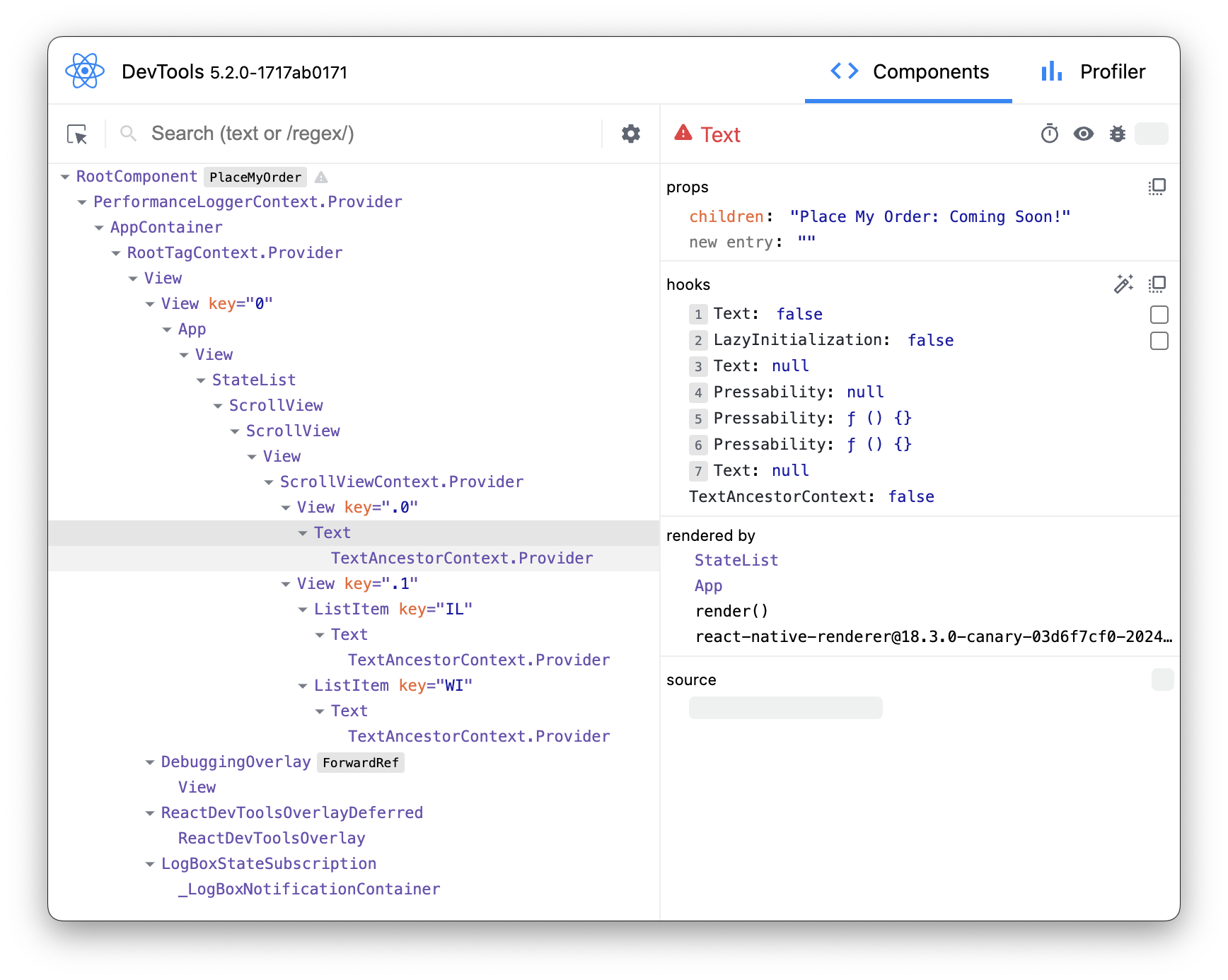
We will be setting up React DevTools to help us inspect the UI:
### Using React DevTools
React DevTools is an extension that provides a powerful set of tools for inspecting and debugging React Native applications. It allows developers to inspect and manipulate the hierarchy of React Native components rendered in their mobile applications. With React DevTools, developers can easily identify component structures, inspect props and state, track component updates, and even modify component props in real-time, greatly enhancing the debugging and development process for React Native projects.
By examining the JSX code below, developers can gain insight into how React Native components are structured and composed. Comparing the JSX code with the React DevTools component tree allows developers to visualize how each JSX element corresponds to a component instance in the application, providing a deeper understanding of their React applications and aiding in debugging and optimization efforts.
```
Place My Order: Coming Soon!
Illinois
Wisconsin
```
### Setup 1
✏️ Install the new dev dependency:
```
npm install --save-dev react-devtools@5
```
✏️ Update **src/package.json** to be:
```
{
"name": "PlaceMyOrder",
"version": "0.0.1",
"private": true,
"scripts": {
"android": "react-native run-android",
"clean": "rm -rf tsconfig.tsbuildinfo coverage android/.gradle android/build android/app/build node_modules/.cache",
"depcheck": "depcheck .",
"devtools": "react-devtools",
"eslint": "eslint .",
"eslint:fix": "eslint --fix .",
"ios": "react-native run-ios",
"lint": "npm run eslint && npm run prettier",
"lint:fix": "npm run eslint:fix && npm run prettier:fix",
"precheck": "npm run typecheck && npm run lint && npm run depcheck && npm test",
"prettier": "prettier --check .",
"prettier:fix": "prettier --write .",
"start": "react-native start --reset-cache",
"test": "jest",
"test:inspect": "node --inspect-brk ./node_modules/.bin/jest --watch",
"test:watch": "jest --watch",
"typecheck": "tsc --noEmit"
},
"dependencies": {
"react": "18.2.0",
"react-native": "0.74.1"
},
"devDependencies": {
"@babel/core": "^7.20.0",
"@babel/preset-env": "^7.20.0",
"@babel/runtime": "^7.20.0",
"@bitovi/eslint-config": "^1.8.0",
"@react-native/babel-preset": "0.74.83",
"@react-native/eslint-config": "0.74.83",
"@react-native/metro-config": "0.74.83",
"@react-native/typescript-config": "0.74.83",
"@testing-library/react-native": "^12.5.0",
"@types/jest": "^29.5.12",
"@types/react": "^18.2.6",
"@types/react-test-renderer": "^18.0.0",
"babel-jest": "^29.6.3",
"babel-plugin-module-resolver": "^5.0.2",
"depcheck": "^1.4.7",
"eslint": "^8.19.0",
"jest": "^29.6.3",
"prettier": "2.8.8",
"react-devtools": "^5.2.0",
"react-test-renderer": "18.2.0",
"typescript": "5.0.4"
},
"engines": {
"node": ">=20"
}
}
```
### Verify 1
While the application is running execute the command:
✏️ Run:
```
npm run devtools
```
This should open a separate window that looks like the following image:
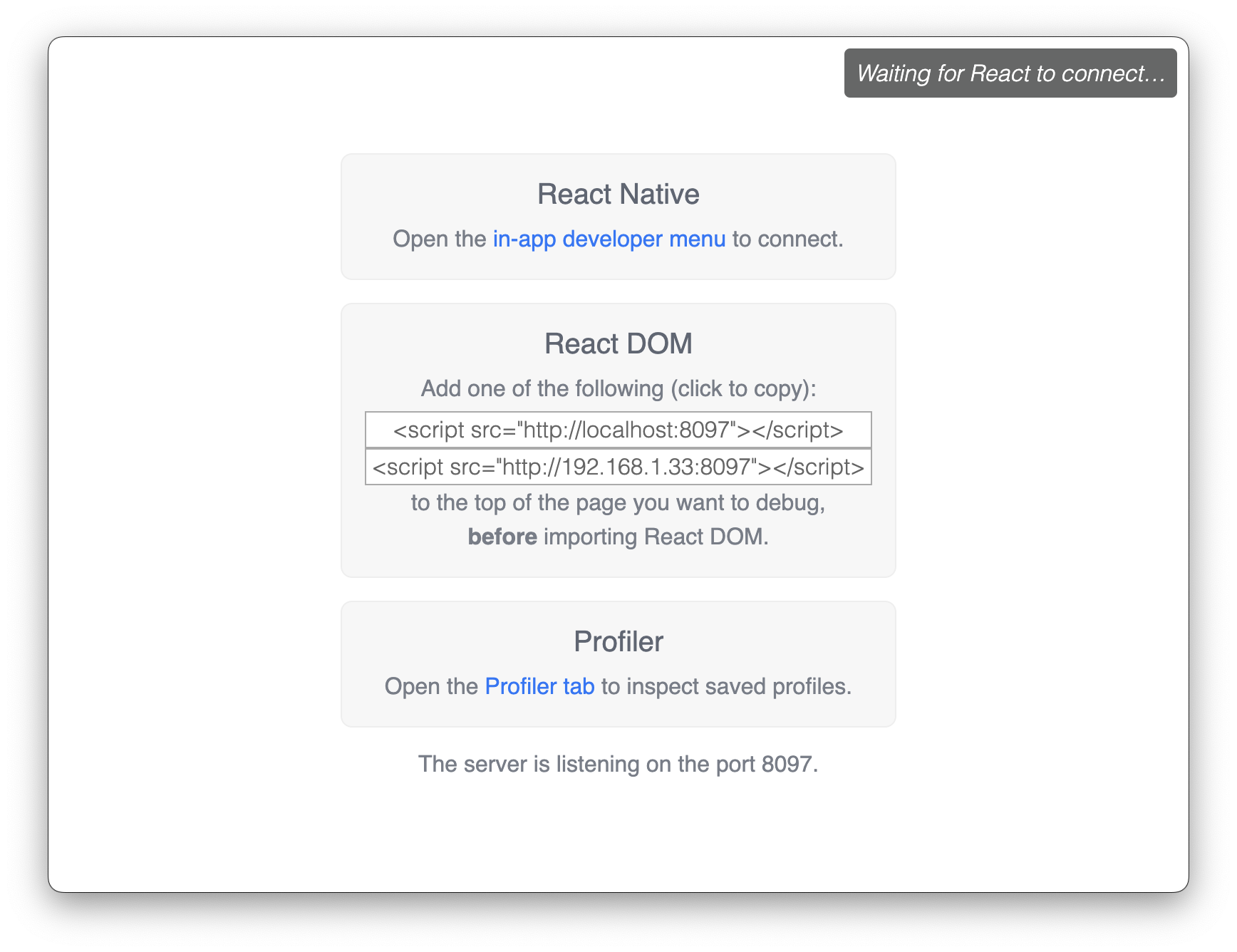
At this point, DevTools is not connected. To connect DevTools to the application, go back to the terminal where you ran `npm run start` and press `r` to reload.
### Exercise 1
Explore the “Components” tab:
- Use the "Components" tab to explore the hierarchical structure of the React Native components in the application.
- Expand and collapse component trees to understand the component composition.
- Hover over individual components to highlight them.
Inspect props and state:
- Select a component from the component tree to inspect its props and state.
- View the current props and state values, and observe how they affect the component’s rendering.
Modify props:
- Experiment with modifying props directly from the DevTools panel.
- Change prop values and observe how they affect the component’s appearance or behavior in real-time.
## Objective 2: React Native’s debugger
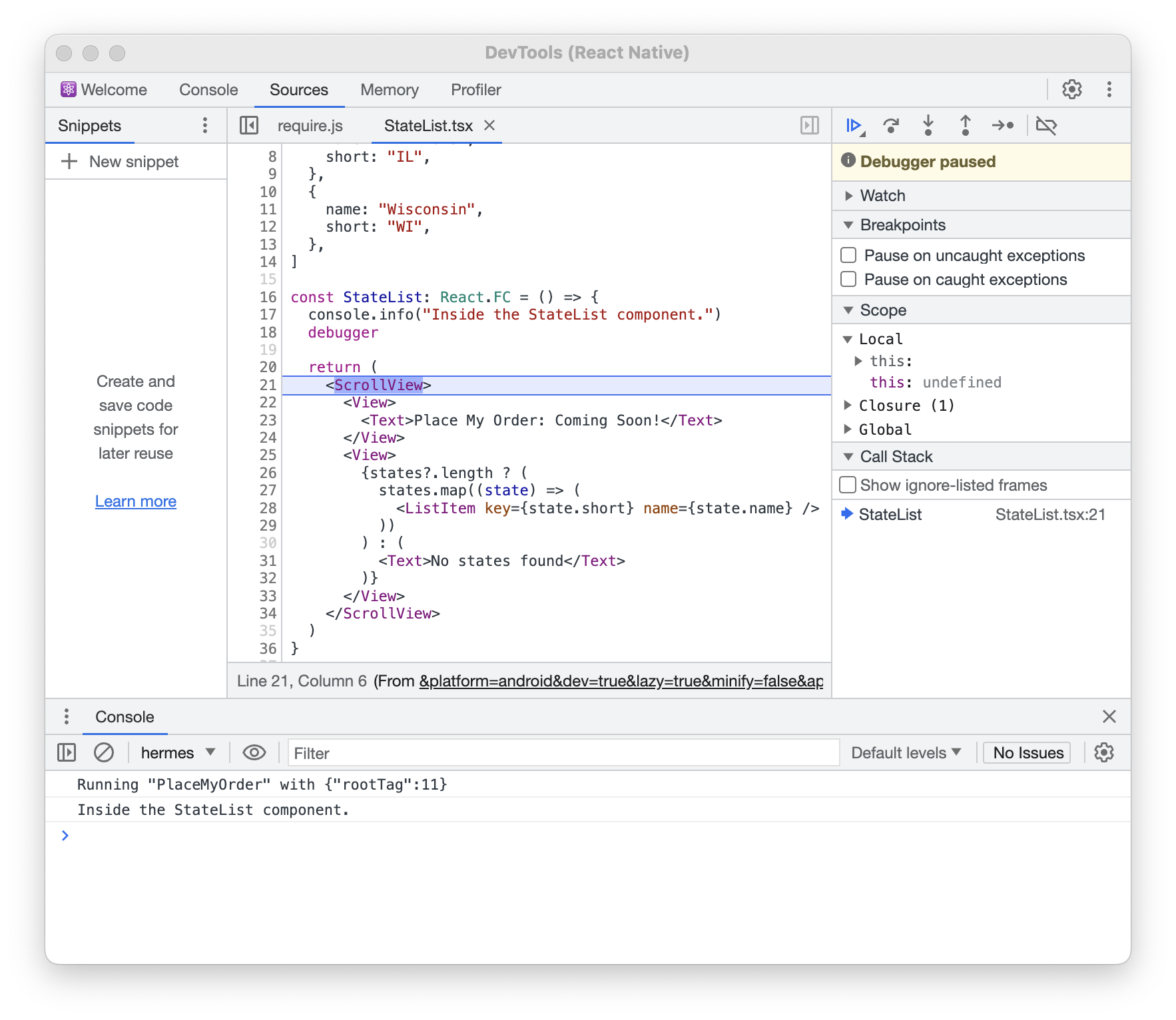
We will be setting up React Native Debugger to help us debug:
### Using React Native’s debugger
React Native Debugger, is a feature in React Native that serves as a debugging tool for developers to step through the code, analyze props, and state more efficiently in their React Native applications. React Native Debugger provides valuable insights into the application's state and flow. React Native Debugger will enhance the debugging process for React Native projects, offering essential functionalities for identifying and resolving issues during development.
### Setup 2
✏️ Update **src/package.json** to be:
```
{
"name": "PlaceMyOrder",
"version": "0.0.1",
"private": true,
"scripts": {
"android": "react-native run-android",
"clean": "rm -rf tsconfig.tsbuildinfo coverage android/.gradle android/build android/app/build node_modules/.cache",
"depcheck": "depcheck .",
"devtools": "react-devtools",
"eslint": "eslint .",
"eslint:fix": "eslint --fix .",
"ios": "react-native run-ios",
"lint": "npm run eslint && npm run prettier",
"lint:fix": "npm run eslint:fix && npm run prettier:fix",
"precheck": "npm run typecheck && npm run lint && npm run depcheck && npm test",
"prettier": "prettier --check .",
"prettier:fix": "prettier --write .",
"start": "react-native start --reset-cache --experimental-debugger",
"test": "jest",
"test:inspect": "node --inspect-brk ./node_modules/.bin/jest --watch",
"test:watch": "jest --watch",
"typecheck": "tsc --noEmit"
},
"dependencies": {
"react": "18.2.0",
"react-native": "0.74.1"
},
"devDependencies": {
"@babel/core": "^7.20.0",
"@babel/preset-env": "^7.20.0",
"@babel/runtime": "^7.20.0",
"@bitovi/eslint-config": "^1.8.0",
"@react-native/babel-preset": "0.74.83",
"@react-native/eslint-config": "0.74.83",
"@react-native/metro-config": "0.74.83",
"@react-native/typescript-config": "0.74.83",
"@testing-library/react-native": "^12.5.0",
"@types/jest": "^29.5.12",
"@types/react": "^18.2.6",
"@types/react-test-renderer": "^18.0.0",
"babel-jest": "^29.6.3",
"babel-plugin-module-resolver": "^5.0.2",
"depcheck": "^1.4.7",
"eslint": "^8.19.0",
"jest": "^29.6.3",
"prettier": "2.8.8",
"react-devtools": "^5.2.0",
"react-test-renderer": "18.2.0",
"typescript": "5.0.4"
},
"engines": {
"node": ">=20"
}
}
```
✏️ Update **src/screens/StateList/StateList.tsx** to be:
```
import { ScrollView, Text, View } from "react-native"
import ListItem from "./components/ListItem"
const states = [
{
name: "Illinois",
short: "IL",
},
{
name: "Wisconsin",
short: "WI",
},
]
const StateList: React.FC = () => {
console.info("Inside the StateList component.")
debugger
return (
Place My Order: Coming Soon!
{states?.length ? (
states.map((state) => (
))
) : (
No states found
)}
)
}
export default StateList
```
### Exercise 2
Execute the command:
✏️ Terminate your existing `npm run start` process and run:
```
npm run start
```
The application should be running in Android Studio.
✏️ In a **new** command-line interface (CLI) window, run:
```
adb shell input keyevent 82
```
This will open up the dev menu. It should look like the following image:
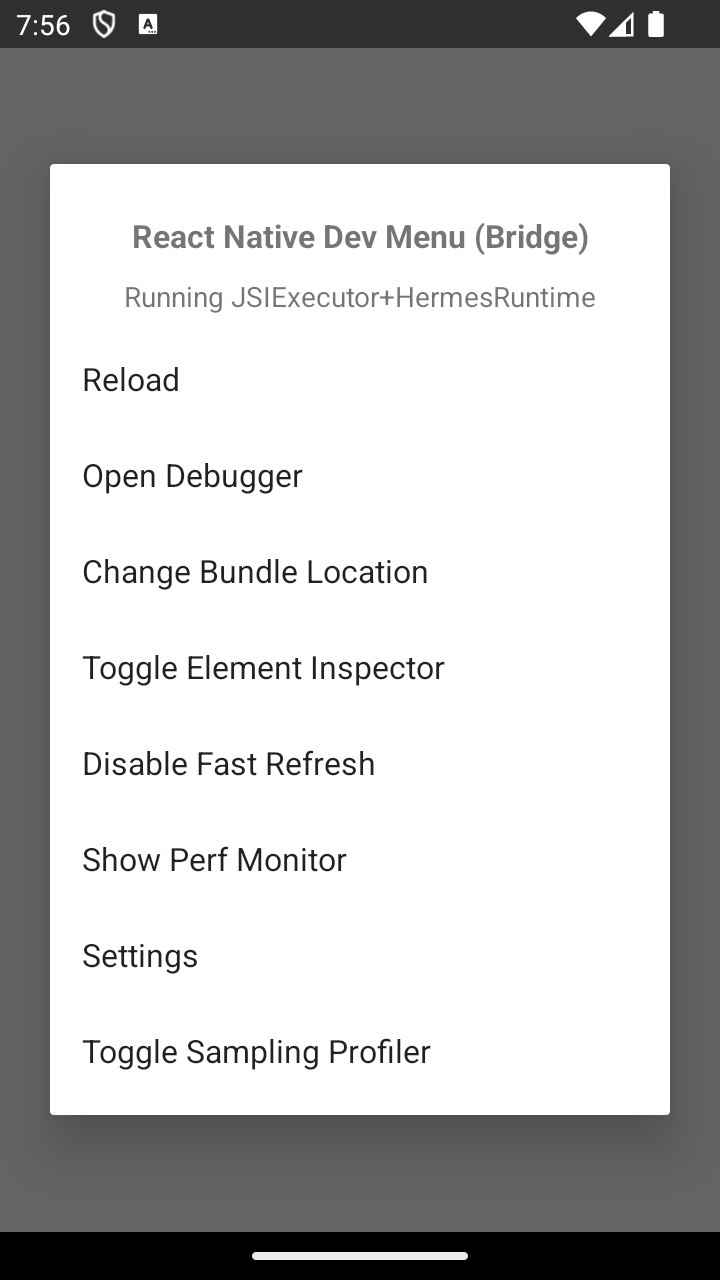
Clicking on "Open Debugger" will open up a separate window for debugging.
To see where the `debugger` is currently stopped, click on `StateList` under the “Call Stack” section in the right page of the “Sources” tab.
### Exercise 2
Exploring the debugger:
- View where the `console.info("Inside the StateList component.")` is being printed.
- Step through your code using the debugger controls (step into, step over, step out) to understand its execution flow.
## Next steps
Next, let’s learn about different ways to apply [Styling in React Native](https://www.bitovi.com/academy/learn-react-native/styling.html?hsLang=en-us) to React Native applications.
###### On this page...
###### Get help
If you need [help](https://discord.gg/J7ejFsZnJ4) with an exercise, please reach out to us on [Discord](https://discord.gg/J7ejFsZnJ4)
If you find a bug, please [create an issue](https://github.com/bitovi/academy/issues/new) or email [contact@bitovi.com](mailto:contact@bitovi.com?Subject=Training%20Suggestion)
## Join the Bitovi Newsletter
Do you want to receive updates about new Bitovi Academy courses, Bitovi open source projects, and dev community news? If so, please provide your email. We won’t spam you or give it away for any reason!
*By providing your email you agree to receive communications from Bitovi*

```json
{
"@context": "http://schema.org",
"@type": "Organization",
"mainEntityOfPage":{
"@type":"WebPage",
"@id":"https://www.bitovi.com/academy/learn-react-native/debugging-devtools.html",
"description": "Learn how to set up and use both DevTools and Debugger.
"
},
"url": "http://bitovi.com",
"logo": "https://www.bitovi.com/hubfs/bitovi-logo-23-1.svg",
"image": "https://www.bitovi.com/hubfs/bitovi-logo-x2.png",
"name": "Bitovi Web App Consulting",
"alternateName": "Bitovi",
"naics": "541511",
"description": "Bitovi is a UX, UI design and front-end JavaScript development consulting company",
"address": {
"@type": "PostalAddress",
"streetAddress": "1134 Pine Tree Lane ",
"addressLocality": "Libertyville",
"addressRegion": "IL",
"addressCountry": "United States",
"postalCode": "60048"
},
"areaServed": {
"@type": "GeoCircle",
"geoMidpoint": {
"@type": "GeoCoordinates",
"latitude": "41.8781",
"longitude": "87.6298"
},
"geoRadius": "5000 km"
},
"telephone": "312-620-0386",
"email": "contact@bitovi.com",
"sameAs": [
"https://www.facebook.com/BitoviLLC/",
"https://twitter.com/bitovi",
"https://www.linkedin.com/company/bitovi"
]
}
```